
The Order Bumps add-on lets customers purchase a primary subscription plan together with one or more additional plans in a single checkout. Instead of completing separate registration or checkout flows for each plan, users select a primary plan, optionally add order bumps, and pay once. Each plan becomes its own subscription on the member account; future renewals are processed separately per subscription.
The Order Bumps add-on is available starting with a Pro or Agency license.
After purchasing a paid version of Paid Member Subscriptions, you can check the following guide on how to install Paid Member Subscriptions.
After installing the Pro or Agency version, to activate the Order Bumps add-on, go to Dashboard → Paid Member Subscriptions → Add-ons → Order Bumps Add-on and click activate.
Order Bumps requires the Multiple Subscriptions Per User add-on because checkout creates more than one subscription per user.
When you activate Order Bumps, Multiple Subscriptions Per User is enabled automatically. While Order Bumps is active, Multiple Subscriptions Per User cannot be deactivated; its Deactivate button is disabled, and attempting to deactivate it shows an explanatory notice.
Order Bumps works with gateways that support the bundle checkout flow:
The legacy PayPal gateways (PayPal Standard, PayPal Pro, PayPal Express) are not supported. If a customer selects one of them while bumps are in the order, checkout will fail with a validation error.
After activation, configure which plans can be offered as order bumps for each primary subscription plan.
Deleting a subscription plan automatically removes it from every Order Bumps configuration that referenced it.
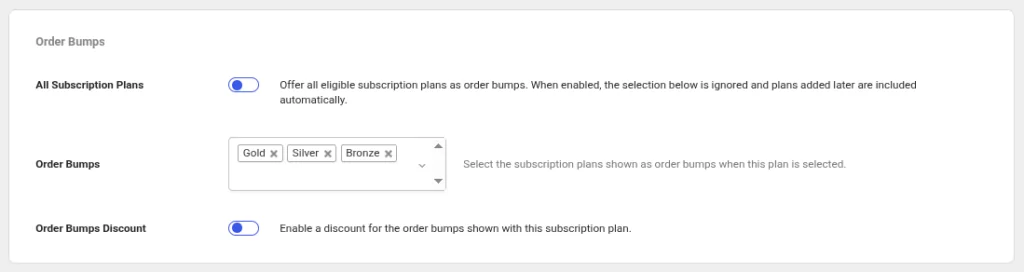
A plan can only be offered as an order bump when it is:
The admin interface excludes ineligible plans from the selection list. If plan settings change after configuration (for example, a plan is moved into the primary’s tier, converted to a Group plan, or switched to Pay What You Want pricing), that bump is filtered out at checkout. The meta box also shows a warning listing previously saved bumps that have since enabled Pay What You Want pricing.
Order Bumps appear on new-purchase checkout forms only:
[pms-register] – registration form[pms-new-subscription] – logged-in new subscription form[wppb-register]), including custom forms created with Multiple Registration FormsThey do not appear on upgrade/downgrade/renew flows, the account page, or the Gift Subscriptions form.
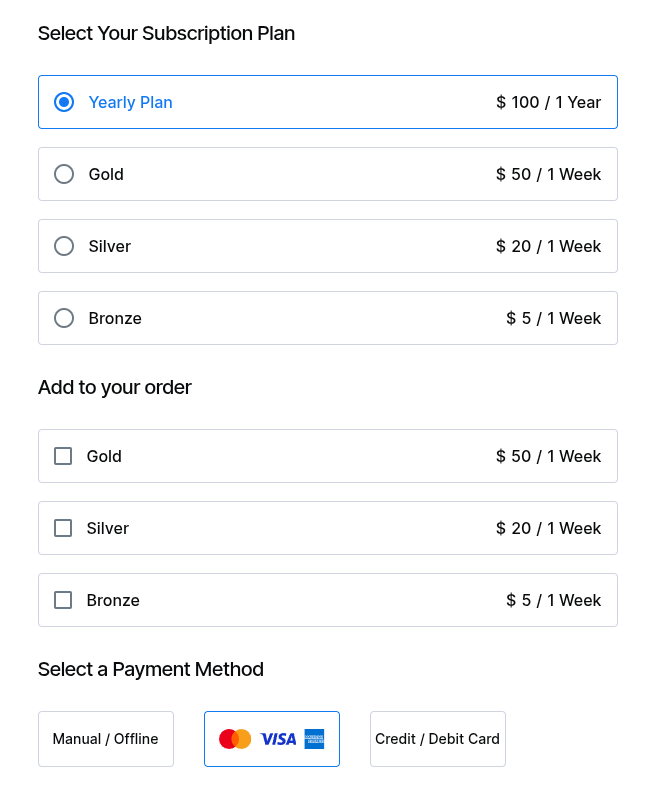
If multiple bumps from the same tier are configured, selecting one hides the others. Only one bump per tier can be purchased in a single checkout.
Bumps the customer already has access to (including another plan in the same tier with active or not-yet-expired canceled access) are not shown.
When a primary plan has Order Bumps Discount enabled, bump prices on the form show:
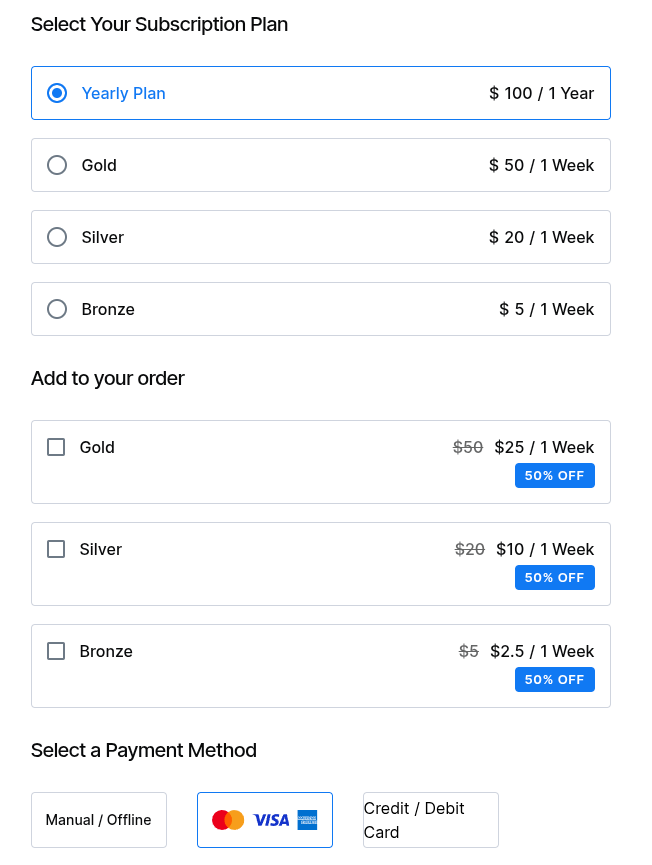
The discount applies to the bump’s price and sign-up fee. Free bumps are displayed as Free, with no discount styling.
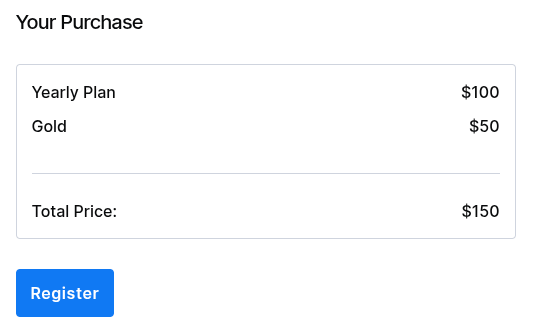
On Profile Builder registration forms, Order Bumps use the same Add to your order section and Order Summary behavior as PMS forms.
Selected bumps are stored in signup meta during the initial registration step. On the email-confirmation activation page, the saved bumps are displayed as a read-only list before payment, re-validated against the current configuration.
Bundle checkouts create a single payment for the full amount. On Paid Member Subscriptions → Payments:
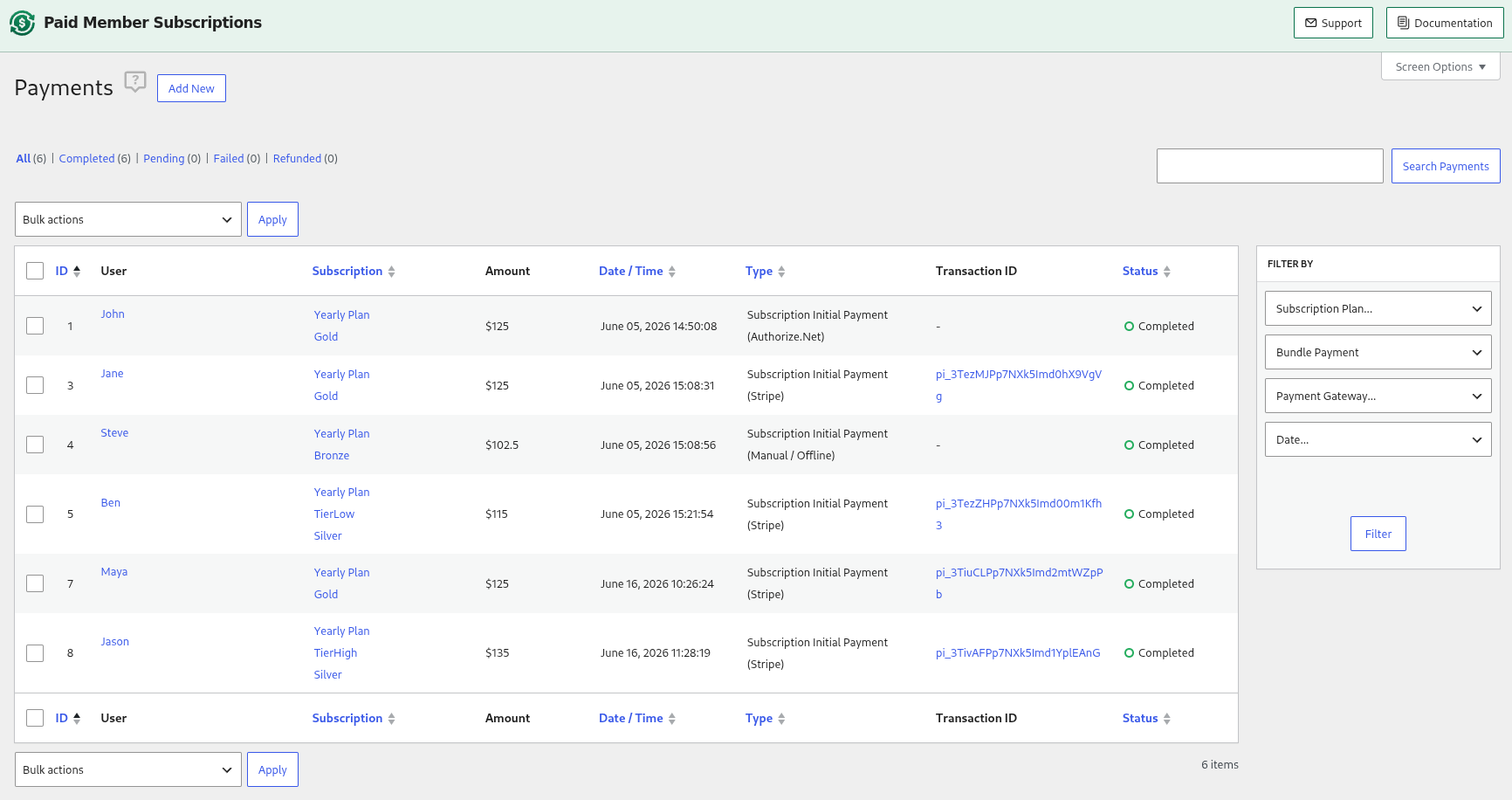
Each bump becomes its own member subscription. Bump subscriptions start as pending until the bundle payment completes, then become active. If the payment is abandoned, they stay pending and grant no access.Subscription logs record the bundle relationship on each subscription.
Gateway payment details saved on the primary subscription (Stripe, PayPal, Authorize.Net, and the card details shown on the account page) are copied to bump subscriptions so renewals and account-page card details stay in sync.
For renewals, each bump stores its own recurring billing amount: the recurring price (sign-up fee excluded) with the Order Bumps Discount, any recurring discount code, and tax applied. If a permanent 100% discount reduces a recurring bump’s price to zero, the bump subscription is created without a renewal schedule.
When the initial bundle payment fails or stays pending, the manual Retry payment link is shown only on the primary subscription (retry URLs pointing at a bump subscription redirect to the primary). The retry checkout displays the original bumps as a locked, read-only list (they cannot be changed) and recharges the whole bundle as a single transaction, in the currency of the original order. On completion, the pending bump subscriptions are activated.
Refunding a bundle payment follows the same refund paths as other payments. Only the initial bundle payment is refunded, later renewal payments of individual subscriptions are separate payments.
When a bundle payment is refunded, bump subscriptions in that bundle are canceled or expired according to the same rules as the primary subscription (admin choice on manual refund, or the Gateway refund behavior misc setting for webhook refunds). The admin refund modal shows a notice explaining that the chosen status applies to every subscription in the bundle.
For trial-anchored bundles (primary still in trial when refunded), the primary subscription may also be expired even when the admin chose to keep access, because no recurring charge exists yet.
A bundle purchase triggers a single set of purchase emails (for the primary subscription/payment). Bump subscriptions do not send separate signup emails. Two new merge tags are available for email templates:
{{order_subscription_plans}} — comma-separated list of all plan names in the order (primary + bumps).{{order_breakdown}} — a per-plan breakdown (Primary: / Bump: lines with amounts) followed by a Total line.Tax is calculated per plan in the bundle (each line is taxed and rounded individually, then summed). The Order Summary shows each line item, the tax row (e.g. 20% VAT), and the total.
Discount codes apply per plan, based on each code’s allowed subscription plans:
Bundle payments generate invoices with one line per plan. Bump lines are labeled with (Add-on). The invoice also lists Subtotal, the discount code (when used), tax, and Total, matching the bundle payment.
Bump prices and the Order Summary use the customer’s selected currency. Bumps that cannot be priced in that currency are hidden from checkout.

Accept (recurring) payments, create subscription plans and restrict content on your website. Easily setup a WordPress membership site using Paid Member Subscriptions.
Get Paid Member SubscriptionsCombine the power of Profile Builder with Paid Member Subscriptions to set up user registration, memberships, and recurring revenue.
Get 25% off with the bundle