



Table of Contents
- 1 Why Giving Members Flexibility Reduces Churn
- 2 How to Create a Subscription Pause Policy That Works for Your Membership Site
- 3 How To Let Members Pause Subscriptions Using Paid Member Subscriptions
- 3.1 Step 1: Install Paid Member Subscriptions and activate the Pause Subscriptions add-on
- 3.2 Paid Member Subscriptions Pro
- 3.3 Step 2: Configure your global pause subscriptions settings
- 3.4 Step 3: Limit how often members can pause their subscription
- 3.5 Step 4: Configure pause subscription settings per membership plan
- 3.6 Step 5: Manage paused subscriptions as an administrator
- 4 What Happens When a Member Pauses a Subscription?
- 5 Should Every Membership Site Allow Users To Pause Subscriptions?
- 6 Frequently Asked Questions About Pausing Subscriptions
- 6.1 Can members pause recurring payments instead of canceling?
- 6.2 How long should a subscription pause last?
- 6.3 Does pausing a subscription remove access to premium content?
- 6.4 Can members pause their subscription more than once?
- 6.5 Will billing automatically resume after a pause?
- 6.6 Does Paid Member Subscriptions support subscription pausing?
- 7 Give Members a Better Alternative to Cancellation
Quick Answer: Subscription pausing lets members temporarily suspend their membership instead of canceling it — keeping the relationship intact while billing is paused. With Paid Member Subscriptions, you can enable this feature site-wide or per plan, control how long pauses last, and limit how often members can use them. It’s one of the most effective ways to reduce churn on a WordPress membership site without adding complexity.
Offering members the pause subscription option instead of canceling it is one of the simplest ways to reduce churn on a WordPress membership site. When someone needs a temporary break, whether because of a busy schedule, financial reasons, or changing priorities, a pause option gives them an alternative to leaving altogether.
If you run a membership site, online community, coaching program, or subscription-based business, you’ve likely seen it happen before.
A long-time subscriber cancels out of the blue. You check their activity and nothing suggests they’re unhappy. They haven’t contacted support. They haven’t requested a refund. In many cases, they simply aren’t using the membership as much as they expected and don’t want to keep paying for something they’re not actively using.
The problem is that cancellation is often treated as a permanent decision when, in reality, many members just need some flexibility. Someone who cancels because they’re traveling for a month isn’t necessarily gone for good. The same goes for a member who’s going through a particularly busy period at work, taking a break from a course, or trying to cut expenses temporarily. That’s why more subscription-based businesses are introducing the option to pause a subscription rather than cancel it outright.
Instead of forcing members to choose between staying subscribed or leaving completely, a pause option allows them to step away for a set period and return later without having to start over. It’s a small change that can have a surprisingly large impact on retention.
In this article, we’ll look at what subscription pausing actually means, why it works so well as a retention strategy, and how to set it up on your WordPress site using Paid Member Subscriptions.
Why Giving Members Flexibility Reduces Churn
Most site owners think of cancellations as a sign that a customer no longer sees value in the membership. Sometimes that’s true. But often, cancellations happen for reasons that have little to do with your content, community, or service.
Think about the different situations your members might be dealing with. Maybe a student needs to focus on exams for a few months, a freelancer whose workload suddenly doubles, a parent with less free time during the summer, or maybe just a member who has simply fallen behind and wants a chance to catch up later.
None of these people are necessarily saying, “I never want to come back.” They’re saying, “I can’t justify paying for this right now.” But when the only option available is cancellation, that’s the route they’ll take.
The challenge is that once someone cancels, getting them back isn’t always easy. They may forget about your site entirely, move on to something else, or simply never get around to rejoining, even if they originally intended to.
So, a pause option keeps the relationship intact. Instead of closing the door completely, it leaves it open for members who expect their circumstances to change in the near future.
Subscription Pause vs Cancellation: What’s The Difference?
Although they both stop billing temporarily, pausing and canceling a subscription are fundamentally different.
A cancellation ends the membership relationship. Access is removed, recurring payments stop, and the member would typically need to subscribe again in the future.
A pause, on the other hand, is designed to be temporary. The subscription remains connected to the member account, billing is suspended for a defined period, and the membership can resume without requiring a new purchase.
The difference may seem small from an administrative perspective, but from a retention perspective, it’s significant.
When someone chooses to pause, they’re still thinking about coming back. But when they cancel, there’s a much greater chance they’ll never return.
How to Create a Subscription Pause Policy That Works for Your Membership Site
Before enabling subscription pausing, it’s worth taking a few minutes to think about the rules you want to put in place.
A good pause policy should give members flexibility without creating opportunities for abuse or making your membership model difficult to sustain.
Ask yourself:
- How long should members be allowed to pause?
- Should pauses be available on all membership plans?
- How many times per year should someone be able to pause?
- Should annual and monthly memberships have different rules?
There’s no one-size-fits-all answer.
For example, a premium community with ongoing engagement may only allow short pauses, while a course membership site might be comfortable offering longer pause periods. The goal is to give members a temporary break without encouraging them to stay inactive indefinitely.
Here are a few best practices to keep in mind.
Keep pause periods reasonable
The longer a member stays away, the less likely they are to re-engage. Many membership site owners find that shorter pauses help preserve retention while still addressing members’ immediate needs.
Avoid unlimited pauses unless there’s a clear reason
Unlimited pauses may make sense for certain membership models, but they’re not always ideal for recurring subscription businesses. Having clear limits helps maintain the value of the membership while still providing flexibility.
Match pause rules to your membership model
A professional community, online course platform, and coaching membership all have different engagement patterns. Design your pause policy around how your members actually use your site rather than adopting a generic approach.
Communicate expectations clearly
Members should understand how long a pause can last, whether access is suspended during the pause, when billing resumes and also how many pauses are allowed. Clear expectations help prevent confusion and reduce support requests.
Accept (recurring) payments, create subscription plans and restrict content on your website. Easily setup a WordPress membership site using Paid Member Subscriptions.
Paid Member Subscriptions Pro
How To Let Members Pause Subscriptions Using Paid Member Subscriptions
Once you’ve decided that subscription pausing makes sense for your membership site, the next step is implementing it in a way that works for both your business and your members.
With Paid Member Subscriptions, you can give members the ability to pause their subscriptions while still maintaining control over how the feature works — including pause duration, frequency limits, and plan-specific rules.
Step 1: Install Paid Member Subscriptions and activate the Pause Subscriptions add-on
The Pause Subscriptions add-on is available starting with a Pro license, so make sure you get one before starting. For easy access, just click the button below.
Accept (recurring) payments, create subscription plans and restrict content on your website. Easily setup a WordPress membership site using Paid Member Subscriptions.Paid Member Subscriptions Pro
Then, you can activate the Pause Subscriptions add-on by going to Paid Member Subscriptions → Add-ons.
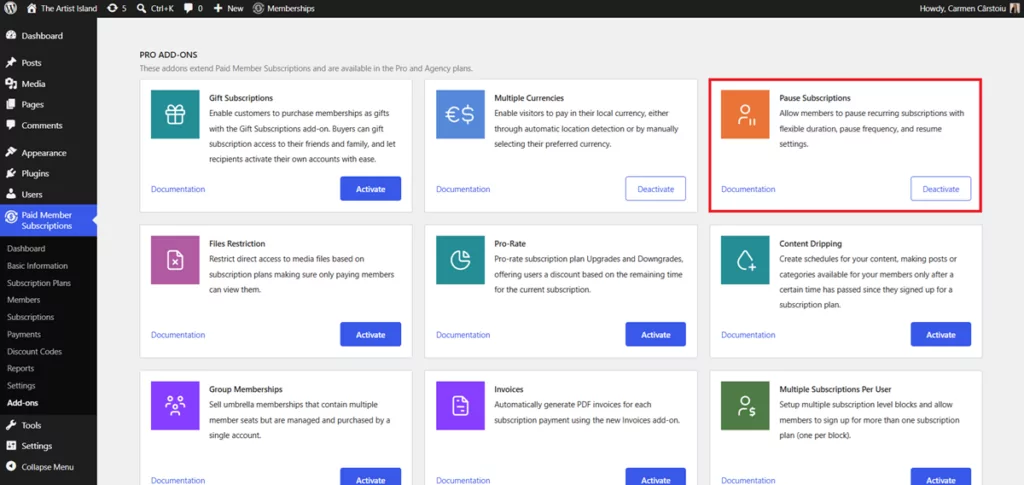
Once the add-on is activated, you’ll gain access to a new set of settings that allow you to control how subscription pauses work across your site.
After activation, you have to choose whether you want to apply global defaults and per-plan customization options.
Step 2: Configure your global pause subscriptions settings
Navigate to Paid Member Subscriptions → Settings → Payments → Subscription Global Configs to configure the default pause behavior for all subscription plans.
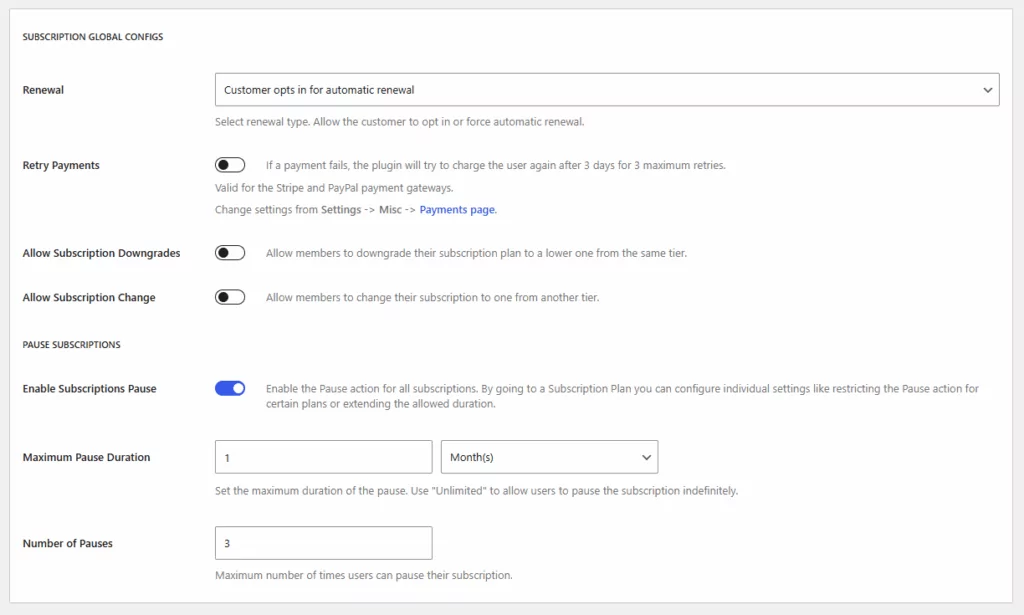
The global settings act as your default rules. These settings determine how subscription pauses work unless a specific subscription plan has its own custom configuration.
The first option you’ll see is the ability to enable subscription pauses. Once enabled, members can pause eligible subscriptions directly from their account area.
Next, you’ll be able to define the maximum pause duration. This determines how long a member can suspend their subscription before it automatically resumes.
Depending on your business model, you might choose to allow:
- A short pause of a few weeks
- A one-month break
- Several months
- Unlimited duration
For most membership sites, a limited pause period tends to work best. Because this way, you are giving members a clear timeframe that encourages them to return while still providing the flexibility they’re looking for.
For example:
- Online communities often choose 30–60 days.
- Course memberships may allow 60–90 days.
- Professional associations may offer longer pause periods.
The ideal duration depends on your audience and how members typically engage with your content.
Step 3: Limit how often members can pause their subscription
One of the most useful controls available in Paid Member Subscriptions is the ability to limit the number of pauses a member can use. Without limits, some members might repeatedly pause and resume subscriptions instead of maintaining an active membership. But by setting a maximum number of pauses, you can prevent abuse while still supporting members who genuinely need a temporary break.
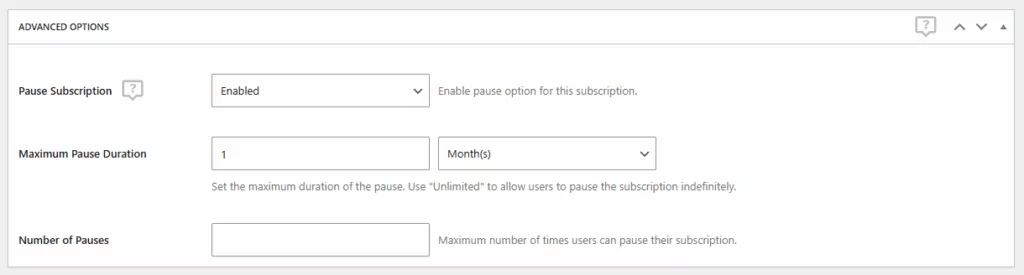
For example, you might allow:
- One pause per subscription cycle
- Two pauses per year
- A fixed number of pauses over the lifetime of the membership
If you’re introducing subscription pauses for the first time, it’s often better to start with conservative limits and adjust later based on member behavior.
Step 4: Configure pause subscription settings per membership plan
But here’s the thing. Not every membership plan needs to follow the same rules.
One of the advantages of Paid Member Subscriptions is that pause settings can be configured at the subscription-plan level. This gives you much more flexibility when managing multiple membership tiers.
For example, you might decide that:
- Monthly plans can be paused for up to 30 days.
- Annual plans can be paused for up to 90 days.
- Premium memberships receive additional flexibility.
- Certain plans don’t support pauses at all.
To configure plan-specific settings, edit the subscription plan you’d like to customize by going to Paid Member Subscriptions → Subscription Plans → Edit Subscription Plan and locate the Advanced Options → Pause Subscriptions.
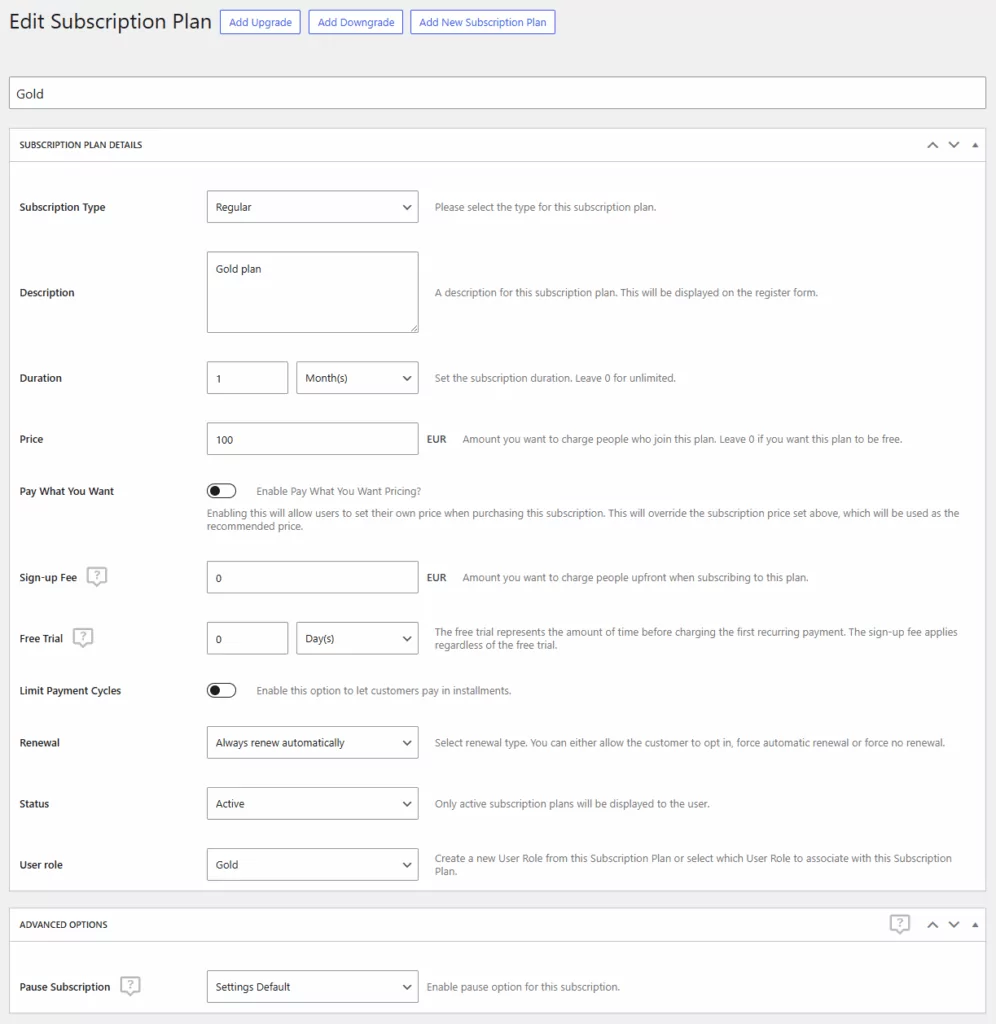
Here you’ll be able to override the global settings and create rules that apply only to that membership level. This approach is particularly useful if your plans offer different benefits or serve different audiences. A casual learning membership and a high-touch coaching program, for example, may require completely different pause policies.
Step 5: Manage paused subscriptions as an administrator
Subscription pausing isn’t just something members can manage themselves.
As an administrator, you’ll also be able to view and manage paused subscriptions directly from the WordPress dashboard. This makes it easier to review active pauses, identify members who frequently pause or monitor overall retention trends.
- Navigate to Paid Member Subscriptions → Members
- Click on a member to edit
- Locate the subscription you want to manage
- Click Edit on the subscription
- Change the Status dropdown to:
- Paused – to pause an active subscription
- Active – to resume a paused subscription
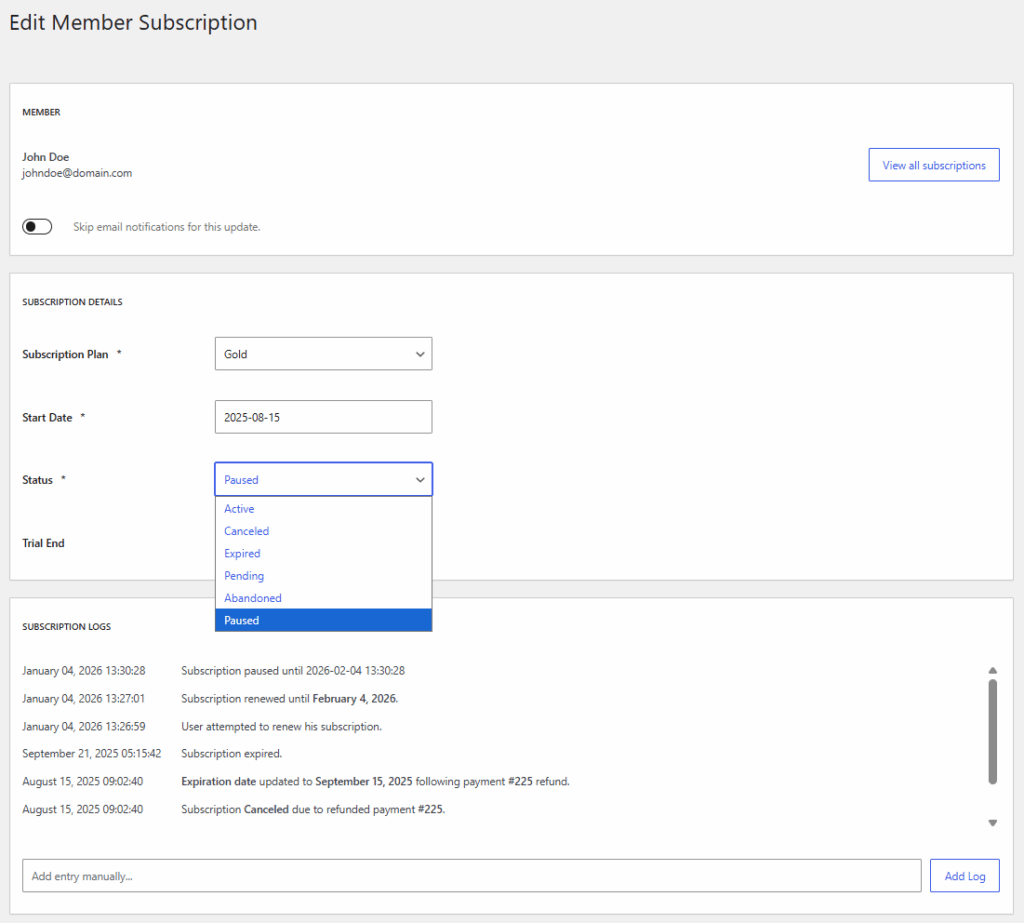
Once you are happy with your settings, make sure to click Save.
Paid Member Subscriptions also allows you to filter subscriptions by status, making it simple to find paused memberships and understand how members are using the feature. Over time, this data can provide valuable insight into why people temporarily disengage and how you can improve retention across your membership site.
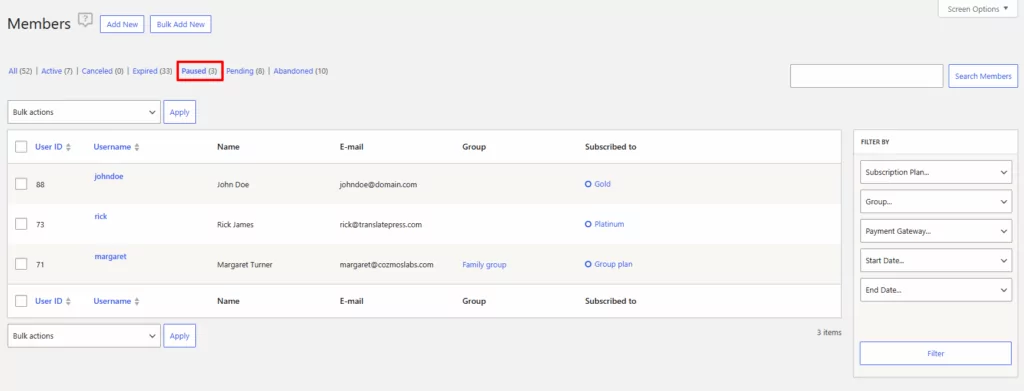
When implemented thoughtfully, it gives members an alternative to cancellation while giving your business a better chance of keeping those relationships intact.
What Happens When a Member Pauses a Subscription?
One of the reasons subscription pausing works so well is that it creates a smoother experience for members. Instead of forcing someone to cancel and potentially lose their account history, they can take a temporary break while knowing they’ll be able to return without starting from scratch. From the member’s perspective, the process is straightforward.
How members pause a subscription
When subscription pausing is enabled for a membership plan, eligible members will see the option to pause their subscription directly from their account page.
The exact experience depends on the rules you’ve configured, but the typical process looks like this:
- The member logs into their account.
- They navigate to their subscription details.
- They select the option to pause their subscription.
- The pause request is applied according to the limits you’ve configured.
- The subscription status changes to paused.
The entire process can be completed without contacting support, which reduces administrative work for site owners and gives members more control over their subscriptions.
What happens to billing during a pause?
Another common question is whether members continue to be charged while their subscription is paused.
In most cases, no. When a subscription enters a paused state, recurring billing is suspended for the duration of the pause period. Once the subscription resumes, the billing schedule is adjusted accordingly.
For example, imagine a member on a monthly subscription pauses their membership for 30 days. Rather than losing those 30 days, their subscription end date and future billing dates are extended by the same amount of time. This ensures members receive the full value of the membership they’ve paid for.
What happens to content access when you pause subscriptions?
For most membership sites, access to premium content and member-only resources is suspended while the subscription is paused.
This approach is usually the most practical because it aligns billing and access:
- Active subscription = active access
- Paused subscription = paused access
- Resumed subscription = restored access
From a member’s perspective, this is generally easy to understand and helps avoid confusion about what benefits are included during the pause period. But if your site has specific access requirements, it’s always worth testing the member journey yourself before rolling the feature out to all users.
What happens when the pause period ends?
One of the biggest advantages of pausing compared to canceling is that the return process is frictionless. When the pause period expires, the subscription can resume automatically based on the rules you’ve configured.
Members don’t need to:
- Purchase a new subscription
- Create another account
- Re-enter their information
- Contact support to reactivate access
Instead, they simply pick up where they left off. That seamless transition is one of the main reasons paused members are often easier to retain than canceled members.
Keeping members informed throughout the process
Communication plays a major role in making subscription pausing successful. Because if members aren’t sure what’s happening with their subscription, billing, or access, they’re more likely to become frustrated or submit support requests. That’s why it’s important to keep them informed throughout the pause lifecycle.
For example, members should ideally receive confirmation when:
- A subscription is paused
- A pause is nearing its end
- A subscription resumes
- Billing becomes active again
Clear communication reassures members that their subscription is being managed correctly and helps set expectations about what happens next. Think of these messages as retention touchpoints. A member who receives a helpful email reminder before their subscription resumes is much more likely to return to active engagement than someone who forgets they ever paused in the first place.
Should Every Membership Site Allow Users To Pause Subscriptions?
Not necessarily.
Like any retention strategy, subscription pausing works best when it aligns with your business model. For many recurring membership sites, communities, content libraries, and learning platforms, pausing is a natural fit because members can step away temporarily and return later without disrupting the overall experience. However, some businesses may find it less suitable. Examples include:
- Cohort-based courses
- Fixed-duration programs
- Live event memberships
- Certification programs with strict timelines
In these cases, pausing may create operational challenges or complicate access management.
The important question isn’t whether every site should offer subscription pauses. It’s whether your members have legitimate reasons to take temporary breaks. If the answer is yes, providing a pause option may help you retain members who would otherwise cancel completely. In fact, subscription pausing tends to work particularly well for membership sites where engagement naturally fluctuates over time.
For example, online communities, learning platforms, coaching memberships, premium content libraries, and hobby-focused memberships often see members go through periods of lower activity without losing interest altogether. In these cases, giving people the option to pause their subscription can help preserve the relationship until they’re ready to become active again.
If your members are likely to return once their circumstances change, offering a pause option can be one of the simplest and most effective retention tools available.
Frequently Asked Questions About Pausing Subscriptions
Can members pause recurring payments instead of canceling?
Yes. Subscription pausing allows members to temporarily suspend their membership instead of ending it permanently. This gives them flexibility while preserving their account and subscription history.
How long should a subscription pause last?
Pause periods typically range from 30 to 90 days, though this varies by membership type. Online communities often allow 30–60 days, course memberships 60–90 days, and professional associations may offer longer durations. The right length depends on how your members engage with your site.
In most cases, yes. Paused subscriptions typically lose access to content and benefits that require an active membership. Access is restored once the subscription resumes.
Can members pause their subscription more than once?
Yes. Paid Member Subscriptions allows site owners to control how many times a subscription can be paused, helping prevent abuse while still providing flexibility.
Will billing automatically resume after a pause?
Yes. When the pause period ends, the subscription can automatically resume and the billing schedule is adjusted to account for the paused time.
Does Paid Member Subscriptions support subscription pausing?
Yes. The Pause Subscriptions add-on allows members to pause and resume eligible subscriptions while giving site owners control over pause duration, limits, and plan-specific settings.
Give Members a Better Alternative to Cancellation
Most membership cancellations aren’t driven by dissatisfaction. Often, members simply need a temporary break.
By giving people the option to pause their subscription instead of canceling it, you create a more flexible experience while protecting recurring revenue and reducing avoidable churn. For members, it’s a convenient way to step away without losing their place. For site owners, it’s an opportunity to preserve valuable customer relationships that might otherwise disappear.
With Paid Member Subscriptions, implementing subscription pauses is straightforward. You can define your own rules, control how long pauses last, and tailor the experience to fit your membership model. And in many cases, that small amount of flexibility can make the difference between losing a member for good and welcoming them back a few weeks later.
Accept (recurring) payments, create subscription plans and restrict content on your website. Easily setup a WordPress membership site using Paid Member Subscriptions.Paid Member Subscriptions Pro
Related Articles

How To Create a Divi Membership Site
If you’re thinking of building a membership site in WordPress, you’ll need a solid theme and a membership plugin that pairs well with it. In this complete guide, we’ll show you how to create a Divi membership site using the popular Divi theme in combination with the Paid Member Subscriptions plugin.
Continue Reading
How to Hide Products by User Roles in WooCommerce?
Do you want to easily hide products by user roles in WooCommerce? Some WooCommerce store owners have a unique requirement where they want to hide certain products from all but a few specific groups of users. There may be many reasons for this, including selling exclusive products only to the more loyal customers, with a […]
Continue Reading
How to Create WordPress Redirects to Another Page, External URLs, or a Subdomain
There are different reasons WordPress site owners want to create WordPress redirects to another page, external URL, or a subdomain. The redirect can be based on an important user action or set up to redirect all users landing on a particular page. Whatever the type or need of your redirect, WordPress offers the flexibility to […]
Continue Reading