



Table of Contents
- 1 What Does Email Marketing Automation Mean for a Membership Site?
- 2 Transactional VS Marketing Emails: What’s The Difference?
- 3 Automated Emails Every Membership Site Should Send
- 4 How to Create Transactional Email Automations for Your Membership Site
- 5 How to Add Marketing Email Automation to Your Membership Site
- 6 Should You Use An All-In-One WordPress Email Marketing Plugin Instead?
- 7 Frequently Asked Questions About Email Marketing Automation for Membership Sites
- 7.1 Can a membership plugin replace an email marketing platform?
- 7.2 What’s the difference between a renewal reminder and an onboarding sequence?
- 7.3 Do I need a separate WordPress email marketing plugin?
- 7.4 Can Mailchimp automate emails based on membership status?
- 7.5 Can Brevo automate membership marketing campaigns?
- 7.6 What is the best WordPress email marketing automation plugin for membership sites?
- 8 The Best Email Setup Is Often the Simplest One
Running a WordPress membership site means you need two distinct types of automation in email marketing: transactional emails that support the member lifecycle, and marketing emails that help you engage, retain, and grow your audience.
The problem is that these two categories are often lumped together under the same label: “email automation.” As a result, membership site owners end up comparing tools that solve completely different problems.
For example, a renewal reminder is not the same thing as a newsletter. A payment failure notification is not the same thing as an onboarding email. Yet many plugin comparison articles treat them as if they belong in the same category.
This creates unnecessary confusion when choosing a WordPress email marketing plugin or setting up automation for a membership business.
In this guide, we’ll explain the difference between transactional and marketing emails, show how Paid Member Subscriptions handles the membership automation layer out of the box, and explore how Mailchimp or Brevo can add powerful marketing automation without overcomplicating your setup.
What Does Email Marketing Automation Mean for a Membership Site?
Understanding automation in email marketing starts with recognising that not all automated emails serve the same purpose — for membership sites, they fall into two distinct categories with very different jobs.
For membership sites, email automation falls into two distinct categories:
- Transactional email automation
- Marketing email automation
Understanding the difference is the first step toward building a reliable email system.
A membership renewal reminder and a re-engagement campaign might both be automated emails, but they’re solving entirely different problems.
Imagine a member’s credit card expires. Their recurring payment fails, so an email needs to go out immediately. Not because you’re marketing to them or because you’re nurturing a relationship. Simply because they need to know their membership is at risk.
Now compare that with a campaign designed to encourage inactive members to return to your community. That campaign might include audience segmentation, personalized content, multiple follow-up emails, reporting, and conversion tracking.
The two scenarios have very little in common beyond the fact that an email is involved. Yet many site owners end up evaluating tools as though they perform the same job.
What Is a Transactional Email Automation?
Transactional emails are triggered by membership-related events. Their purpose is to keep members informed about account activity, subscription status, and important actions that affect access to your site.
Examples include:
- Onboarding emails right after registration;
- Membership confirmation emails;
- Subscription renewal reminders;
- Membership expiration notifications;
- Failed payment alerts;
- Account status updates.
Members expect these emails. And in many cases, they rely on them.
If someone joins your site and never receives confirmation, they’ll wonder whether their payment was processed correctly. Or if a member doesn’t receive a renewal reminder, they may lose access unexpectedly.
To be more specific, these emails aren’t marketing assets, but a part of the membership experience itself.
What Is Marketing Email Automation?
Marketing emails are designed to strengthen relationships with subscribers and encourage engagement. Rather than responding to account events, they’re used to nurture members over time.
Examples include:
- Welcome emails;
- Weekly newsletters;
- Educational campaigns;
- Upsell campaigns;
- Re-engagement automations;
- Product launches and announcements.
This is the side of automation in email marketing that most people think about when they hear terms like “customer journeys” or “email funnels.” And while these campaigns are incredibly valuable, they don’t replace operational membership emails. Actually, the most successful membership sites typically use both systems together.
Transactional VS Marketing Emails: What’s The Difference?
| Transactional Emails | Marketing Emails |
| Onboarding email Membership confirmation Renewal reminder Failed payment alert Expiration notification Account update | Welcome sequence Newsletter Educational email Re-engagement campaign Upgrade promotion Product announcement |
The distinction matters because each type of email requires different functionality.
A membership plugin understands subscriptions, payments, and member status. On the other hand, an email marketing platform understands segmentation, campaigns, deliverability, and customer journeys.
Trying to force one tool to excel at both isn’t always the simplest approach.
For WordPress membership sites, email automation works best when split into two dedicated layers: a membership plugin like Paid Member Subscriptions for transactional notifications, and a platform like Mailchimp or Brevo for marketing campaigns.
Automated Emails Every Membership Site Should Send
Before thinking about marketing campaigns, every membership site should have a reliable transactional email system. These emails help reduce confusion and improve the member experience.
Onboarding emails
The first email a member receives often shapes their perception of your site.
An onboarding email should:
- Confirm registration;
- Explain next steps;
- Provide login details;
- Help members access benefits quickly.
Membership confirmation emails
Whenever someone purchases a membership plan, they should receive confirmation that the transaction was successful. This creates trust and reduces support requests.
Renewal reminders
Many members don’t actively choose to leave. Sometimes they simply forget when their subscription expires. So renewal reminders help prevent accidental churn and encourage timely renewals.
Membership expiration notifications
Members should know when access is ending and what options they have for renewing. Clear communication reduces frustration and helps maintain a positive experience.
Failed payment notifications
Failed payments are one of the most common causes of involuntary churn in subscription businesses.
When billing issues occur, immediate notification gives members an opportunity to update payment details before access is interrupted.
How to Create Transactional Email Automations for Your Membership Site
One thing we’ve noticed over the years is that many site owners start looking for a WordPress email marketing plugin when their actual challenge has nothing to do with marketing.
They’re trying to solve membership transactional problems. Maybe members aren’t receiving renewal reminders, users are confused about expiration dates, or failed payments are slipping through the cracks.
Those aren’t email marketing issues. They’re membership management issues.
It also adds the WordPress email automation layer your membership site is actually missing. It handles the operational automated member notification side natively, without requiring a separate marketing platform to manage membership lifecycle emails.
Instead of building workflows from scratch, you can configure essential member emails directly inside the plugin.
Step 1: Install and Configure Paid Member Subscriptions
Begin by installing and activating Paid Member Subscriptions on your WordPress website, and get a paid license in order to access this functionality.
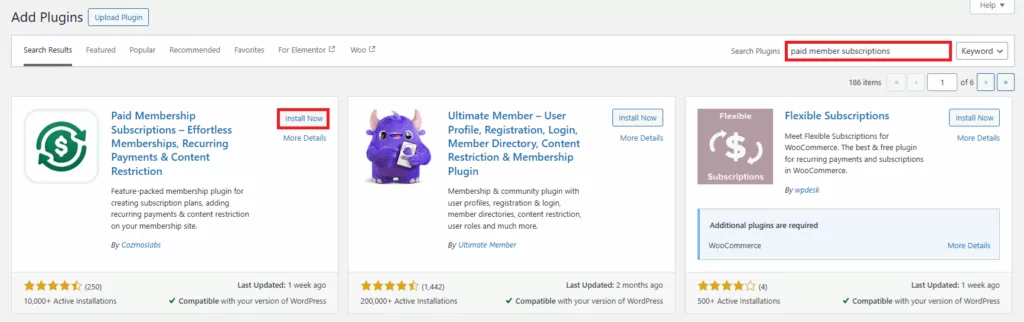
After activation, create your membership plans and configure your preferred payment gateway from the Paid Member Subscriptions settings area.
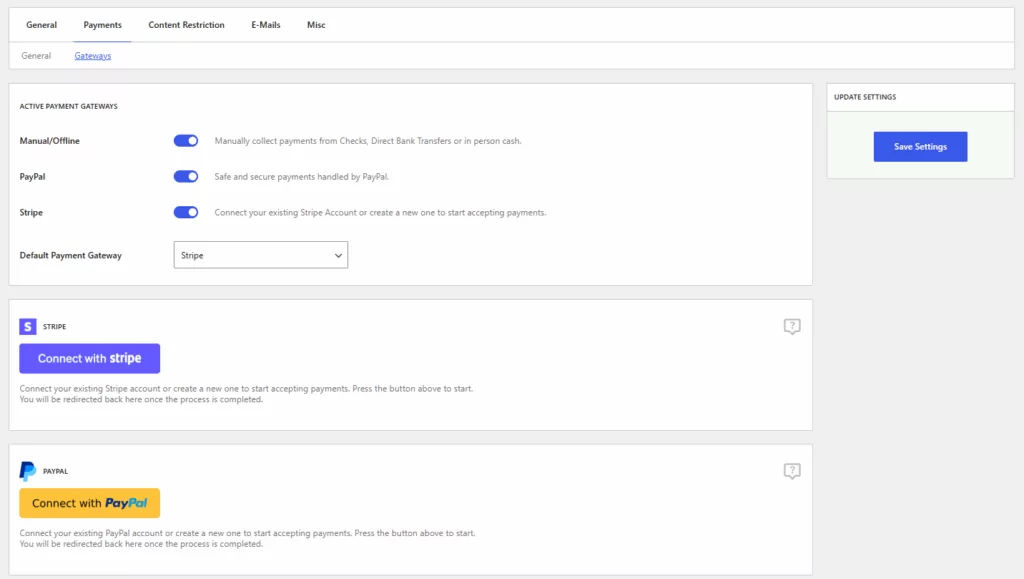
If you need help with this step, here are some helpful resources:
- How to Start a Membership Site in 2026 (The Definitive Guide)
- How to Create a WordPress Registration Form with Payment Options (Stripe, PayPal, and Others)
- WordPress Recurring Payments: How to Add Them to Your Website
Once your membership structure is in place, you’re ready to set up automated membership emails.
Step 2: Activate the Email Reminders Add-on
Transactional email automation is powered by the Email Reminders add-on.
To activate it, navigate to:
Dashboard → Paid Member Subscriptions → Add-ons. Locate Email Reminders and click Activate.
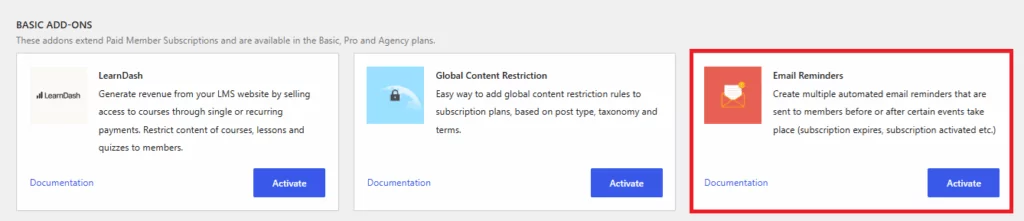
Once enabled, a new Email Reminders section will become available inside Paid Member Subscriptions.
Step 3: Configure Your Membership Email Notifications
Next, navigate to Paid Member Subscriptions → Email Reminders.
This area allows you to create and manage automated transactional emails for your membership site.
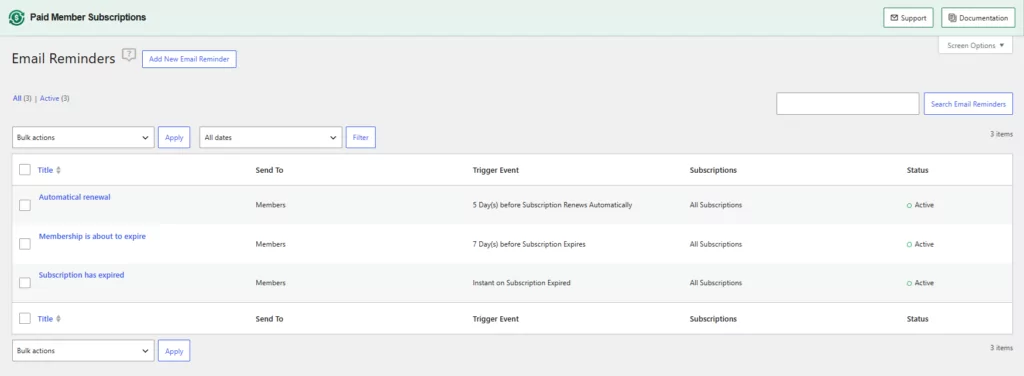
For example, maybe you want to also implement automatic renewals for your subscription plans.
Renewal reminders help reduce accidental churn by notifying members before their subscription expires. So adding one for your audience is a great addition.
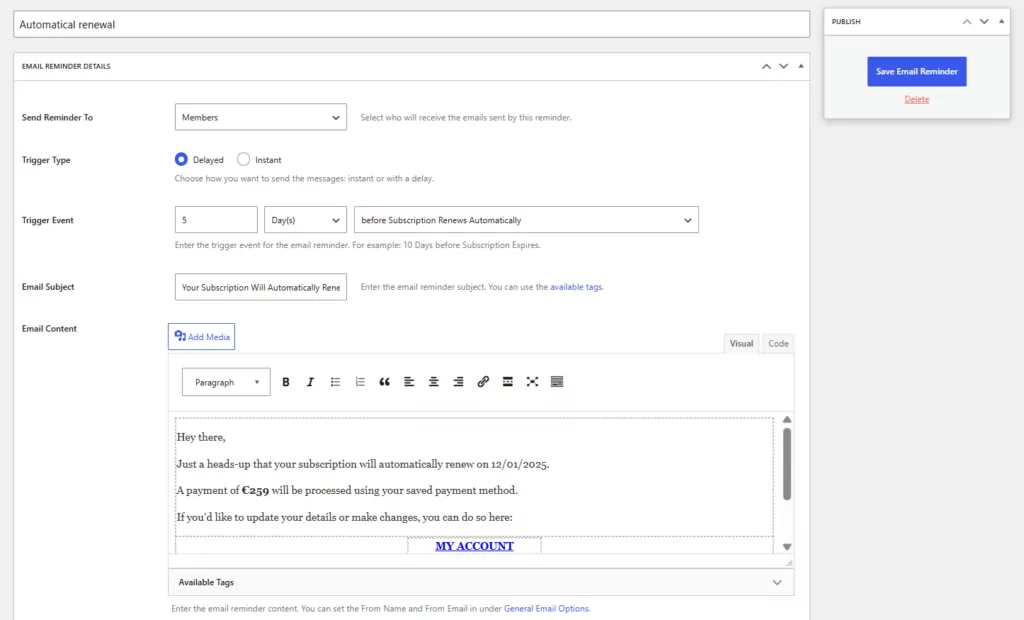
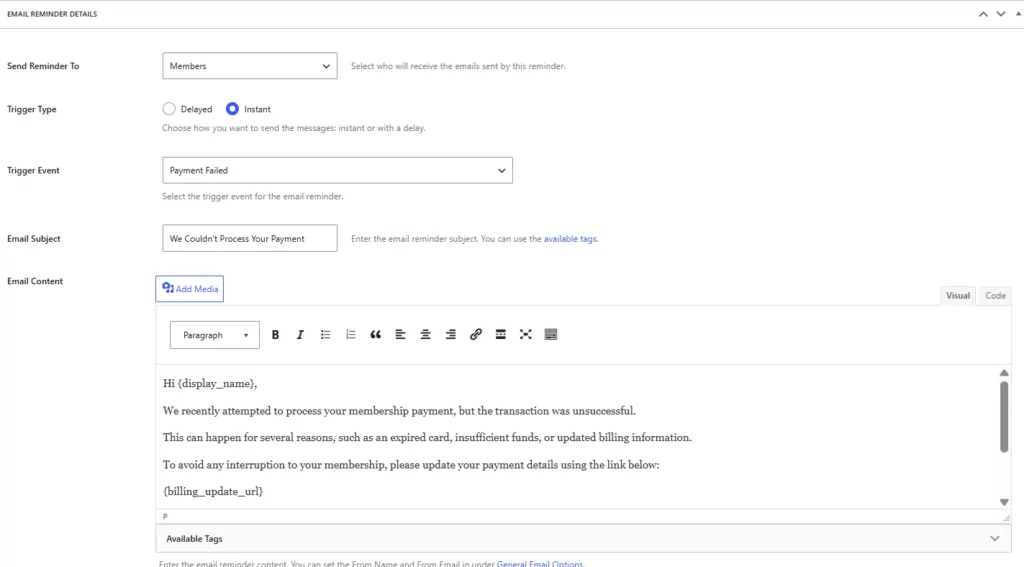
Besides this, failed payments are one of the most common causes of involuntary churn.
By automatically notifying members when a payment fails, you give them the opportunity to update their billing information before access is interrupted.
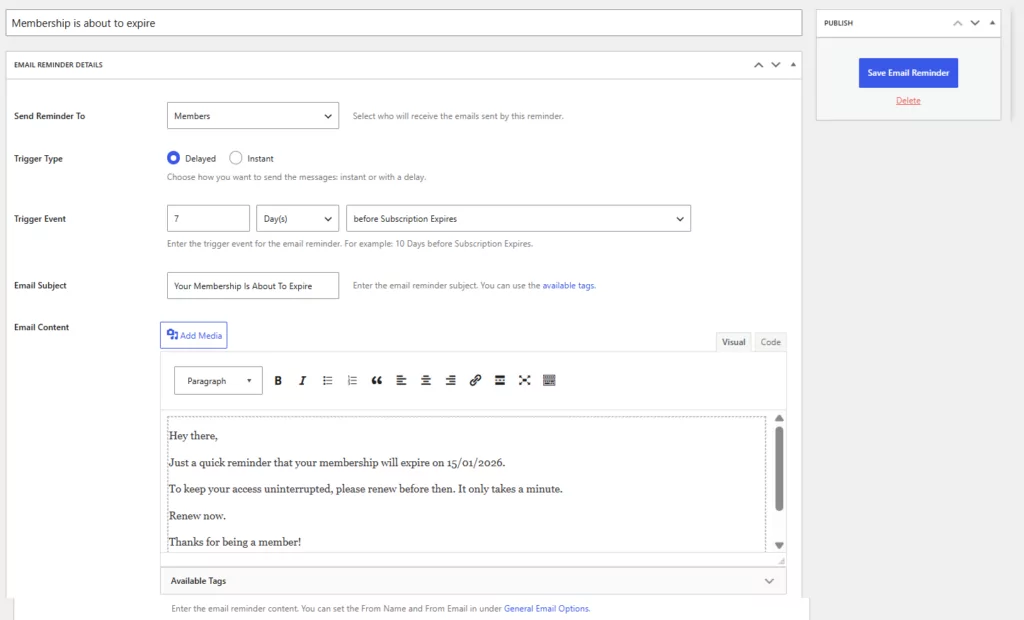
Another great example are expiration date reminders. These help reduce accidental churn by notifying members before their subscription expires. For example, 7 days before expiration, you could send an email informing them about the expiration date.
And besides these, you can also add whatever type of email automation you see fit to improve your users’ experience.
Once these automations are in place, your membership site can automatically handle the most important operational emails throughout the member lifecycle.
How to Add Marketing Email Automation to Your Membership Site
Once your transactional emails are covered, you can focus on the second part of the equation: marketing automation.
Paid Member Subscriptions offers dedicated integrations for both Mailchimp and Brevo. These add-ons synchronize membership data with your email marketing platform, allowing you to create automated campaigns based on membership activity.
For example, when someone joins a membership plan, upgrades to a higher tier, or renews their subscription, that information can be automatically sent to Mailchimp or Brevo and used to trigger marketing automations.
Why Do You Need Marketing Emails: A Practical Example
Paid Member Subscriptions allows you to sync membership data directly with your Brevo or Mailchimp audience. This means your email marketing campaigns can react to membership information automatically.
That includes:
- Creating onboarding sequences for new members;
- Segmenting subscribers by membership level;
- Sending renewal-focused campaigns;
- Promoting premium upgrades;
- Building automated engagement workflows.
Because the data syncs automatically, your campaigns remain aligned with what’s actually happening inside your membership site.
A practical example: Let’s say someone joins your Premium membership plan on your site, so they register through Paid Member Subscriptions. Their information is automatically synced to Mailchimp, meaning along with their email address, Mailchimp also receives information about the membership they just joined, like the membership tier and status.
So, that action could trigger a series of emails, tailored to their membership type:
- Day 1: Welcome and getting started guide, telling them about their subscription and what they gained access to.
- Day 3: Most popular resources, so they engage with the content available to their membership access.
- Day 7: Success stories from other members in the same membership program as them to reinforce their decision to join.
- Day 14: Advanced resources and next steps or even an upsell to a higher tier.
That’s one example of the type of automation in email marketing that drives long-term engagement.
How To Connect Paid Member Subscriptions With The Mailchimp Add-On
For this tutorial, we’ll use Mailchimp, but the same process goes for Brevo setups, too.
All you have to do is go to Dashboard → Paid Member Subscriptions → Add-ons → MailChimp Add-on and click activate.
Enabling the Mailchimp add-on will open up a new section called Email Marketing that can be found under your Dashboard → Paid Member Subscriptions → Settings. Here, you will have to introduce the API Key and the Audience ID to successfully connect it.
If you need help in generating these, take a look at this step-by-step tutorial:
After that, choose the audience you want to synchronize from Mailchimp and configure membership field mapping.
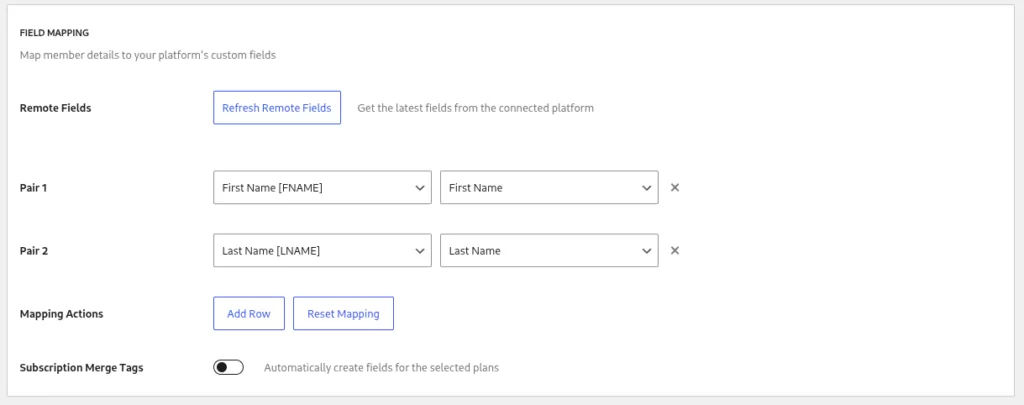
In this example we have mapped the First Name [FNAME] field from Mailchimp with the First Name field from our website. The same thing with the Last Name field.
Once connected, membership activity can automatically update subscriber data and trigger marketing campaigns.
How to Set Up a Marketing Email Automation with Mailchimp
The next step is to actually build your marketing automation inside Mailchimp.
This is where you define what happens after a member is added to your audience or assigned a specific membership tier. For example, you can create a simple onboarding automation for new members: In Mailchimp, go to the Automations section. Choose Start from scratch or use a prebuilt template.
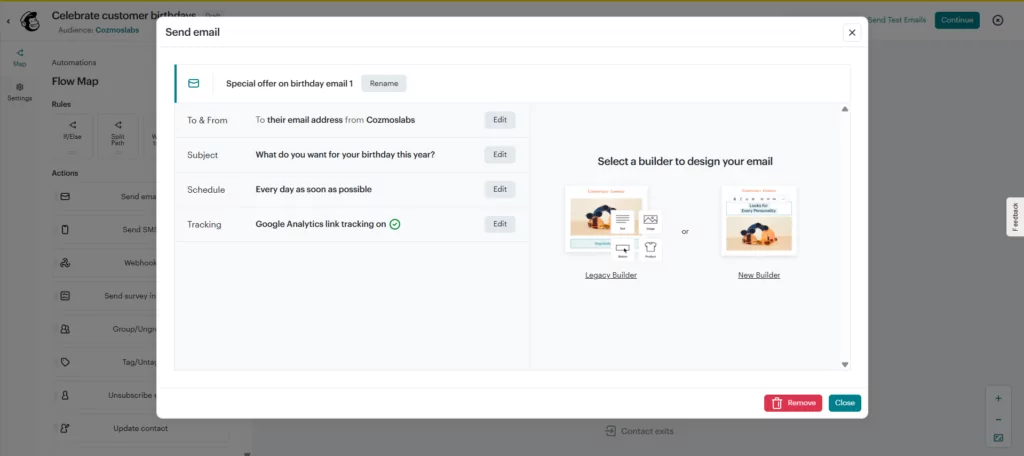
For example, you can build a re-engagement automation that triggers when a member has been inactive for a set period. In Mailchimp, go to Automations → Create and choose Start from scratch. Set the trigger to “Subscriber activity” — specifically, subscribers who haven’t opened or clicked any emails in the last 30 days and carry a membership tag from Paid Member Subscriptions.
From there, add a short two or three-step sequence:
- A first email highlighting what they’ve been missing — new content, community activity, or recent updates relevant to their membership tier.
- A second email, a few days later, with a direct prompt to log back in, paired with a link to your most popular member resource.
- If they still don’t engage, a final email can offer a short-term incentive like a discount on renewal.
Because Paid Member Subscriptions keeps membership status synced with Mailchimp, members who cancel or let their subscription lapse can be automatically removed from the sequence — so you’re never emailing someone about content they no longer have access to.
Once you’re done, click Publish, and you’re done.
Should You Use An All-In-One WordPress Email Marketing Plugin Instead?
At this point, some of you might be wondering about all-in-one solutions. And that’s a fair question.
All-in-one WordPress email marketing plugins like FluentCRM and MailPoet combine membership and campaign functionality inside your dashboard — and for simpler setups, that’s a reasonable choice.
For some businesses, that’s exactly the right approach. If your marketing requirements are relatively straightforward and you prefer keeping everything inside your WordPress dashboard, these tools can make a lot of sense. But they’re not necessarily the best fit for every membership site.
As your email strategy becomes more sophisticated, you’ll often find yourself wanting:
- More advanced segmentation;
- Better deliverability infrastructure;
- Dedicated marketing analytics;
- Larger automation capabilities;
- Additional communication channels.
Those are some reasons many growing membership businesses prefer separating membership management from email marketing automation, using platforms like Mailchimp or Brevo.
Besides this, another advantage of having a separate email marketing platform would be the custom access per individual users. For example, you may hire someone who takes care of email marketing directly into Mailchimp, without worrying about accessing your WordPress admin dashboard. For most membership businesses at scale, deliverability alone is a strong enough reason to separate your marketing email infrastructure from your WordPress installation.
Frequently Asked Questions About Email Marketing Automation for Membership Sites
Can a membership plugin replace an email marketing platform?
Not entirely.
A membership plugin can handle transactional emails such as welcome messages, renewal reminders, and payment notifications. However, dedicated marketing platforms generally provide more advanced campaign, segmentation, and automation features.
What’s the difference between a renewal reminder and an onboarding sequence?
A renewal reminder is a transactional email triggered by membership status.
An onboarding sequence is a marketing automation designed to help new members engage with your content and benefits over time.
Do I need a separate WordPress email marketing plugin?
Not necessarily.
If your primary goal is sending membership notifications, Paid Member Subscriptions may be enough. If you also want advanced marketing automation, integrating Mailchimp or Brevo can expand your capabilities.
Can Mailchimp automate emails based on membership status?
Yes — and it’s straightforward with the right integration.
Using the Paid Member Subscriptions’ Mailchimp Add-On, membership information can be synchronized with Mailchimp and used to trigger automated campaigns.
Can Brevo automate membership marketing campaigns?
Yes — you can easily do this with the right tool pairing.
The Paid Member Subscriptions’ Brevo Add-On allows membership data to be synchronized with Brevo so you can create targeted campaigns based on subscriber information and membership activity.
What is the best WordPress email marketing automation plugin for membership sites?
The answer depends on your goals.
Many membership businesses benefit from using Paid Member Subscriptions for transactional member notifications and a dedicated platform like Mailchimp or Brevo for marketing automation.
The Best Email Setup Is Often the Simplest One
There’s a tendency in WordPress to look for all-in-one solutions, and sometimes that’s the right choice. But when it comes to membership sites, combining every email responsibility into a single tool can create unnecessary complexity.
Most sites need reliable membership notifications that keep subscribers informed about registrations, renewals, expirations, and payments. But at the same time, they need marketing automation that helps build engagement, improve retention, and generate additional revenue.
Paid Member Subscriptions on its own handles the first layer exceptionally well. Then, when you’re ready to expand your marketing efforts, Mailchimp or Brevo can provide the second layer without forcing you to rebuild your membership infrastructure. And for most membership site owners, it’s far easier to manage than trying to make one platform do everything.
If you’re building a membership business for the long term, pairing a dedicated WordPress email automation plugin like Paid Member Subscriptions with a platform like Mailchimp or Brevo is often exactly what you need.
Accept (recurring) payments, create subscription plans and restrict content on your website. Easily setup a WordPress membership site using Paid Member Subscriptions.
Paid Member Subscriptions Pro
Related Articles

How To Create a Divi Membership Site
If you’re thinking of building a membership site in WordPress, you’ll need a solid theme and a membership plugin that pairs well with it. In this complete guide, we’ll show you how to create a Divi membership site using the popular Divi theme in combination with the Paid Member Subscriptions plugin.
Continue Reading
How to Hide Products by User Roles in WooCommerce?
Do you want to easily hide products by user roles in WooCommerce? Some WooCommerce store owners have a unique requirement where they want to hide certain products from all but a few specific groups of users. There may be many reasons for this, including selling exclusive products only to the more loyal customers, with a […]
Continue Reading
How to Create WordPress Redirects to Another Page, External URLs, or a Subdomain
There are different reasons WordPress site owners want to create WordPress redirects to another page, external URL, or a subdomain. The redirect can be based on an important user action or set up to redirect all users landing on a particular page. Whatever the type or need of your redirect, WordPress offers the flexibility to […]
Continue Reading