



Table of Contents
- 1 What is a Complex Subscription?
- 2 Why Should You Try a More Complex Subscription Strategy?
- 3 Complex Subscription Ideas You Can Try Yourself
- 3.1 1. Tiered Membership Levels
- 3.2 2. Allow Upgrades/Downgrades
- 3.3 3. Flexible Billing Options
- 3.4 4. Content Restriction Rules
- 3.5 5. Limit Subscription Members
- 3.6 6. Automatically Downgrade Plans on Expiration
- 3.7 7. One-Time Purchase Plans
- 3.8 8. Invite-Only Subscription Plans
- 3.9 9. Schedule Plan Availability
- 3.10 10. Advanced Discount Code Controls
- 4 Complex Subscriptions Are the Future
Complex subscription models are no longer just for large platforms, they’re becoming essential for any online business looking to offer flexible, tiered, or time-sensitive membership options. Most online businesses no longer settle for a single monthly plan with one level of access. And honestly, neither should you.
As your audience grows, you’ll probably find yourself needing more control: maybe you want to limit a special VIP plan to just a handful of people, or open a seasonal subscription for only a few days, or give your members different upgrade paths depending on where they are in their journey.
These are all examples of what you’d call a complex subscription setup, and they’re much more common than you might think.
The good news? You don’t need to be a developer or invest in some expensive external platform to build them. You can create some surprisingly flexible setups right inside WordPress with the right tools.
Let’s take it step by step.
What is a Complex Subscription?
Most people think of subscriptions as something pretty straightforward. You sign up, you pay monthly or yearly, and that’s it.
But once you start adding structure on top of that, like rules, timing, limits, tiers, or custom access paths, things move into the “advanced subscription” category.
For example:
- A membership with multiple levels (Bronze, Silver, Gold).
- Access limited by time (like a launch window).
- A plan that only appears if you have an invite code.
- A subscription you can buy once and never again.
- A VIP tier capped at 50 people.
- A system where users automatically shift to another plan after expiry.
None of these are complicated to understand, but they do make your overall subscription strategy much more dynamic. And in most cases, that’s exactly what helps a business grow.
Just look at major companies popularizing layered subscription logic:
- Netflix introduced paid “extra member” slots so accounts can be shared outside one household, increasing revenue per account no matter the viewer count.
- Spotify tiers personal, family, student, and Duo plans – same product, different value layers.
- Discord Nitro uses seat-based add-ons and perks, creating multiple upgrade paths instead of one linear subscription.
Why Should You Try a More Complex Subscription Strategy?
There are a few key reasons:
- You earn more per customer. When people can upgrade easily (or buy one-time access passes), they tend to do it.
- You have better control. Limited seats, invite-only plans, and scheduled availability help your offers feel more intentional.
- Your business becomes more stable. Complex subscriptions often mean steadier revenue and clearer forecasting.
- The member experience improves. Different types of members get different flows, instead of everyone landing in the same place.
And hear me out: you don’t have to be Netflix or Adobe to use complex subscriptions. Course creators often use tiers with limited mentorship spots, coaches run seasonal or VIP groups, community builders offer special access passes, and agencies sell team seats or usage-based plans. These businesses all rely on flexible subscription structures because they create urgency, improve predictability, and keep members more engaged.
Complex Subscription Ideas You Can Try Yourself
Instead of thinking of subscriptions as a single monthly payment, you can use more flexible structures that increase revenue, create urgency, reward loyalty, or segment your members by intent and value. Below, I created a list of subscription ideas you can experiment with, starting from common setups and gradually moving toward more advanced ones.
Note: All of these can be implemented manually with custom development, but you can build them much faster with Paid Member Subscriptions and the Advanced Subscription Toolkit add-on, no coding required.
1. Tiered Membership Levels
A classic and powerful structure. Instead of one subscription, you create multiple levels that unlock progressively more features, content, or benefits.
For example, you might offer a Basic tier, a Standard tier for more frequent users, and a Premium tier for those who want full access to your services or exclusive offers. Each tier can unlock progressively more content or benefits.
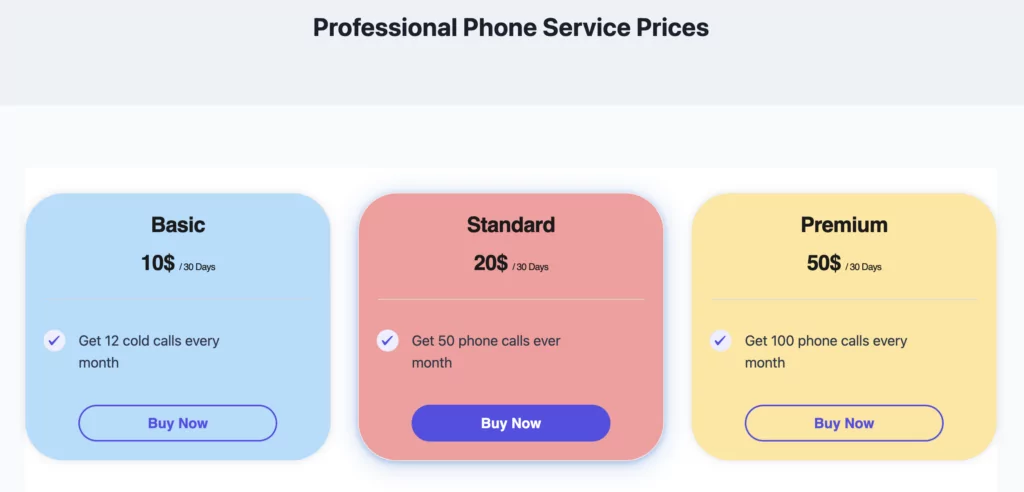
Why does it work? Because it encourages upgrades, increases revenue per user, and also helps users move through a journey instead of staying stuck on one tier.
2. Allow Upgrades/Downgrades
When members switch plans mid-cycle, the plugin automatically calculates the difference so they only pay (or get credited) for the remaining time. This is especially useful when someone upgrades from Basic to Premium halfway through their billing period. This way, they won’t be charged twice or lose time they’ve already paid for
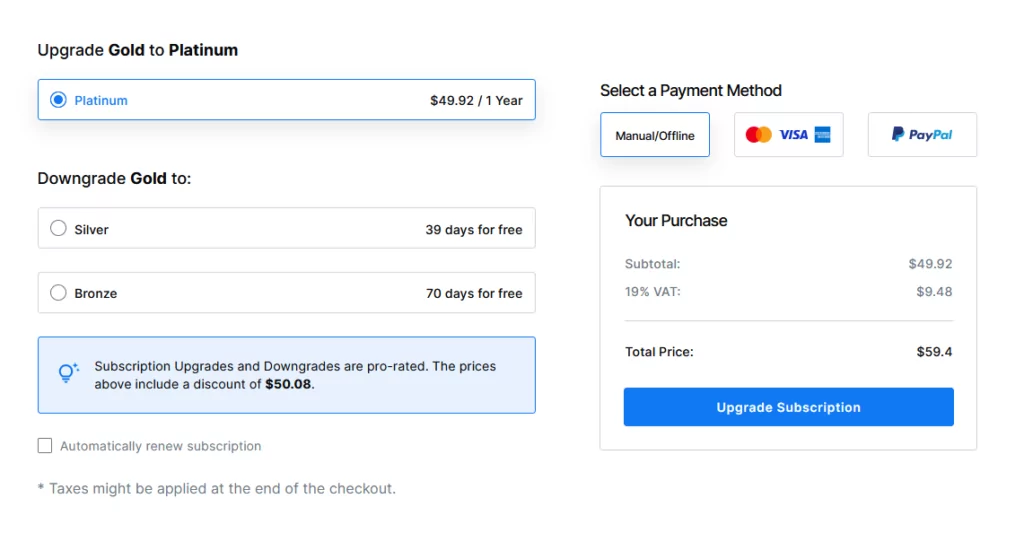
With Paid Member Subscriptions, you can implement this very easily. Once you have one subscription plan created, you can easily create upgrades or downgrades for it by hovering your mouse over the current plan.
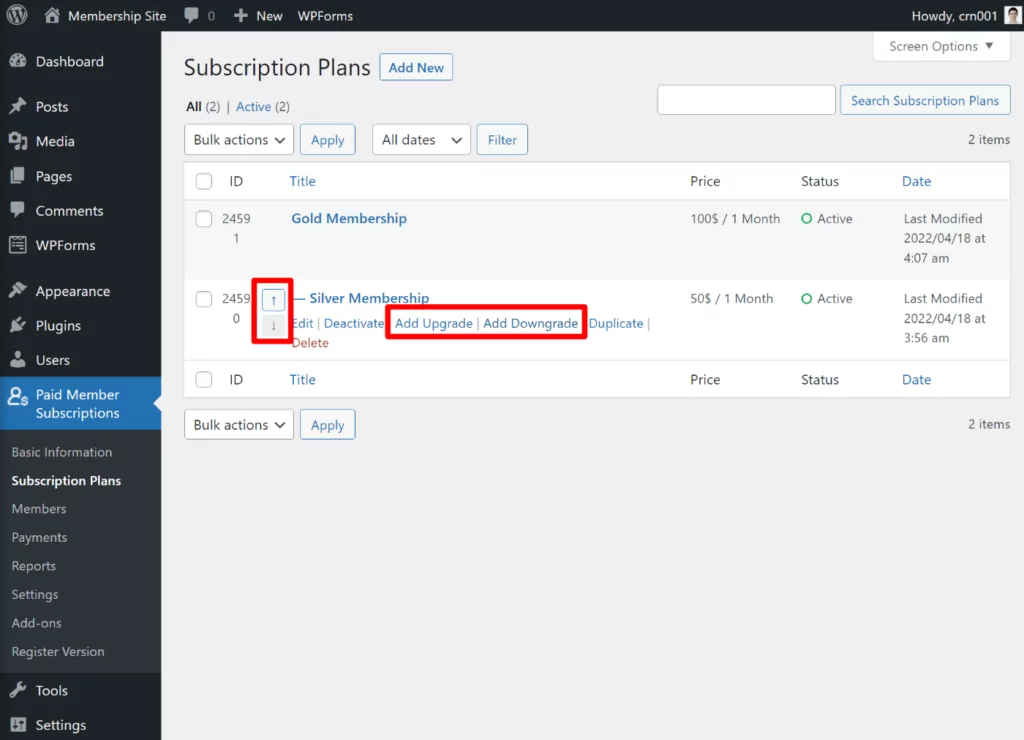
Then, you can enable the Pro-Rate add-on to allow payments to be pro-rated upon upgrade or downgrade.
3. Flexible Billing Options
Many customers want more than a monthly option. Some prefer to test first, others want to pay long-term upfront at a discount. Taking that into consideration, you can test free plans, quarterly payments, or even annual plans with savings.
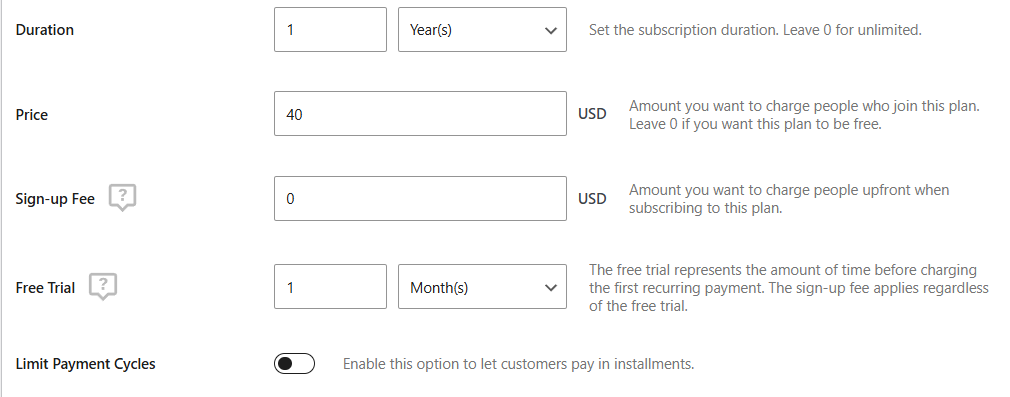
For example, to include a free trial for your plans with Paid Member Subscriptions, all you have to do is toggle the Free Trial option on the subscription plan creation and enter the number of trial days you want to offer.
You could also enable installment payments, multiple currencies, donations (variable pricing), sign-up fees, and much more. The more flexible the payment process is, the more comfortable the customer is to buy.
4. Content Restriction Rules
Not all members should see the same content. You can control exactly what members see based on their plan, status, or whether their membership is active, paused, or expired.
For example, you might restrict premium video tutorials to active subscribers while still allowing expired users to view teaser content or basic articles. This gives them an incentive to renew or upgrade, tailoring their experience based on subscription level.
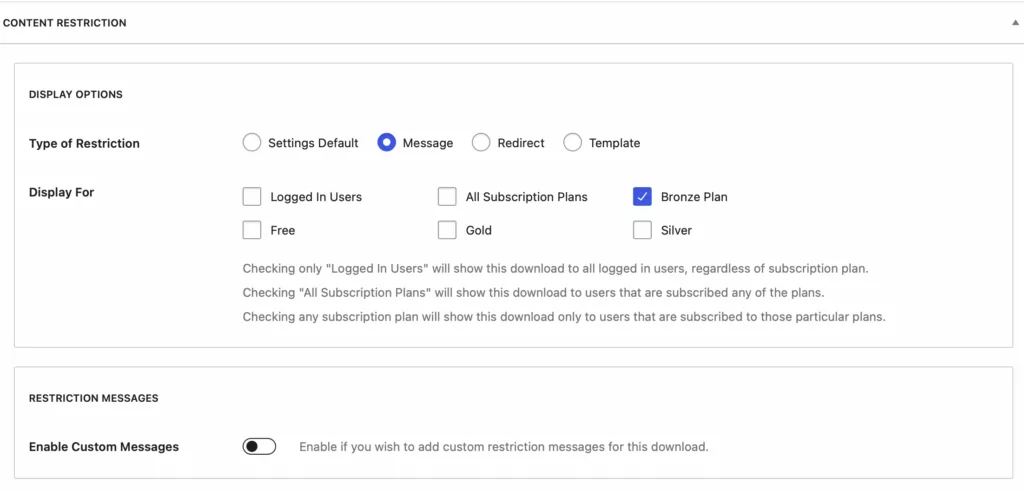
The simplest way to set up content restrictions in Paid Member Subscriptions is to open the page or post you want to restrict and scroll down to the Content Restriction box. Select “Who can view this content” (e.g., users subscribed to the Bronze plan) and add a custom message for non-members, if desired.
5. Limit Subscription Members
Some memberships work best when access is capped. With this option, you can set a maximum number of people who can join a plan.
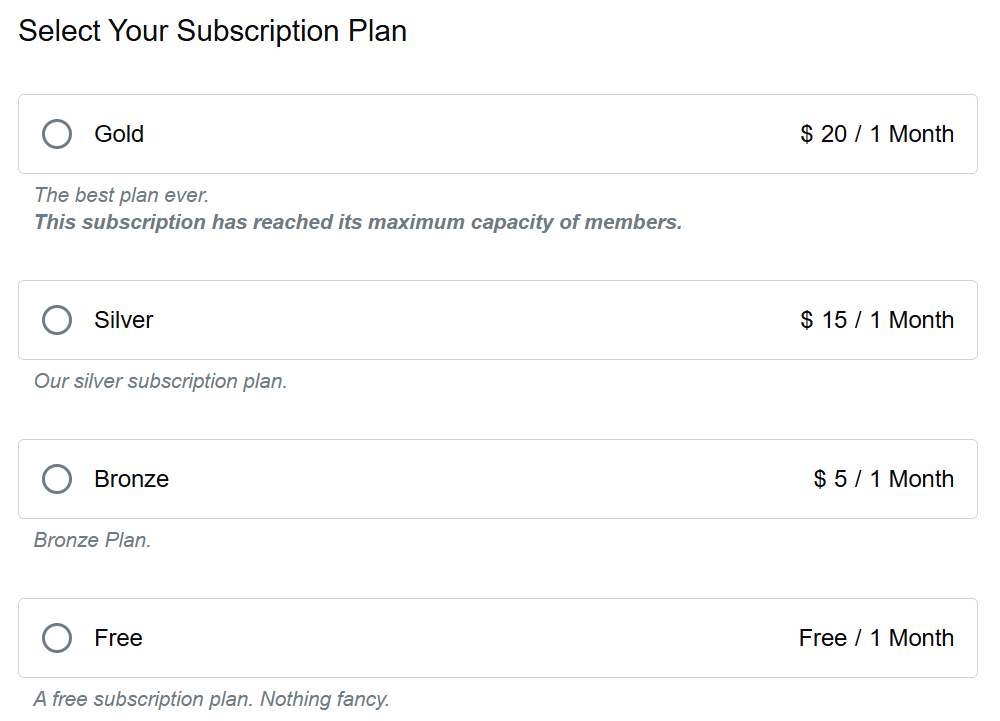
This is especially handy for VIP memberships where exclusivity is part of the value, private beta programs that require controlled onboarding, or high-touch coaching packages where you only have the capacity to support a small group.
Once the cap is reached, the plan simply becomes unavailable on the front end and visitors are notified that all spots have been filled, keeping the experience clear and avoiding frustrations.
6. Automatically Downgrade Plans on Expiration
In many subscription models, a user’s access shouldn’t simply disappear when their membership expires. This setting automatically moves them to another plan within the same tier with no manual work involved.
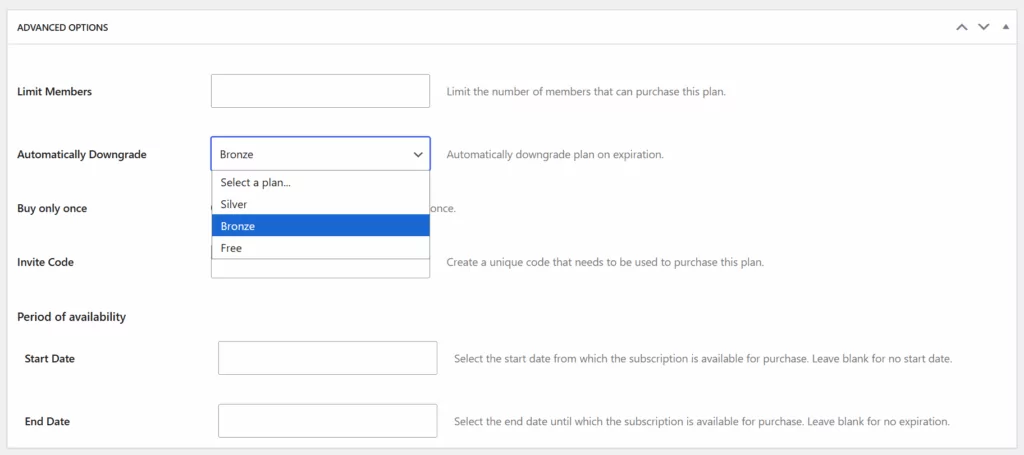
It’s a great fit for trial periods that should seamlessly transition to a free or basic tier, short-term promotions that shouldn’t renew at the same level, or temporary upgrades that are meant to last only a set amount of time. Instead of losing a user entirely when a higher-tier plan ends, you keep them engaged and still connected to your content or community.
7. One-Time Purchase Plans
Some products or experiences are meant to be purchased once and only once. By marking a plan as a One-Time Purchase, you can offer special passes or limited opportunities that users can’t repeatedly buy.
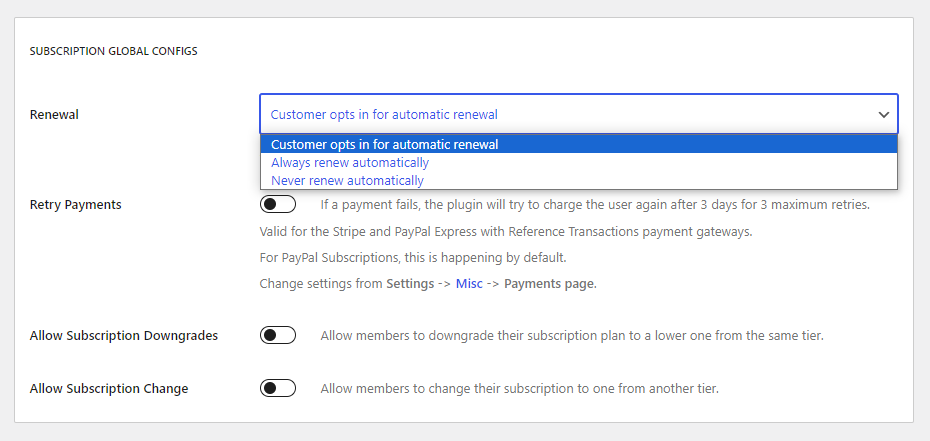
This works well for things like single-use access passes, promotional bundles, one-off events, or even lifetime deals where the value comes from exclusivity. After a member purchases the plan, it won’t appear to them again in renewal or upgrade forms, ensuring the offer remains truly one-time.
8. Invite-Only Subscription Plans
If you prefer to keep a subscription private or limit access to a select group, using an invite-only entry is a powerful structure. Members join only if they have a valid code, which gives you complete control over who gets in.
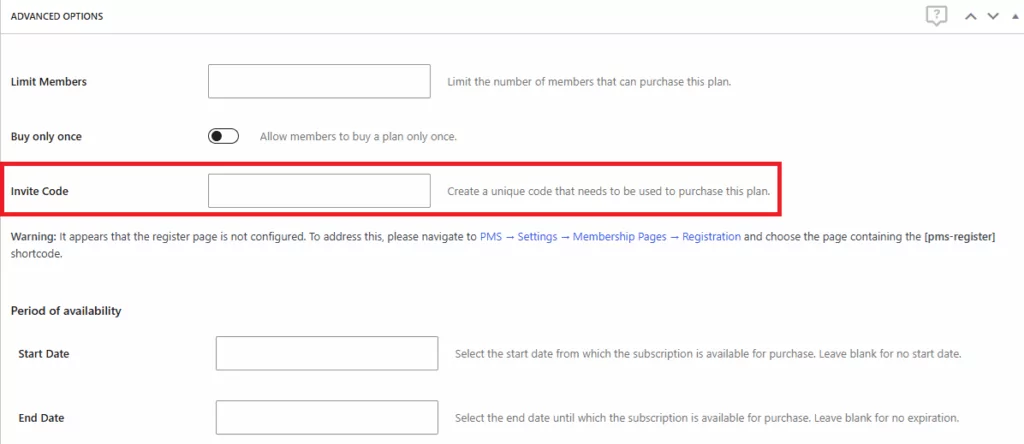
This functionality is ideal for private betas, VIP communities, partner-only memberships, staff groups, or soft-launch phases where you want to gather feedback before opening things up publicly.
If you want to create this easily in WordPress, Paid Member Subscriptions offers invite-only plans and even lets your administrators generate links that auto-fill the access code, which makes distributing access to trusted users quick and convenient.
9. Schedule Plan Availability
There are times when a subscription should only appear during a specific timeframe, like seasonal sales, course enrollments, or limited-time premium tiers. With Scheduled Availability, you can assign a start date, an end date, or both, controlling exactly when a plan is visible on the site. When the availability window closes, the plan simply hides itself from the front-end automatically.
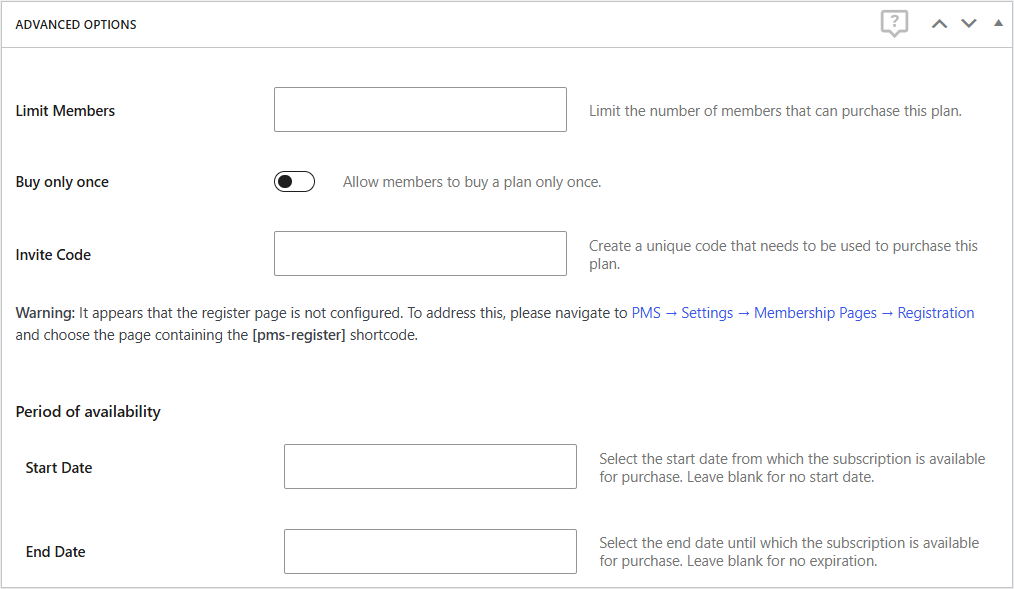
This makes it easy to run Black Friday offers, open and close enrollment periods, or temporarily introduce new membership levels without needing to revisit the settings later.
10. Advanced Discount Code Controls
Instead of broad discounts, you can show certain offers only when the timing is right. These become much more powerful with the Advanced Subscription Toolkit. When creating or editing a discount under Discount Codes → Advanced Options, you’ll find three additional targeting rules:
- Upgrade-Only Discounts – A discount shows up only when someone moves to a higher plan within the same tier.
- Expired-Only Discounts – These appear exclusively for members whose subscription has already expired.
- Time-Limited Discounts – You can require users to have an active subscription for a minimum number of days before the discount becomes available.
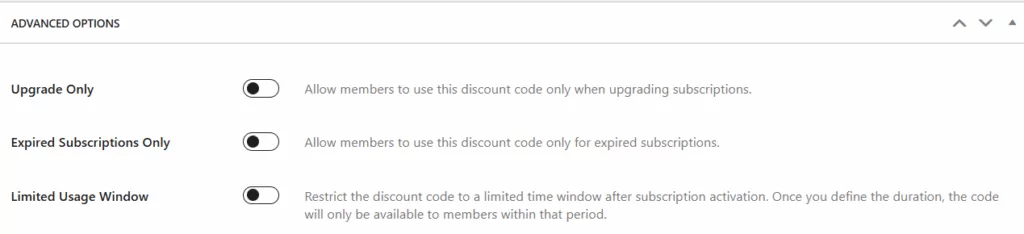
For example, an upgrade-only discount will show up only when a member moves to a higher plan within the same tier, making it perfect for nudging users into more valuable memberships. You can also create discounts that apply only to users whose membership has expired, which is a powerful way to win them back.
And if you want to reward loyalty or encourage faster upgrades, you can set a minimum amount of time a user must be subscribed before the discount becomes available. Together, these rules allow you to design offers that feel timely, intentional, and personalized to each stage of a member’s lifecycle, taking your complex subscription options to the next level.
Complex Subscriptions Are the Future
As complex subscription models continue to evolve, businesses are demanding more flexibility: tiered systems, limited-access plans, invite-only memberships, time-sensitive offers, usage variations, and more. These advanced structures help increase recurring revenue, create better customer experiences, and give you far more control over how members join and interact with your site.
Paid Member Subscriptions, especially when paired with the Advanced Subscription Toolkit add-on, makes all of this accessible to anyone, with no technical background required.

Paid Member Subscriptions Pro
Accept (recurring) payments, create subscription plans and restrict content on your website. Easily setup a WordPress membership site using Paid Member Subscriptions.
Get Paid Member SubscriptionsWhether you’re launching a simple membership site or building a multi-layered subscription business, Paid Member Subscriptions gives you the tools to grow and adapt over time.
Related Articles

How To Create a Divi Membership Site
If you’re thinking of building a membership site in WordPress, you’ll need a solid theme and a membership plugin that pairs well with it. In this complete guide, we’ll show you how to create a Divi membership site using the popular Divi theme in combination with the Paid Member Subscriptions plugin.
Continue Reading
How to Build an Elementor Membership Site with Paid Member Subscriptions
Are you looking to add membership functionality to your Elementor site in WordPress? Perhaps you want to create subscription plans, restrict access to premium content, and accept payments within the popular page builder. The good news is that you can use Paid Member Subscriptions to do all this and more. For example, you can customize restriction […]
Continue Reading
How to Create a Website with Membership and User Login
Searching for a way to create a website with membership and user login? Membership sites are very popular because they let you build your own community. Instead of relying on social media for your audience, you can create your own group of members on your own platform (and maybe even charge for membership if you […]
Continue Reading