


Table of Contents
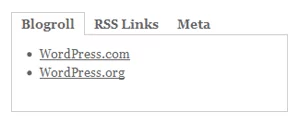
Tabbed widget areas for Thematic
Tabbed widgets for WordPress themes have been around since WordPress it self. They are a perfect way to save on vertical space and add a bit of interaction with the users.
There are two classic ways of implementing the tabbed widgets.
- Creating a hard coded widget and using the jQuery Cycle plugin. This means you can’t easily modify the content of the tabs unless you open the widget file.
- Using a tabbed widget plugin. While this is ok for some users it just ads a lot extra code that doesn’t justify the end.
Luckily there is a optimized way of doing things. Write a bit of javascript that converts any default thematic widget area into a tabbed widget area. The title of the widgets placed in you widget area will automatically become the widget tabs.
The jQuery Tabbed Widgets Plugin
This piece of code comes from a friend of mine, David Turton. It was initially written for a different html structure, so that means the code I’ll post here will be easily modified to support any WordPress widget areas and transform them into a tabbed widget area.
(function($) {

	$.fn.dttabs = function(options) {

		var options = $.extend({
			widgetid : '#secondary',
			fade : null,
			tabTitleReference : null,
			interval : null,
			startTab : 1,
			tabContainerName : 'tab-items'
		}, options);

		return this.each(function() {

			var $this = $(this),
				divCount = $this.children('li').length,
				tabContainer = '
-
- ‘; $this .children(‘li:not(:nth-child(‘ + options.startTab + ‘))’) .hide() .end() .hover(function() { $this.addClass(‘hovered’); }, function() { $this.removeClass(‘hovered’); }); for (var i = 1; i <= divCount; i++) { if( options.tabTitleReference ) { var heading = $this .children(‘li:nth-child(‘ + i + ‘)’) .find(options.tabTitleReference) .filter(‘:first’) .text(); if( heading !== ” ) tabContainer += ‘
- ‘ + heading + ‘
‘; else tabContainer += ‘
-
- ‘ + i + ‘
‘; } else tabContainer += ‘
-
- ‘ + i + ‘
‘; }; tabContainer += ‘
';
				$(options.widgetid).prepend(tabContainer);

				var $container = $('#' + options.tabContainerName);

				$container
					.find('li:nth-child(' + options.startTab + ')')
						.addClass('tab-selected')
					.end()
					.find('a')
						.click(function() {
							var $a = $(this);

							var num = $a.attr('rel');
							if( $this
									.children('li')
									.eq(num - 1)
									.is(':visible')
							) return false; // user is already on selected tab

							$container
								.find('li.tab-selected')
								.removeClass('tab-selected');

							$a.parent().addClass('tab-selected');

							if( options.fade ) {
								$this
									.children('li')
									.hide()
									.eq(num - 1)
									.fadeIn(options.fade);
							}

							else {
								$this
									.children('li')
									.hide()
									.eq(num -1)
									.show();
							}

							return false;
						});

				// auto change tabs
				if( options.interval ) {
					var i = options.startTab;

					setInterval(function() {

						if( !$this.hasClass('hovered') ) {
							$container
								.find('a')
								.eq(i)
								.trigger('click');
							i++;
							if( i === divCount ) i = 0;
						}

					}, options.interval);
 				}

		}); // end each

	}

})(jQuery);
This is the jQuery plugin and now all we need to do is to initiate our tabbed widget.
If we change #secondary with #primary then the Primary Aside widget will be transformed into a tabbed widget area.
Integrating the tabbed widget javascript code with Thematic
Next we need to add these two javascript pieces of code to our child theme. Add the following code to functions.php of your child theme for Thematic.
function add_js_to_header(){
	?>
Adding a bit of style
The basic functionality is there. However we still need to add a bit of css to the mix or we’ll have a bad looking tabbed widget 🙂 .
This css code goes inside style.css of your child theme.
/*
	Tabed Widget Area #secondary
*/

#secondary .widgettitle{
	display:none; /* The title will be in the tabs. We don't need this anymore. */
}
#secondary  #tab-items{
	border-bottom:1px solid #cccccc;
	margin:0;
	padding:0;
}
#secondary  #tab-items li{
	display:inline;
}
#secondary  #tab-items li a{
	font-weight:bold;
	text-decoration:none;
	padding:3px 10px;
	display:inline-block;
	margin-bottom:-1px;
}
#secondary  #tab-items li.tab-selected a{
	background:#fff;
	border:1px solid #ccc;
	border-bottom:none;
}
#secondary .xoxo{
	padding:10px;
	border:1px solid #ccc;
	border-top:none;
}
#secondary .xoxo .xoxo{
	padding:0;
	border:none;
}
And now we have a tabbed widget for Thematic!
Related Articles

WordPress User Roles: What They Are & How To Use Them in WordPress
WordPress user roles allow you to assign different capabilities to users on your website. This is especially useful for WordPress sites that require users to create an account (such as membership sites) or sites that need to grant different access permissions to different users (such as online magazines). Having different user roles on your WordPress […]
Continue Reading
Best WordPress Monetization Plugins & Tactics to Grow Your Revenue
You will agree that finding the best WordPress monetization plugins (and tactics) to grow your revenue is challenging. If that describes your situation, you're in the right place, and we have your back as always. Like you, I had big dreams when I started my first WordPress site. Also, like you, I was skeptical about […]
Continue Reading
Beginner’s Guide to: What Is WordPress?
Ever now and again the question arises with new clients that aren't really tech savvy: "What Is WordPress?" What I'm hoping to achieve with this post is to drop the technical jargon for a minute and explain in down to earth words what is WordPress, how can it help you, what is WordPress.com, what's a […]
Continue Reading
it could be complicated, but thank you very much. it is indeed a big help, and since i am a new web designer i try to gather more information about this profession.
sorry,It’s not display on my IE:(.
was this fixed for IE ?
shame.
great tip.
great site. nice to see some good coverage on Thematic.
Now it’s fixed. The initialization function had a ‘,’ that didn’t belong there.
You can test the preview and see that it’s working on IE7 and IE8 as well.
Thank you for the bug report!
Christian,
thanks heaps for this. yes, that solved it.
the text degrades in ie7. is that just a browser problem?
also having problems with “show search box in access”. fine in firefox, ie7, puts it under access div. i guess thats just seperate styling?
new to all this and from what i hear, ie can be very time consuming.
thanks again for your time
Target the search box like so:
.ie7 #searchbox{
margin-top:-32px;
}
That should do the trick.
i found i had to move .ie7 #access-search (as i’m keeping a div around search)
thanks again , for your help.
Sorry about the dumb question, but where do i put the codes? Aside the functions.php i dont know where to put the rest of the codes so thematic will process them.
Just add them directly in your childtheme directory.
Was able to figure it out by myself. But thanks for the reply.
Thanks Cristian for the tabbed widgets setup. I have it working on one site (berkshirelinks.com) but, with same code and theme, NOT working on another (newberkshire.com). Checked and double-checked everything and cannot find the problem preventing the tabs on newberkshire.com.
I think you have an error in the script before the initialization of Thematic Tabs. That stops script execution, so the tabs never appear. Try and remove the script before it and try it again.
Must be something else; successfully using same child theme, including the dttabs script and function, on a couple sites – but it won’t work on this one. Thanks just the same, Cristian.
Following on from Zed’s initial comment – I do not know where to put the first set of codes. You don’t specify a file and you reply to Zed by saying in the child directory. I’m confused… Which file should I add each of the first codes to? Index.php? Sorry for the ignorance, but I have very limited programming knowledge!
With the first piece of code create a new file called dttabs.js and upload this one inside the Child Theme directory.
The second you can ignore.
The third and forth paragraph tell you where to put the code (the third in functions.php and the forth in style.css)
Let me know if this worked out ok for you!
Couldn’t get it to work, so I’ve used a plugin instead. Thanks anyway for the help!
First of all, thanks for the nice post.
One thing though – I’d recommend loading the CSS dynamically with jQuery. Or at least some of it, like removing the widget titles, so that it displays nicely, just like a plain sidebar, for those poeple that browse with JS disabled.
Just wanted to say “thank you” for a great solution! The more I play with it, the more I’m loving Thematic.
Hi,
I would like to know if someone tested this with the latest version of WP 3.3.1, and latest version of Thematic 0.9.7.7, under IE7 & IE8, because it does not work for me on those browsers, please let me know.
Thank you.
I am sorry, it works in IE8, but not IE6 or IE7
I would appreciate a reply. Thank you.
Hi Bogh,
This was writen a long time ago and hasn’t been tested latelly. However I don’t think it ever worked on IE6 and IE7 (you might consider dropping support for those two browsers).
I think it’s just a css thing so you can try and fix it using css IE specific hacks.
Thank for your reply.
I know that is an old post, but I can’t find a better tutorial for this, your seems to be the best.
Your demo is working under IE7, so this is why I supposed that is not working with the latest versions of WP and Thematic. I think yours was made with some old versions.
The problem in IE7 is that it does not display the tabs, it displays their content.
I will try to see if it can be fixed with CSS.