


Table of Contents
 Photo by derSven
One of the hardest things to do with WordPress is creating a multilingual site or blog that is easy to maintain and develop.
My interest on the subject comes from the need of my customers for easy to maintain multilingual WordPress websites. This way they can extend their services to new markets.
I’ve had this discussion in the past, with a description of various WordPress plugins and methods to develop a multilingual WordPress site or blog.
In that article I’ve talked about the theory behind multilingual web-developement and mostly about the multilingual WordPress website and four ways of implementing it:
- The “Two-Tree” concept ( we use “language” categories )
- Automated translation (using google languages or babelfish)
- Manual translation using plugins ( I could only find one really good plugin that can do that so we’ll look into that)
- Semi-automated payed translation. (this is rather an ingenious concept and I believe the people who created the service will have a lot to gain from it)
Today we’ll talk about a new and really interesting
Wordpress multilingual plugin: WPML.
The interesting thing about this multilingual plugin is the way it organizes the information. It’s completely different from qTranslate (that I presented in the previous multilingual blog post). Instead of using language tags (that separates the content in different languages), MPLM links one post in English to another post that will represent it’s translation in Spanish for example. This way you get to translate everything in a very clean way. Plus, it’s compatible with WooCommerce which means you can translate your e-commerce store.
Beside this, there are more really cool features that help you get a complete translation done, like:
- Theme localization – Provide translation for texts that appear in your theme.
- Professional translation – an optional service, built for people who want to have their site’s contents professionally translated.
- Navigation – Control the appearance of site-wide navigation based on WordPress pages.
- Sticky links – This is an essential function for running full websites with WordPress. It guarantees that links between pages can never break.
- Home page link – All themes have links to the home page. This function will make that home page link point to the correct language.
- Hard coded theme links – Many themes include hard-coded links. This will make these links language dependent so that the link text and the target match the display language.
The Tutorial – Building a multilingual website from scratch with WordPress
The best way to showcase the functionality of this plugin is creating a tutorial in which we’ll create our very own multilingual website.
For this I’ve installed a new DemoWordPress blog here, installed our plugin (you can download and install it from here) and the Thematic theme ( because I do like it a lot! )
So far so good. Next we’ll need to add some content to our new WordPress website. This is going to be a site about a fictional company called “Lettuce INC.” that produces 100% natural lettuce (Lactuca sativa). 🙂
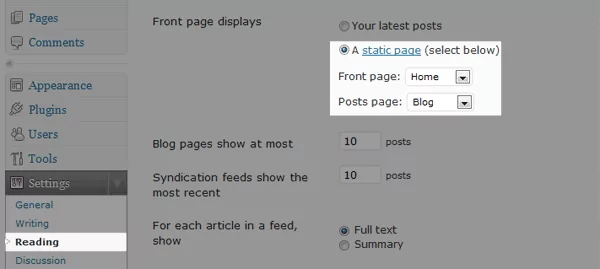
We’ll have four pages: Home, About, Blog and Contact. Also we’ve selected the Home page to be a static one (as opposed to displaying our latest posts). You can do this from the admin panel, just go under Settings → Reading.
The available languages will be English (default language) and Romanian.
Setting up WPML, the multilingual plugin for WordPress
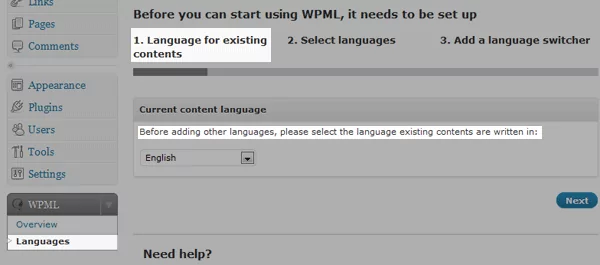
The first thing you need to do is install WPML to get to the setup wizard. Before we can start translating anything we need to tell WPML what languages we’ll have on our site. So head over in the WordPress dashboard and select WPLM → Languages.
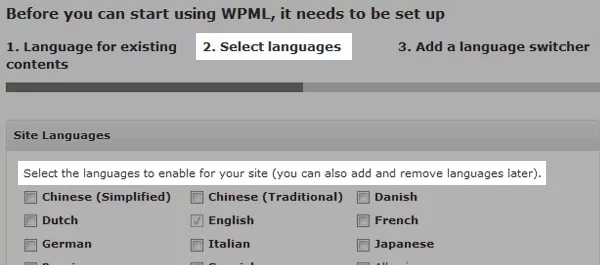
The next step lets us select the secondary languages for our site. I’ve selected Romanian as the language for the translated content.
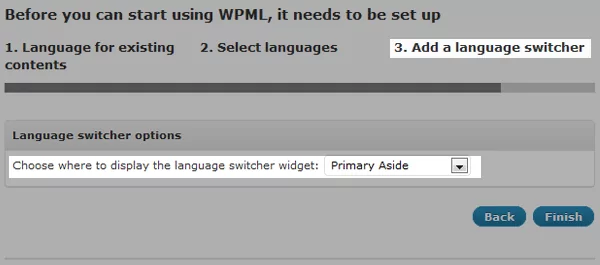
The third and final step to activating WPML consists of adding a language switcher. This way the visitors will be able to easily select their preferred language. While available in the form of a language switcher widget, it’s also possible to insert it directly into the WordPress theme using the icl_post_languages() function, but this is outside the scope of the current tutorial.
Translating our content
Now that we’ve set up the plugin we can finally start translating our content.
We’ll start by translating the pages of our blog. To do so simply go to the edit pages admin panel in WordPress and there, we have a small “+” button that lets us translate individual pages.
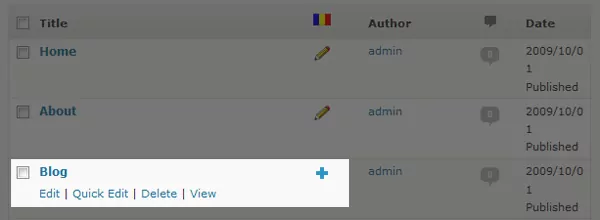
This will create a new page for us where we can add the translated title, content, custom fields (if any) and basically anything needed for your page without affecting SEO or rankings in search engines like Google.
Another way of generating the same result would be to open (or create a new page for that matter) any page and on the right side, above the Publishing box, we have the language box.
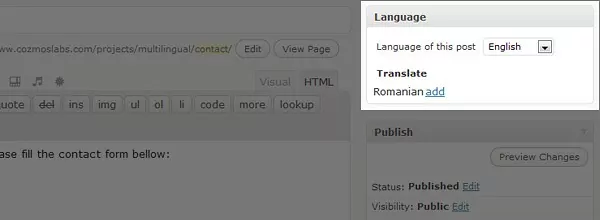
Translating the blog
Similar to the pages we can translate blog posts.
Also we can translate categories and tags. This is a really useful functionality that in my opinion makes this translation plugin complete.
To do so we’ll go to the category page in the WordPress admin panel and click on the category that you want to translate. Then scroll to the bottom and in the Language box click “Add translation”.
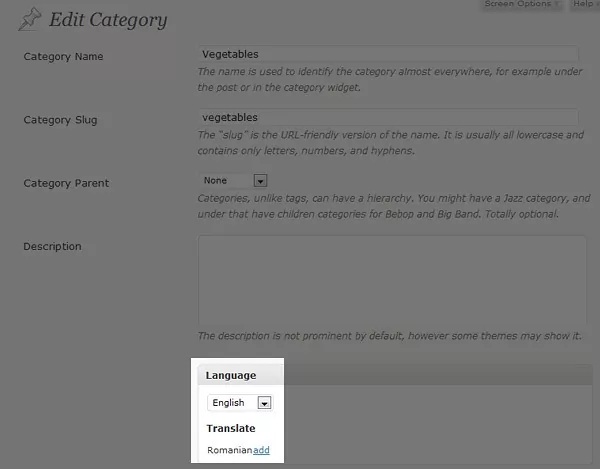
Translating various strings in WordPress like blog title, blog description or widgets
Our next stop is the String Translation under the WPML tab.
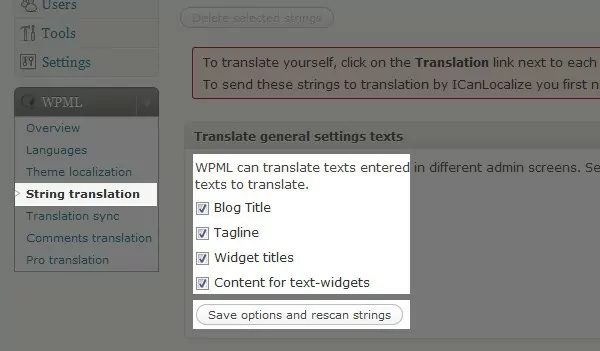
You might want to “Save settings and rescan strings” first, just in case.
An interesting functionality here is the possibility to import/export .po files. The way this works is you export the English strings in .po format, insert them into PoEdit to translate them, export the Romanian .po files from PoEdit and then Import the translated file into WPML… Confused? Don’t worry… the only reason you might use this is if you need to hire someone else to translate your site but you don’t want to give them access to the WordPress backed to do the translation!
Theme translation
The only thing left for us now is to translate our theme.
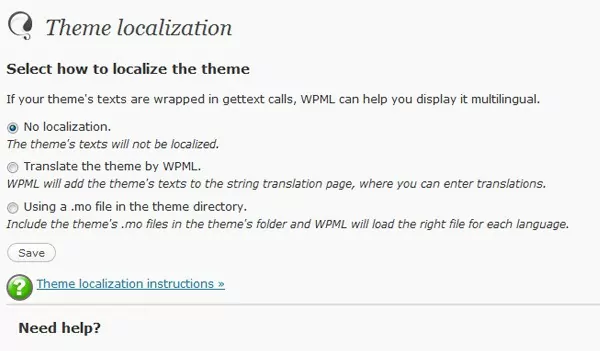
There are two way of doing this:
- Translate the theme by WPML.
WPML will add the theme’s texts to the string translation page, where you can enter translations. - Using a .mo file in the theme directory.
Include the theme’s .mo files in the theme’s folder and WPML will load the right file for each language.
Both are good ways… I’ve mentioned in the beginning that I’ve chosen Thematic for a reason and that reason is that it’s localized in a lot of languages… 13 to be exact (lucky number 🙂 ). This means if your needed language is between those 13 then you don’t have to translate your WordPress theme.
Conclusions
What I like
- It’s the first and only really complete multilingual translation plugin for WordPress which transforms the platform into a WPML multilingual CMS
- Visitors can use the language switcher to translate the website from the current language into a different language using machine translation for multilingual content
- You can easily translate any page, post, widget, theme text, blog string, plugin, etc… without affecting SEO as well as content created with page builders
- Professional translation process. This is how the WPML team makes money! They offer the possibility to automatically translate your blog without touching a single string. This is done by real translators (no robots at the end of the line) so you get really good quality .
- Comments translation. So if you really want to take your multilingual blog to the next level then comments translation is the way to go.
- Lets you work with a team of translators or translation service providers using the WPML Translation Management add-on.
- It works with WooCommerce.
What I didn’t like
- Ok… Call me picky… but PLEASE transform the “Advanced »” link into a BIG BUTTON in the Languages Section in WPML. I’ve searched for something like 2 hours for it. I thought it was removed or something in the latest version! I mean that’s where all the good stuff is, like selecting the URL format and admin language!
- The information on the WPML.org website is… terribly unorganized… there is a lot of good info there, just that it’s all over the place. There is a really informative forum… but there is no link to the forum in the main menu items! You have to click the main support page and there you have a link to the forum. Not user friendly at all.
Final thoughts
The WPML plugin is genius! It’s the best multilingual plugin for WordPress and WooCommerce there is and it comes with useful add-ons. As you could see the only things that I didn’t like were simple UI issues! But the core of the plugin is rock solid and the functionality it provides it’s just unprecedented! I wish the WPML team best of luck and congratulations for this really, really good multilingual plugin for WordPress! Keep up the good work!
Related Articles

Best WordPress Monetization Plugins & Tactics to Grow Your Revenue
You will agree that finding the best WordPress monetization plugins (and tactics) to grow your revenue is challenging. If that describes your situation, you're in the right place, and we have your back as always. Like you, I had big dreams when I started my first WordPress site. Also, like you, I was skeptical about […]
Continue Reading
WordPress User Roles: What They Are & How To Use Them in WordPress
WordPress user roles allow you to assign different capabilities to users on your website. This is especially useful for WordPress sites that require users to create an account (such as membership sites) or sites that need to grant different access permissions to different users (such as online magazines). Having different user roles on your WordPress […]
Continue Reading
Overview of the WordPress Community in 2016
As 2016 comes to a close and we are looking forward to the next year we wanted to take some time and look at the WordPress activity within the whole community. Automattic published the past week their annual report, where you can check lots of statistics about their activity, WooCommerce, Jetpack, WordPress.com and WordPress VIP […]
Continue Reading
Hey, i want to ask a question.
Does this plugin have an if statment also, so we can actually use it and change the logo for example of the blog?
I’ve used this small function that I’ve added inside the functions.php of the theme:
function clang(){
	if(ICL_LANGUAGE_CODE=='en'){
		echo 'en';
	}
	if(ICL_LANGUAGE_CODE=='es'){
		echo 'es';
	}
}
Then, inside my theme I’ve inserted a language dependent image like this:
<img src="<?php bloginfo('template_url'); ?>/images/logo-<?php clang() ?>.gif" alt="Logo" />simpler?
function clang() {
echo ICL_LANGUAGE_CODE;
}
Thanks for writing a great tutorial. It’s much better than our own ‘getting started guide’.
The two points you made are good. We’ll make the ‘Advanced’ link into a proper button in the next minor release. We know that we need to rearrange wpml.org and will do that soon too.
You guys did a great job with this plugin! Keep up the good work!
A multi-lingual blog is a great idea. It’ll definitely increase readership and traffic for your blog.
so nice info sharing. Thank’s a lot for informatif posting ^_^
[…] Multilingual WordPress – WPML Plugin Review (tags: wordpress plugin multilingual translate) […]
thanks for this great post
We’ve just started putting WPML to use and it’s potentially outstanding, but we have a few frustrations and questions:
THEME COMPATIBILITY
Many advanced themes don’t display the widget language selector properly (tried a few from ElegantThemes.com). We’ve found “multi-language” themes that are a bit friendlier to WPML and include po files, but some are better than others. It would be nice if WPML provided a review system of WPML friendly themes.
LANGUAGE SELECTOR ISSUES
These same themes don’t display the language selector when I post the PHP code in the header (or maybe it’s just that I’m not a programmer). In fact, I don’t even see the code snippet when I check the source code – it disappears.
“TEXT-DOMAIN”???
I’ve searched, but I’ve had trouble finding out exactly what a “text-domain” is, when it’s needed, and how to set it up properly.
Any advice would be much appreciated!
You should address these issues to WPML forum. This way more people should benefit from this discussion.
As far as theme compatibility, if the theme isn’t localized then there is no way to built a multilingual website with it. You don’t have to have the .po files, because you can use “Translate the theme by WPML”… but the theme still has to be localized with gettext (for more info about how WordPress translates content here: https://codex.wordpress.org/Translating_WordPress#Localization_Technology)
Language selector… have you checked to see if there exists a translation for each page? Because for example, if we have the page called “ABOUT” and it’s in english but we don’t yet have the translation for it, then the Language Selector isn’t displayed on that page! It’s only displayed on pages that have a translation. This could be the reason your Language Selector disappears!
And finally the TEXT-DOMAIN! That’s quite simple. When you localize a theme you use the gettext functions in php: _e($message). This is fine, but sometimes you want to separate all the gettext calls into categories, for example all gettext calls from a particular theme. To do that you use something like this: _e($message, ‘your-theme-name’), where ‘your-theme-name’ is the text domain!
If you’re still having issues with it and just want someone to make it work you can send me an email!
Ho do you know is a theme have the gettext? please let me know!
Hy there kenedy!
it’s fairly easy to check if a certain theme is localized or not.
Step 1: (you can skip this step if you know a little bit of functions)
Open the Twentyten theme folder from your /wp-content/themes folder and open the file header.php (for instance) and do a search for either of the following function calls: __( ‘Page %s’, ‘twentyten’ ) or _e( ‘Skip to content’, ‘twentyten’ ). These 2 functions use the gettext() feature built into WP
Step2: open your themes folder and randomly select a .php file. Do a search for either “_e(” or “__(” (without the “”) and if your search gives you positive results, your given theme is localized.
Thank you!! i just bought te plugin.. i read that you can apply the gettext to a theme too.. I`ll let you know about it…
Great response…
[…] Multilingual WordPress – WPML Plugin Reviewtutorial on building a multi-language blog/website with WordPress and the WPML Plugin. This entry was posted in bookmarks and tagged 3d, avatar, cappuccino, collaboration, costume, dannyhess, delicious, Design, development, director, film, halloween, howto, ia, inspiration, jamescameron, language, losangeles, minimal, mockup, movies, multilingual, newyorker, origami, papercraft, Photography, plugins, prototyping, quiverstudios., surfboards, surfing, ui, ux, webdesign, wireframes, wood, woodensurfboards, wordpress. Bookmark the permalink. Post a comment or leave a trackback: Trackback URL. « Luca at Nine Months […]
Yes, it’s really great started guide article, saved my time. It’s help me a lot using WPML plugin. Thanks.
Thank you, this is a very interesting tutorial for a very interesting plug-in. Congratulations to developpers.
But can we edit the translated pages for SEO purposes ? I mean : I’m French, I want to translate my website in English to address US market. I must edit my meta-tags on English translated page, etc etc.
Will this be possible ?
Thanks again
Yes.
Have a look at this page: https://wpml.org/2009/10/wpml-compatibility-for-popular-themes-and-plugins/
Basically WPML work well with the “All in One SEO Pack plugin” for WordPress. This means you’ll be able to translate all your meta-data.
Very clear and informative post Cristi, well done.
I have been looking for SEO-specific information on the WPML website and forum to no avail. You seem to be quite familiar with WPML so I’ll post here.
I just installed WPML and am using two domain names, one for each language (English and French). So far so good.
I have had All-In-One SEO Pack installed for some time now (it’s all configured). The “blog title tag” and “description tag” of the home page don’t seem to be compatible with WPML (i.e. I can’t translate them).
I then installed Headspace2 as recommended by WPML. Same, I’ve found many options to edit many other tags (page, post, categories, etc.) but not the meta tags on the home, i.e. “blog title tag” and “description tag” (and why not “keywords tag” though I’m not too concerned by that).
I’m using two domain names, so as far as the user is concerned I have two home pages. I would therefore like to be able to configure two “blog title tags” and two “description tags” (two different SEO strategies in two different languages). Both AIOSEO and Headspace2 seem to only offer one “blog title tag” and one “description tag”.
Any ideas?
You have me at a loss here. I’ve installed HeadScape 2 with the latest WPML but I’m really not sure if you can translate the homepage. Best way to go about this is post on the WPML forum here: https://forum.wpml.org/
Thanks Cristi, I’ll post there too.
I think I must be missing something big or there’s something at the core of SEO that I haven’t understood. In my understanding, the especially and of each page, and *especially* the home page (or let’s say the main landing page), are paramount to a good SEO strategy. It just seems impossible to me that WPML would translate all meta tags but those two (which incidentally happen to be the two most important for Google SERP snippets). So I’m definitely missing something 🙂
I’ll see what they have to say on the WPML forum. Thanks though.
[…] Multilingual WordPress – WPML Plugin Review“Multi lang WP sites” […]
Awsome. Thanks for your answer Cristi.
Multilingual WordPress – WPML Plugin Review…
…
[…] to invest my time nutting out the WMPL plugin. You can read Cristian’s tutorial on using it here, and watch the WPML Intro videos if you are a lazy bum like […]
[…] Multilingual WordPress – WPML Plugin Review – Test du plugin multilangues WPML, […]
You did a great job with this plugin. Awesome!
Keep it up!
Thanks for this idea. I have a question…how it is possible through this plugin to have for each language some different keywords in the header section? Also … to have some different sidebar…I’m talking about WordPress here.
I resolved that…Thank you very much
Hi Denisa, can you suggest how to do it? and how to put the keywords on every post?
Hllo, working on a new website at http://www.elcatey.com with WPML. For now in combination with All in One SEO but the problem is that you can not make seperate titles and descriptions for seo in AIOSEO. That is not working. Is this working with headspace? I was looking around and at one point they mentioned that there is a compatibility pack for headspace, but where?
Wanted to download Headspace but is an older version. Its not compatible with 2.9.2…
Your questions would be better answered here: https://forum.wpml.org/
It’s the official wpml forum.
I’m creating a multilingual website with wpml and all in one seo pack and I cannot change the title, descriptions and keywords in the /es /en /it homepages.
How did you succed?
Thanks in advance for helping.
Thanks a lot for your clear explanation of WPML!
I got one question left:
In my website I’ve written a contact form in the sidebar area. So I would like to get a different sidebar for each language.
How would it be possible to have all these contactforms in the same sidebar.php and get a different one shown for each language.
Thanks in advance!
This piece of code should do the trick:
if(ICL_LANGUAGE_CODE=='en'){
   //here you output the code for the en contact form
}
if(ICL_LANGUAGE_CODE=='es'){
   //here you output the code for the es contact form
}
Hope this makes sense.
Thanks a lot for these lines of code. I used them with a plugin that let me write PHP code in a simili-text box widget. This way, the content of the text box is translated depending of the language selected. The plugin I used is available here: https://www.hongkiat.com/blog/execute-php-in-wordpress-post-page-and-widget-sidebar/
Regards
Great read, this is exciting stuff!
[…] Multilingual WordPress – WPML Plugin Review – Test du plugin multilangues WPML, […]
Hello,
Thank you for this very interesting information. I would like to know if you have any video about it?
I will try this plugin.
Regards,
Antonio
Hai, anyone knows why the second option ‘Translate the theme by WPML’ is not available?
I only can see 2 options. Thanks in advance!
Hy yall i having a trouble with my permalink. i’m using the bamboo theme and wordpress.
the switcher language seems to work properly but, the permalink is not associng the correct language the id is correct but the language is still on one of the 3 languages of the site…
like …?p=98andlang=fr even if the choosen language is english.
i must say that the title is shown correctely the header ( first lines of articles ) is shown correctely but the read all and the permalink are linking to the bad language.
what did i miss?
I do not know how to say to you! Thanks so much for your useful infos!Keep on and brighten yourself!
Gardening tips
I recently came across your article and have been reading along. I want to express my admiration of your writing skill and ability to make. You got a really useful blog I have been here reading for about an hour. I am a newbie and your success is very much an inspiration for me.
Hi I just like to have
“Notify me of followup comments” here… easer to be remembered..
I am web designer and worked with JoomlaFish some years ago.. Today I was googling for best wordpress multi language and gladly find this.
Well I have small question but nerver mind if you don’t know by hart… i will find it…
can I have one domain name for one language and other for other language?
Without many guru works…
Yup. WPML support sub-domain instalations: https://wpml.org/features/
This is fantastic, exactly what i was looking for! surprised their isn’t more plugins developed with this functionality seems like it would be in high demand!
[…] Multilingual WordPress – WPML Plugin Review Relaterade inlägg :WPML Multilingual CMS Plugin | WordPress PluginsMultilingual variables | drupal.orgXili-language Plugin | WordPress PluginsWordPress plugin and widget tutorialCreate a Custom WordPress Plugin From Scratch | Nettuts+By Blogsdna […]
[…] the original here: Multilingual WordPress – WPML Plugin Review Tags: using-the-wpml, […]
Hi…
It is really an interesting post.. this will surely help us out as we run a translation service company.. Thanks for the tutorial:-)
it looks really great, i’m gonna give it a try. thanks for the review
It’s a long time I would like to test wpml actually. My next project will be with it. Qtranslate is interesting but issue with url…
hi
i m so much confused i m using wpml all things going well but i m using some other plugins for recent post and top 3 posts but Wpml is not showing there the translated post according to Danish Language ……..have u nay idea ……………plz help me
Kind Regards Gull
thanx for the info…really appreciated!!!
I am new to all this and was wondering if this wpml really works well if wanting make my English site into a mirror image but in French for example???
[…] WordPress plugin – Multilingual WordPress. WPML plugin review […]
Thats the first time i visited this, i found many info here!
Keep it up 🙂
Hi,
I would like to know if there’s a way to use a multilingual pluggin in wordpress.com…can you help me?
thanks a lot!!
fiona
Hi Cristian,
Nice post, really good explained.
There is just one thing I’m not sure if you did forget to mention or it is not possible.
I have used in the past many other translation plugins, some of them where crap, and some others were fairly good. At the minute im using Transposh, which does a fantastic job in translation and editing the translation directly on the page. But I have a problem with every single plugin I tried, and it is with sitemaps.xml.
For some reason Transposh don’t create the sitemaps automatically, and they say in their forums if you use the beta version for Google sitemaps xml generator plugin, it adds all the languages in the sitemap. This is a big massive problem, as what it does is include all the languages url’s (example: http://www.app42day.com/en/wild-blood) in to the same sitemap divided by date, but all the translations mixed. As you can imagine, when you submit that sitemap to Google webmaster tools, it creates a big mess. It shows mixed language results for different Google countries (example: http://www.google.it – search: wild blood iphone – result url: https://www.app42day.com/fr/wild-blood)
So the question is, is there any way to sort this problem with WPML plugin? is there any way to do it with transposh?
Thanks a lot!
Hi!
I just need some advice about WPML plugin. I don’t know if I have to buy wpml cms or wpml blog. I’ll translate my blog by myself but does wpml blog translate categories too? And what about seo for all languages with wpml plugin? Does it work? How can I know if my theme is compatible? So many questions…:-)
Thanks a lot
Your blog is great!
Hi Cristian,
WPML is great but it seems to only index the default language in Google which makes it kind of useless.
I m using “All in One SEO” and BWP as sitemap generator. Do you have any advise to have secondary languages indexed?
Cheers,
Regards,
tnx for this informative review. i do understand wpml now. wpml documentation is terribly unorganized. super headaches. tnx again!
Wow! This is a very well documented article Cristian, I must say this is impressing.
Although wordpress has changed a lot since the time you wrote about it in this article. I’d appreciate an update to this article. WPML has already dominated the overall purpose of wordpress.
Hey, i want to ask a question.
i have a problem in Comment section of website. i change qtranslate to wpml. But i cannot able to import comments. then i use the Wpml Comment Merging plugin for Comments. It show the comments on both language. but same comments as in english langauge.
In qtranslate it show different language Comments (french and english language have different comments.)
I want the comments different for different language.
My website url is : https://demo.196flavors.com
Thanks in advance for helping….
This seems to me that this article has been sponsered by wpml!
If its supposed to be review then one should write both good and negative things about the Product!!
WPML is not for those who has no knowledge of PHP. Atleast one should be familiar with the language inorder to solve many minor errors which comes with this plugins.The more you use WPML the more error or bugs you see down the line..
I’ve been told to reinstall old version of wpml inorder to solve a bug. All the translation has been done. And when you think and feel everything is going fine a bug caused by WPML Plugins appears and your day is gone solving this problem.
If you have time and nerve to use multilanguage site( specially WebShop) with this plugins then go ahead.But mind you, if you want to have a professional look for your site then stay away from this plugin because sooner or later out of nothing you will see error coming. the latest error which i got and which seems to be very common is as follows:-
Fatal error: Allowed memory size of 805306368 bytes exhausted (tried to allocate 32 bytes) in /test/wp-content/plugins/sitepress-multilingual-cms/lib/xml2array.php on line 15
This is called review, you help with images thanks cristian!
Great plugin thanks for introduced with us.
Hey!
Amazing, detailed, review of the extremely popular WPML plugin.
Wanted to let you know about a new plugin we recently launched, Bablic Localization, it’s also for WordPress localization/translation but it does it in a way more effective and user-friendly way.
All of the translation is done in our user-friendly editor. You simply right-click on any element (text, images, css, error msgs, forms, etc) and edit it right there and then. Once you’re happy with the results (which you see in real-time in our visual editor) simply click save and publish and that’s all!
You can also choose to start with machine or human translation. No need to create pages, menus and so on. Or to even check if it’s compatible with other plugins, unlike WPML, it works with all wordpress plugins and themes.
The plugin is called Bablic Localization. You can just enter your URL on bablic.com to get started and see it in action!
Would love to know your thoughts!
Thanks for writing a great tutorial. This is very useful information for every WordPress user.
I have been using the WPML plugin for some time… what was to follow was a nightmare… we ran the plugin for a 2nd language for quite some time… and then figured that the plugin was quite a resource hog – as measured by: P3 (Plugin Performace Profiler). We saw that 70% of the resources consumed on our website were by this Plugin. And that by removing WPML we could speed up response time of our website by up to 50%.
So we decided to uninstall the plugin and run the 2nd language manually. What was to follow was and still is an ongoing nightmare.
WPML the plugin from hell, will modify the database irreversibly. So that after uninstalling the plugin the database is compromised.
The result is that permalinks on the website are wrong. We had countless conversations with WPML support and they could not provide a solution. So we have now programmer working on this manually changing links in the site… back to what they are supposed to be.
All hell broke loose when we upgraded from WP version 4.3 to 4.4 – that is when the links in the site got screwed up.
And we have to pay dearly for this reparation of the site. Our programmer is still working on getting rid of the damage that WPML did to our website.
So be very careful betting your site on the WPML plugin. For us it turned out to be a huge mistake.
And we had to learn that their support sucks greatly.
Hi All,
I am a staunch defender of WordPress almost since its inception and I think WPML was wonderful when it was a free plugin ;))
Over time, it seems that wordpress has put aside the option of creating web pages with different languages with no additional cost (free)
Do you know if someday it will be implemented in the source code of WordPress the ‘translation process’ to various languages as already makes in others CMS?
Thanks in advance.
Greetings from Barcelona!!
Amazing! Its really awesome piece of writing, I have got much clear idea about from this post.