


Table of Contents
Update 11.17.2010
The category image was removed and all thumbnails are now created using the Featured Image default functionality. If no Featured Image is added a default image appears in place.
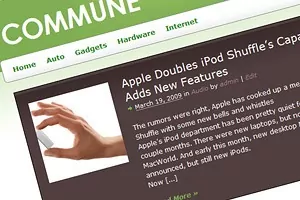
Simply put I have been lazy lately. I know this isn’t the best way to sell my self but a little bit of honesty hasn’t hurt anyone (or has it? ). So without further ado I here by present you Commune Child Theme based on Thematic!
As far as I know it’s the first magazine like Thematic child theme released for free!
Is it a bird, is it a plane?
Hardly! Just a Thematic Child Theme with a twist!
There are many reasons why you should consider using the “Commune child theme” :
- It’s green
- It’s a Thematic Child Theme – this being said it has all the features Thematic has including fully widget-ized with widget areas above and below the content—and even in-between.
- Lets you upload your own logo / banner image through an admin panel
- Uses the Featured Image functionality
- It was designed to work with the Tabbed Widget Plugin and WP-PageNavi plugin (update – Tabbed widgets doesn’t currently work with WordPress 2.8)
- The main menu displays all your categories and subcategories
- Tested and works on all modern browsers: Firefox 3, IE7, Safari, Google Chrome
A small guide
There are basically three things to explain: adding your own logo, the Tabbed Widget and adding images to posts!
Adding your own logo
Commune features an Options page that allows you to upload your own logo or banner image. You need to go to the WordPress admin panel and under “Apperance -> Child Theme Options”.
This is how the interface looks like:
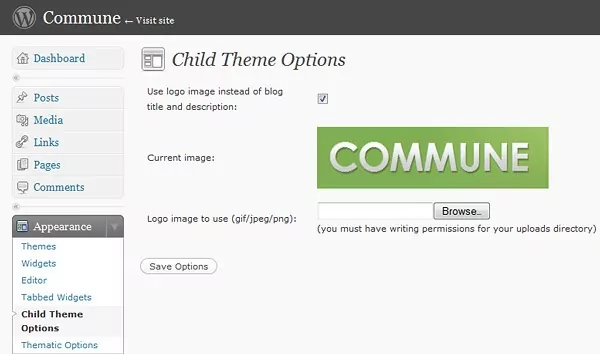
Child Theme Options Page – You now have the posibility to upload your header image from WordPress
The Tabbed Widget – update: it currently doesn’t work with WordPress 2.8
To use the functionality of the Tabbed Widget Plugin you first need to download and install it!
Once that’s out of the way select Appearance –> Tabbed Widgets. The interface gives you the possibility to create 8 Tabbed Widget areas, but in out case we’ll use just one. In Tabbed Widget No. 1 select the widgets you want displayed. For the demo of the child theme Commune I used:
- Recent Posts
- Recent Comments
- Tag Clouds
- Search
Make sure you give a title to each individual widget or your users will only see 4 tabs.
Other settings you need to take into consideration are:
- deselect show title (it’s deselected by default)
- select Style as: tabs
I’ve also uploaded an image with the settings for the Tabbed Widget Nr.1.

The next and last step is to head over to Appearance -> Widgets. Select the Primary Aside Widget, click Show and add Tabbed Widget 1 to it and save changes. After this you should have your Tabbed Widget displayed on the front-end of your blog in all it’s glory!
Category and post images
Another key element of this theme is the way pictures are used and displayed. For this the Easy Peasy Images code by Andrew Rickmann was integrated into the theme code.
What this does is to get a list of all the images attached to a post. It then finds the first image with a sort order of 0 and displays it. By default all images have a sort order of zero unless you choose to reorder them. If you don’t make any changes then it will find the first image. If you reorder them using drag and drop the first image in the list will have an order of 1 and you would need to change it to 0.
Default images by category
The theme will add a list of categories to the Media -> Library so that you can assign images to one or more categories. If the function doesn’t find a post attachment with a sort order of 0 then it will default to the image attached to the category the post is in. Note: it will use the first category image it finds.
For more information on the usage you can see a video-tutorial over at Andrew Rickmann’s web-site, www.wp-fun.co.uk
As always if you have any questions or if you find bugs please let me know! I appreciate every input!
Related Articles

15+ Best WordPress Membership Themes in 2026
Looking for the best WordPress membership theme? We collected 20+ free and premium options, all of which make a great option for membership websites.
Continue Reading
I Searched for the Best WordPress LMS Themes So You Don’t Have To
Searching for the best WordPress LMS themes for your online course or eLearning website? There are a lot of options out there, but not all of them are great. To save you a bunch of time, I narrowed down the list to the eight best WordPress eLearning themes that work with popular LMS plugins such […]
Continue Reading
Overview of the WordPress Community in 2016
As 2016 comes to a close and we are looking forward to the next year we wanted to take some time and look at the WordPress activity within the whole community. Automattic published the past week their annual report, where you can check lots of statistics about their activity, WooCommerce, Jetpack, WordPress.com and WordPress VIP […]
Continue Reading
Was waiting so impatiently for a Thematic mag theme, was so glad when Ian told about this with me, so here it is, I’m glad, I’ll be using this at http://www.mobileroyale.co.cc right away ! Thank you !
Very neat just got Ian’s Tweet. Probably the coolest Thematic child theme I have seen yet. And I have seen quite a few.
I either chose Thematic or Hybrid as a starting point for any WordPress project we do. Sometimes when I am done I forget which framework I used:).
I have been playing around putting various jquery slider’s into child themes it is pretty easy to incorporate, and I think this theme would have that extra pop by having a featured content slider that pull featured posts y a custom field or stickies etc.
Anyway awesome job you churn out some great child themes. Thanks I downloaded it and I am sure I will learn a lot from it.
Thanks!
Was waiting so impatiently for a Thematic mag theme, was so glad when Ian told about this with me, so here it is, I’m glad, I’ll be using this at my blog right away ! Thank you !
Tried a few times to be the first commenter, my comment doesn’t seem to appear -just realised it was catched for spam.
Sorry for double posting, having a bit connectivity issues today. Just activated the theme at my place.
Ha Flyer you got that up quick:)
@KFLYER – No problems! Glad you like my theme! I think you should disable the exerp image plugin and try to read my short user guide for the theme. If you have issues let me know! Also I think you have to many categories to be displayed correctly in the main menu!
Cristi, does the plugin automatically add excerpts ? I’m using Excerpt Editor not only because of excerpts but also for meta data . Yes, I’ve a bit too much categories. Unable to fix it since I’m mobile ( more at https://tr.im/moblogger )
Yes. It displays excerpts. Also the image is added automatically. All you have to do is upload a image and just let it be in the Gallery. No need to actually include it in the content!
Yes, I know about the image resizing. But I’m using the Excerpts Editor mainly for meta data. It really is a great plugin if you ask me. Will check if there’s an option to hide its More link.
https://www.laptoptips.ca/projects/wordpress-excerpt-editor/
Any ways to change
1. RSS icon to Feedburner feed
2. Display more than one Featured article ?
🙂
To change the RSS to feedburner just use https://wordpress.org/extend/plugins/feedburner-plugin/ . It changes all feeds to feedburner ones automatically!
Right now there is no way to have multiple Featured articles (I’ll consider it for future versions of the child theme). But that dosen’t mean that the featured article has to be the last one added. You can make it a sticky and will still be there even if there are newer one written!
As far as metadata goes I use https://wordpress.org/extend/plugins/all-in-one-seo-pack/ . I know that the excerpt plugin has a lot of functionality but I don’t know how my theme and it interacts at the moment!
There is the possibility to disable its Continue Reading link, I’ll see.
Sadly, Sticky cannot be done in the main mobile browser I use.
Glad to see more themes coming! 🙂
This one is pretty good too.
Hello Christi, that’s again a wow awesome theme!
Beautiful looking theme! Thanks for making it free, and for the mini-tutorial on tabbed widgets. I love tabbed widgets, I’m really glad you incorporated them into this theme.
[…] Commune Magazine child theme per Thematic Framework per WordPress. […]
Thanks everyone for the kind feedback! I think I’m going to start work on color variations of the theme!
Great theme, but the search box and button are not themed to match the rest of the typography. It is not a big deal, but you know how the details are…
Also, it holds up pretty well in IE6, except the secondary sidebar breaks into one main bar instead of two thin bars as you have in the demo.
Again, great theme!
Commune suddenly stopped displaying thumbnails on my blog, http://www.mobileroyale.co.cc . Any ideas ? Tried deactivating new plugins, no use.
To be honest I don’t know! Have to changed the Image order in the gallery options of each post?
By default all images have a sort order of zero unless you choose to reorder them. If you don’t make any changes then it will find the first image. If you reorder them using drag and drop the first image in the list will have an order of 1 and you would need to change it to 0.
@Cristi I didn’t change any. Can you please take a look if I provide with login details ?
Wow, I am going to play with this. I currently hate my theme, lol. I am so interested in the picture auto resize/capture – that’s my biggest complaint about most magazine style themes I’ve tried.
Please do. If you have any issues with it please let me know. This will help me improve my work.
All righty 🙂 After hours of playing I have the theme live on my site and so far am pretty happy with it and have decided that its definitely a keeper.
I have never used thematic before so am having issues with a few things due to my own inexperience and trying to change it to suit my needs. What are normal easy fixes for me are taking a lot more time than usual as I dig around in different files and read up on the forums and documentation. I’m starting to understand it though, and the more I understand it the more I like it.
The auto resize image is AWESOME. Everybody out there relying on custom fields should start using it immediately! I had one glitch where my images were not showing at the 150×150 size because they were not big enough, others even though a big image was uploaded were only showing at 70×70 because I had that set as my default thumbnail size in wordpress media settings. So I changed that in the settings and thankfully since I only have 20 posts on this blog it worked out okay for me to delete the old and upload new ones for each post. Not sure maybe if there would be a better work around that though? The other site I’m thinking of using this theme on has over 250 posts, which could be a nightmare!
Anyways, thank you for this awesome theme! I would be happy to contribute my red/pink/purple stylesheets/images if you think anyone would be interested (though i’m sure it’s not the most popular color choices out there!) – just let me know and I will send them to you.
Will keep you updated on other sites I decide to convert over also though may take awhile! I wasn’t really planning on spending 5 hrs today learning thematic & customizing a new theme! Am so glad I did though!
Beautiful child theme, Cristi, thank you! I was already thinking of using but needed to convert to a purple theme, then saw your comment about possibly working on color variations. I quickly looked at the CSS and it looks like there’s only a few images I would need to recreate; the rest would be editing just the css style colors — am I missing anything before I start to work on editing the green to a purple color theme?
Thanks again. Excellent work!
Yael
No… not really. As long as you don’t change the dimensions of the elements everything should be straight forward. Also have a look at https://loudmom.com/ where @Chelle converted Commune to a red/pink/purple theme!
Hi
Brilliant design but I think I have found a bug!
Take a look at:
https://lostwithiel.eu/
If you look at the secondary aside you will notice that the tab headings are not being shown. Any ideas why please?
Also if I use ordinary widgets instead of tabbed headings the widgets don’t site right and end up flowing into each other. I’ll do a demo once you seen the tabbed headings if you want.
Thanks
Rich
@Richard Brown Thanks for the heads up! The secondary aside wasn’t meant to support tabbed widgets. Just add the second tabbed widget to the “primary aside” and everything should be ok. Or just add normal widgets to the “secondary aside”.
As for the second issue I’ll have to see it in action to figure out what that’s about!
I installed the commune theme with only the tabbed widget plugin activated but the sidebars arent working. If I use the default theme they work but the commune theme gets dorked up. Its at https://netphotopro.com if anyone has any suggestions.
@Kerry – None of the Thematic css is accessible. You uploaded the Commune theme to the wrong folder. Right now it is in: wp-content/themes/commune/commune/ . Notice you have it put in two commune folders when only one is required for this to work. Also check to see if this is the case with the Thematic theme as well.
[…] updated Commune Child Theme to version 0.2. This is just a bug fix release, most of them css […]
[…] Commune is another great Thematic child theme, designed by Cozmoslabs. It features a magazine-style layout. […]
Thanks Cristi, that is exactly why you shouldnt work on themes with no sleep for a days and severe jet lag. I felt pretty stupid when I saw the response.
Hello,
I’m just testing your theme. I think it’s great and visually attractive. Congratulations.
Just one questions. The last post is always shown as a the featured post. Can I choose my featured post using a categorya or a tag?
Thanks!
@Pablo – Commune was created to make use of the sticky post in WordPress 2.7+ : https://www.nathanrice.net/blog/definitive-sticky-posts-guide-for-wordpress-27/
Right now there isn’t any other way of displaying featured posts.
Hi, im also using ur great child theme! my question is how to exclude some pages out of the page_menu and how to change the main navigation from category to pages (also exclude some)
thx 4 you help Simon
@simon – you need to open the function.php file inside commune and where it says add_action(‘wp_page_menu’, ‘categ_menu’); add an // in front of it. This will comment out the action that changes the pages to categories.
As for hiding certain pages the easiest way to do it is with a plugin: https://wordpress.org/extend/plugins/exclude-pages/
Let me know if this worked out for you!
i have the pages in my main nav. but how can i exclude out of the top nav? would like to do it with code… nocht so much queries…
finished that one^^ now i need to exclude some from my main nav (the big one)
Cristi,
This child theme is so fun! Thanks so much for sharing it for FREE! Love it!
I am however hoping the images would show up in the category pages. Can you give me any tips on how to do that? I LOVE the way the thumbnails look on the main page and would love to have it carried over to the category pages as well. Thanks so much agian for all of your hardwork!
Do you know how to add pictures to the category pages? Any tips out there? I’d love some help.
Sorry to answer you so late.
I’ve updated the Commune Child Theme with images in the category pages and a few other bug fixes. Clear your cache and re-download it.
A new file appeared inside the commune folder named categories.php. Copy it inside your modification of the theme and also see there are some changes inside the style.css. If you have problems with it don’t hesitate to ask for help!
PS: I really like the way you customized my Theme. Love the colors 😉
i’m writing a functon right now to change the “function categ_menu” to a “function wp_page_menu” but its my first time with functions… so far: but its not working… where ist the categ_menu implemented in the theme or how and how can i change it to wp_page_menu.
Or is there maybe another misake in my thinking??
[…]
/* ********************************************** */
/* Create unordered lists with our pages */
/* ********************************************** */
function wp_page_menu() {
?>
<a href=”” title=”Subscribe to our RSS feed”><img src=”/images/rss.gif” id=”rss_in_menu” border=”0″ alt=”RSS Feed” />
<a href=”/” class=”on”>Home
ID.’&echo=0′);
if ($children) { ?>
<?php
}
add_action(‘wp_page_menu’, ‘categ_menu’);
[…]
lol ok here is my code… https://youpal.de/wp-content/uploads/functionsneu.php
sry 4 spam but php seems notto be working… here is the txt link -.-
https://youpal.de/wp-content/uploads/functionsneu.txt
@simon – have a look at this forum post: https://themeshaper.com/forums/topic/including-specific-pages-in-menu . Try to comment the add_action(‘wp_page_menu’, ‘categ_menu’); and use the code on the link. Theoretically it should work, although I’m not sure about the sub-menus!
works perfect + child pages! thanks so much!
I applied the theme to my blog, but now all of the posts that have images in there are displaying the first image twice. If there a way to still have the thumbnail image with the excerpts while keeping the images where I placed them with the post itself?
@Jason – You need to modify the single.php file that resides inside the commune theme. Try and delete the < div class="thumb_150x150" ></div> and let me know if that worked for you.
I had the same problem, and I could fix for posts. But not able to fix for RSS feeds 🙁
That worked like a charm! Thanks. Now all I need to do is play around with the CSS.
Hi there,
This is a very silly question, as I’m sure the answer is obvious, but how do I change the title text of the blog (e.g., where it says “Commune” in the sample site)? My site just has a big blank there and I can’t figure out how to modify it.
Thanks!
@L.C. – That is the blog title. To change it you need to go to the backend of WordPress->Settings->General.
How can I keep my links widget in a single column inside the secondary aside, and still have a second column for other widgets?
Thanks Cristi for offering such a beautiful theme for free. I am still in my learning curve here. My website is up but in a very crude form. Really appreciate your advice to finish it off properly.
1/ try to create a forum. What’s a better approach?
2/ when I entered the latest post, the picture is not showing in the black colour box. Is there a limit in the size / pixels for the image to be uploaded?
3/ I couldn’t see the tagline underneath or aside the Domain Name. What is the fix?
p.s. I have been to Chelle’s loudmom.com. It is fantastic. I would like to try out different colours in the future too. 🙂
I haven’t modified PHP, and i’ve been getting this error
Warning: Invalid argument supplied for foreach() in /home2/clicheov/public_html/wp-content/themes/commune/index.php on line 3
??
and
Fatal error: Call to undefined function thematic_post_class() in /home2/clicheov/public_html/wp-content/themes/commune/index.php on line 27
HELP??
@Junius – 1. For the forum I would go with bbpress.
2. That image should have appeared. Really not sure why it didn’t. I suppose it’s not part of the gallery of that post.
3. Right now the description is not displayed. The theme code has to be modified for this to happen.
@Patric – have you uploaded Thematic as well? This is a child theme and without it’s master framework (Thematic in this case) it won’t work. If you have uploaded Thematic please try and reupload it. Something could have gone wrong during the transfer.
Cristi,
thanks for the advice. About the picture, I fixed it when I pulled the image out from the post and loaded it in the library. Am I supposed to do it this way?
I have also tried to fix two other things mentioned underneath but still in vain. Can you explain step to step how to overcome it. (Sorry for the trouble as I am pretty much a starter in these things.)
Firstly, it is about the tabbed widget. I followed you tutorial but still couldn’t get it up on the sidebar.
Secondly, not sure how the bottom section is created. (I mean the section showing “Pages/About Green Community/RSS link” in the Commune sample website)
Hi Cristi,
Great Theme!
Question: Is it possible to place an ad div container (160×600) on the right side of the layout, outside the #main div, and if so where do i put it in php/html and how to css it?
Thanks again!
Maui.
You can use some of theme hooks to add an absolute positioned div to the theme. For more info you can have a look on the Thematic Guide
Hmm, already uploaded it to the themes folder (public_html/wp-content/themes/) then I uploaded Commune to the same folder (public_html/wp-content/themes/). ?
Oh wow, now it’s working. I didn’t do anything.
Thanks a bunch:DD
Absolutely love this theme. Green is the new black 😉
I am experiencing an issue with the tabbed widgets though. On my front page, archives, search etc. everything is fine, but on single posts the tabs come out on top of each other. See: https://www.runegamborg.dk/2009/02/24/oevelokale-memorial/
I have glared at single.php for long now, but cannot see what the problem is. Any thoughts?
I don’t really have any idea why this is so. Probably has something to do with the fact that your blog is installed inside the CMS folder and your links are routed to look like the root of the server. I really don’t have any immediate ideas on how to fix it.
Hmm. Thanks for the reply! I’ll look into that.
I’m thinking that it could be the permalink structure. Come to think of it, this could just be a plugin issue and really has nothing to do with your theme at all :p
hi one more question, how can i split the comments from the trackbacks, i want trackbacks only as linklist. (problem is they are counted but dont show up)
got an idea? on how to show the trackbacks?
Can you send me a link to a post that has both comments and trackbacks! I don’t yet know what the problem might be.
Your theme is really great! I am developing a site with it and it is one of the best child themes for thematic that I have found. I am trying to hide the entry meta info on the homepage. I want to keep the date and comment number though. Is there a way to hide the categories and author? Could that be done with CSS or is it in the functions file?
Through CSS it would be fast and easy to do. I think you should try it! Thematic has a complehensive body class so you can target particular HTML elements only on the homepage.
The comments are separated in the HTML for the category and the author so you can target them separately.
my problem is: i use ur Commune theme and i want to display my trackbacks below the comments(i have trackbacks, they are counted but not shown). the is a bit confusing. thats why i don’g get whats wrong why they are not showing up.
Hi Simon. Try and delete and reupload the Thematic Theme and also Commune. There are some issues with your current installation of the themes that shouldn’t have happened (like the blue in the menu and the number of comments in the bottom of each post on the home-page). Problems like this could appear if the files weren’t uploaded correctly to the server through FTP.
Also Commune doesn’t make any HTML changes to the comments, only CSS ones. As such this would be an issue with the Thematic Theme you have on your server.
For weeks I’ve been looking for the perfect theme for my blog and at last I found this!
This theme is brilliant, smart, and charming!
Thank you so much for this theme!
I have one question though. How to change the theme for a logo?
I’m working on updating the Commune theme so you can upload a logo from the themes options (which right now don’t exist). I’ll post a blog article soon with the updated theme and a tutorial that will help Thematic users to modify their own child themes to support logo uploading.
Hey thanks for that info! I’m looking forward to that update. How is it possible to put a Google search bar on the header? Just below the PAGE LINKS.
Just updated Commune with the possibility to add your own logo or banner image. Just clear your cache and re-download the child theme.
As for the google search bar I would use the functions.php file to add the code to the thematic_belowheader hook and style it with css. If you’re new to this I would recommend you read the tutorial series over at ThemeShaper.
Also another good place to look for general Thematic questions is the Thematic Forum and the Thematic Guide.
Superb! Thank you for the update! You are very helpful! Thank you so much!
Hello. Getting a Stylesheet is missing and Template is missing error after uploading Commune and Thematic. Any ideas?
Commune stylesheet must reside in the wp-content/themes/commune/style.css and the thematic inside wp-content/themes/thematic/style.css
These kind of error appears when the themes aren’t uploaded correctly. Please check the upload directorys and if you still experience this issues let me know and we’ll see how we can fix it!
Thanks for the speedy reply.
Uploaded both themes intact to the mentioned locations.
I did alter the thematic folder to delete its version notation. Thematic is there and there’s no problem with that, but would that alteration impact Commune.
Also the Commune zip contains Commune within Commune1. I’ve uploaded Commune. Is that right?
Anyway…..long story short. Still getting that error, even after logging out, clearing Firefox private data, etc.
Thanks again for the speedy response. Commune, by the way, looked to be an attractive way to familiarize myself with Thematic.
Do you have a test server? Try and activate Thematic and give me a link to that. Also if you can give me access to you WP install I can try and see what’s that all about. You can use the contact form for sending me the login data if you like: https://www.cozmoslabs.com/about/ . This is the only way I can help you I guess!
I did encounter this problem before but it was an issues with the folder names most of the times.
Oops! Made an error with 7-Zip. Apologies for bothering you with this non-error.
Hehe! No problem! I’m glad you sorted it out! 🙂
Hi Cristi
Getting the same ‘Template is Missing’ error. My stylesheet is present at the exact same location as you’ve mentioned. Could there be any other problem?
Aahw..hold on..I did not upload thematic at all 😀
Sorry,,will upload and let you know…
I’d like to change the size of the excerpt thumbnails. Can I do that in the WordPress settings or does it need to be done in one of the php files?
Yes you can! The Easy Peasy Images is based on the WordPress Medial Library. In the back end go to Settings -> Media and change the default 150×150 px default to 100×100 for example. Please not that you’ll have to change the CSS as well, particularly the width of blog_listing div.
Another thing to note is that the older thumbnails will not be updated. You’ll have to find some way to automatically change all the other thumbnail. If you find an easy way please do let me know!
If you view the Commune preview now you’ll see that the first image is 100×100 instead of the 150×150.
Let me know if this worked for you!
Cheers!
Why not batch process the images with a program like irfanview. it takes seconds to change an entire folder. the only thing is that you have to download all the images and then upload them again.
hey,
I have the same issue as simon: the comment count gives the number of comments and pingbacks, but the bingbacks are not shown. also i have the blue in the menu. so I tried to delete all theme files and uploaded thematic and commune again, but nothing changed. the url is https://internetsperren.at
The blue starts to appear after I commented the add_action(’wp_page_menu’, ‘categ_menu’) and used the code from the link https://themeshaper.com/forums/topic/including-specific-pages-in-menu as you suggest simon to do. So this is no upload error.
Now that you mentioned that you’re using the page-menu instead of the categories menu I finally figured it out! It would seam I forgot to code into the css the styling for the selected page.
To fix-it add inside the style.css this code at the end of it:
.sf-menu .current_page_item{
color:#d3d3d3;
}
This is a gray color, but you can change it to any color you like!
As for the trackbacks… I really don’t know at this point. I’ll have to check it further.
Thank you all for the bugs! 🙂 This kind of feedback really helps me build a better theme. It’s already at version 0.4!
hi Cristi, somehow I still couldn’t see the posts from clicking on the categories. Any thoughts?
Hi. You made changes to the Permalinks in WordPress settings. Reset those settings and I believe the category links will work just fine!
Thank you! I added the code at the end of the style.css but there’s no change. However, it’s not a big deal. 🙂
I have been trying to put the comment number in the entry-meta next to the date. Is this done in the functions file or the index? Also how would I add the word “Comments” net to the number. Thanks.
@cristi:
could you please explain why you’ve included a default.css of your own? I think it beats the purpose making the child them based on the framework and using only style.css to the theme changes.
it also breaks your time if I use the default.css from Thematic 0.9.5
The default.css is actually the old default style form thematic 0.6. I’ve started work on commune quite some time before Thematic got it’s new white clean look so when 0.9 appeared Commune broke. So for it to be future prof I had to make sure it uses as few default styles from the Thematic Theme.
Thanks for the quick reply, I think that for the theme to be completly future proof you should move all your custom code to the style.css. in that way we can benefit from any updates to the default.css in newer versions of thematic. It may be a bit of work now, but it will save a lot of work later.
Hi Cristi
Thanks for this great theme.
If I upload an image i doesn’t get scaled. It is shown in full size in the articel list. Any idea what is wrong. Do I have to install another plugin to enable image scaling?
Normally it should be automatically scaled. Can you send me a link to see what’s going one?
>If I upload an image i doesn’t get scaled. It is shown in full size in the articel list. Any
>idea what is wrong. Do I have to install another plugin to enable image scaling?
Forget it, my mistake. There was no GD Library on the server. After “apt-get install php5-gd” everything is fine.
Thanks for your theme.
Hello. I have one question. I want to disable automatic photo inserts to the posts. I’d like to manually add graphics to the posts without this “only upload” option. What i must to do?
Can anyone help me? Please 🙂
Just delete the single.php file in Commune and see if that did the trick. In the single posts pages the uploaded image won’t appear any longer, but you’ll still have the thumb nails on the home page.
Percefct! Thank You very much!
[…] next one, Commune, I think is particularly […]
I have one more question to complete my blog’s startup. I don’t know if this is about Commune style, but I thing it is…
So, How can I change test in the search form? Default text is: “To search, type and hit enter”. I’d like to change tis text to my localised text. I can’t find this phrase in any of .php file :/
Please help, and sory if this is not about Commune.
That text comes with the Thematic search widget. It’s localized so you can translate Thematic using the .po and .mo files and thus further help the community by offering a Polish version of this great theme framework ;).
Heck… you even gave me a great idea for a new tutorial!
Another option would be to filter the “thematic_search_form” with your own code… Unfortunately that’s a bit difficult to explain, but here goes:
– inside the functions.php of Commune create a new function called custom_search_widget
– in this function copy the code that is inside widgets-extensions.php (except the declaration of the function and the echo apply_filters part) – as you can see inside that code is the text you want to change
– at the end of the function add the code ‘return $search_form;’
– finally after you close the function just add in your file: add_filter(‘thematic_search_form’, ‘custom_search_widget’);
If you have no experience with php chances are you won’t have much luck getting this right so let me know if you have any issues and I’ll send you the code!
Cheers!
Thank You for “showing me the right path” 😉 I have changed the text in the widgets-extensions.php code. I know that this is shortcut, but I’m not a programmer at all 😉
If translation tutorial will show, I will lern myself to include this text in PL files 🙂
Thank You for help! Best regards.
I’ve translated Thematic .pot file, and this string is not there, or it’s not reading it correctly. It’s a thematic bug.
You should post this to the thematic forum. This way it can be fixed in the future. https://themeshaper.com/forums/
Hi,
I noticed this comment is over a month old and I’m not sure if the last thematic update added this filter but you can now easily change the search box text by putting this in functions.php
//Change search box text
function ngguide_search_value() {
return “Type then whack enter..”;
}
add_filter(‘search_field_value’, ‘ngguide_search_value’);
Cheers.
I didn’t know about this filter! Thanks.
The tabbed widgets plugin doesn’t work on wp 2.8?
Yes… It would seam Tabbed widget plugin doesn’t work with WP 2.8 It’s a javascript problem.
Have you considered people who use Opera? No, you have not, and that’s why the theme preview doesn’t work.
in Opera.
Hello again 🙂 I’m fighting with old version of my website on Google. I have been studying wordpress how-to for 404.php file, and I’m not sure that now Google bot will now remove old, invalid pages:
Original thematic 404.php conains code at the beginig:
I have changed this (following the wordpress how-to) to:
I have add two lines to .htaccess:
ErrorDocument 404 index.php?error=404
Redirect 404 index.php?error=404
I’m asking for advice if this is no problem. I want to remove all old and invalid pages from google. Google bot neds invalid pages to have error 404 header included for preventing of removing “good sites”.
Best regards, Michael.
The commenting system doesn’t allow to post code inside it. Try and send me an email using the contact form. https://www.cozmoslabs.com/contact/
I am having issues with the RSS feed displaying double images. It looks like it is pulling the images from the homepage and from the post. I deleted single.php because the same thing was happening with posts and that is fine now. Any ideas why this might be happening?
I have had the same problem and I will use only text in RSS. But I’m curius that there is posibilyty to bypass the double image effect 🙂
I know about that bug and it’s somehow triggered by the image script. I have no idea why this is happening. Will try and see how it can be fixed.
@Michal and Cristi,
Do you know a way to display the full post in the feed without images(text only as you said you do Michal)? When I set the Reading setting to Summary it doesn’t display the images in any readers, but I would like to have the full post without images.
Hmmm, I have only summary.
When I have a picture on a post it slides the text to the right and is not visible when the sidebars active. How do I fix this? Check out my posts to see what I’m talking about.
I’m new to Thematic and trying to understand how it all works.
How did you get the top navigation to display in the footer as an unordered list in your Commune demo site? I looked at the functions.php, but didn’t find the code.
You can use the “1st Subsidiary Aside” widget area to add the Pages widget!
Thanks Cristi – I found the “1st Subsidiary Aside” after I posted here.
Question for you: is there an explanation somewhere of Thematic’s functionality, that describes the various widgets and where they display?
I found a great diagram (https://bluemandala.com/thematic/thematic-structure.html) showing where the various widgets display on a page, but no basic explanation of Thematic.
Haven’t downloaded this yet, I apologize if it would be obvious once it’s downloaded an installed
The top post in the grey box. Is that a “featured post,” dictated by category, or simply the newest post? If it’s the latter, is there an easy way to make it dictated by the category or to put a “featured post” at the top?
The “Featured Post” is dictated by either the latest post or a Sticky post. Right now there isn’t an easy way to put a post in a category but the Sticky functionality is similar even if there are needed more clicks 🙂
Hi. First I would like to commend you for this awesome child theme. I have a few questions though.
First, how do I turn off the automatic posting of images in my posts while retaining the auto thumbnail feature?
Second, how does can I have the ‘featured content’ stay there while I put in newer posts but not intended to be a feature?
Sorry but I’m new at this so your help would be much appreciated.
– turn off the automatic posting of images : just delete the single.php file that comes with Commune
– ‘featured content’: use sticky posts. See this article for more info: https://www.nathanrice.net/blog/definitive-sticky-posts-guide-for-wordpress-27/ . Also please note that if you have 2 sticky posts, both will appear on your blog homepage, and the brown one will be the latest one. So if you want to change the featured post make sure you ‘un-sticky’ the previous post!
Hope this helps!
Is there some way to remove the “Pages” heading that displays above the page listing in the footer? I’d like to list the page links, but without the “Pages” text above the page listing.
When you add the Pages widget just don’t add the title in it and leave it empty.
Is there a way to remove the blog title from the theme? I want to place an image instead.
You made some modifications to the theme because the Blog Title isn’t there in the original theme.
For a quick fix try adding in style.css that resides in the Commune folder, at the end of the file this code:
#blog-description{ display:none; }
I played around with it last night and fixed it. Can you tell me how to create a sidebar on each side instead of just the one on the right?
I would like to hide the #page_menu, which I’m guessing is easy enough with CSS, but I would like to change #access so that the menu displays “Home” & my pages instead of the Categories.
What changes do I need to make to the php in order to accomplish this?
Hi Risti,
is it hard work to remove the menu below the logo on this themes ??
I only wish the small menu abowe to right and widgets to right
Do you know which file who has to be modified ??
Or is it impossible to change
Best Regards
Nick67
Hi Nick,
Try and add this code to the end of your functions.php file that is found inside the Commune theme:
function remove_thematic_access() {
remove_action(‘thematic_header’,’thematic_access’,9);
}
add_action(‘init’,’remove_thematic_access’);
This should remove your menu.
Hi Cristi,
Thanks a lot for this super them. The best I’ve seen so far. I’s like to know if there is anyway to change the main menu to display pages instead of posts? And perhaps the brown bar at the top to display customized links to forum, login etc?
Looking forward to your reply. Keep up the good work!
Cheers!
To change the Commune main menu to pages open the functions.php file inside Commune and search after:
add_action(‘wp_page_menu’, ‘categ_menu’);
Then replace it with:
//add_action(‘wp_page_menu’, ‘categ_menu’);
As for the top menu in functions.php search for the php function called comune_topmenu . Were it says echo $menu, replace that with a unordered list of your custom menu.
Hi Cristi,
Thanks a lot for your reply and help! I’ll try it out. About the top menu thing, can you please explain to me what unordered list of my custom menu is? How exactly do I do that? Sorry about the question but I don’t know programming.
Cheers!
Thanks, Cristi. This was very helpful.
How do I get the “Home” link to appear along with my pages in the main menu?
Also, if I want to remove the top menu altogether, is it best to set it to “display:none” in the CSS or should the php be edited?
Thanks a lot Cristi!
I’ll just have to replace the url and the title right?
Cheers!
Hi so… I made the rough site. I applied Commune. I edited pages that show in the brown top right menu nav. Each page that has since been saved subsequently disappears… what the heck is happening? I’m stumped. Thanks..
PS the pages that have disappeared can be accessed from the 1st Subsidiary Aside. Cheers
Lisa, the reason your pages disappeared was that I didn’t account for sub-pages in the top menu.It’s fixed now, so you can clear your browser cache and redownload the commune theme, then copy the new style.css over the old one and reload your browser. It should work.
Hi Cristi. Thanks so much for your help. It’s improved in one way and gotten worse in another… Now it’s showing only one of the child pages and none of the parent pages… Also, the subsidiary aside sections are gone at the bottom… Haha strange!
And to be clear, I only overwrote the style.css file… Cheers
I think you have just to many pages in the menu. Try and unpublish one of them and see if that helps.
Hi Christi – Sorry to bother you but actually that did not solve the problem. The pages listed at the bottom of the site are not showing up at the top. Only the pages I have not resaved since activating this theme display… Wondering what causes that… Thanks
PS I really like this theme otherwise. For real ~ excellent, thanks. Not critical, I am still confused about several of the widget display areas… have yet to realize where they display…
Hi Cristi,
I just want to write just to say Thanks! I really like this Theme!
L.
Hi Cristi ~ Any chance you could still help with the brown menu problem? I’d love to clear it up. Sorry for spelling your name wrong and I really do love this theme you’ve made, even more why I’m anxious to show it off properly. I wonder why the pages don’t show at all since I saved them… I tried uninstalling and reinstalling too. Cheers ~ L
Hello, Cristi thank you for this beautiful theme!
I have one question. Why the superfish is disabled with IE6? Is it possile to turn it on?
Thanks!!!
Hello, i just installed this awesome theme to make a healthblog.
I’m a WP noob. so please excuse.
The problem Im having is that all of my categories are not showing up in the main menu.
I only need 4-5 items, but onlu home and uncategorized are showing up.
How do I add more to the standard menu?
Thanks!
i had installed green commune on my blog, but i wanted to show an ad banner on the top right hand side just beside where the blog name is displayed. can you please tell me how to do tht?
Since the Tabbed Widget Plugin doesn’t with WordPress 2.8, what’s the solution / workaround? Any Idea?
There isn’t much choice right now. However commune doesn’t really needs the tabbed widgets plugin!
[…] Otra posibilidad es el instalar child themes ya preparados, en la misma página de thematic teneis algunos. Tiene de bueno que puedes ir pillando de aqui y de allá para que tu blog sea más personalizado. Uno de los child que más me ha gustado ha sido Commune. […]
I am having trouble having images appear in the blogroll on the left. I would like for the image that is linked in my post to appear on the blogroll to some degree. Perhaps you could point me in the right direction. I have two posts up, one linking an image from another site and one that was uploaded. https://www.endsmiss.org
I’ve described in the post how the image functionality works. Pretty much you have to upload your image inside your post and the image will appear. It won’t work with linked images, neither with images that are uploaded in other pages or posts. The images must be inside the Gallery of that post or it won’t work.
On my install of Commune there is Child Theme Options under appearance. Is it because I am running WPMU?
No. That’s by default with this Child Theme. It let’s you upload your own logo the easy way.
Sorry, I meant NO. I wanted to add a logo and the child theme options isn’t there.
This is going to sound like a really stupid question, but here goes:
How do I add a button to the ‘category’ navigation on the top of the page?
I have a static page offsite that I want to link to.
In ‘normal’ themes, I just go to the header.php file and do the thing to add a button.
I have checked everywhere but can’t find the code that is generating the navigation. I did figure out that your child theme is not creating it’s own navigation but using thematics.. searched their forum with same question but no luck.
thnx
Another question if you don’t mind:
I’m finding that when the site is ready I am going to have about 30-40 pages and about 200 sub-pages….
As to categories, I will end up with about 15, maybe as many as 20, though I hope not.
What I can’t figure out is how to choose which links to not show on the navigation. All my prior themes had an option in the admin to ‘hide’ navigation items, but this one doesn’t as far as I can tell.
Is there an easy solution?
To modify the menu look inside the functions.php for categ_menu. To remove items from the menu try and search wordpress.org for plugins that do that. There are quite a few!
Hi Cristi –
None of the pages show in the top brown header area. I had to add a widget and place them in the footer to even become visible. Would you please help me fix this problem?
Thank you,
Lisa
Cristi i made a pages widget and added it to the bottom of the right column to show how the page names come up blank — they acknowledge as entities but show nothing to read or click upon…
Hi Lisa. I noticed that the text doesn’t show up. To be honest I have no idea why this is happening. If you want I could have a look provided you give me your ftp and admin account for interactivebodywork.com. If you’re ok with this please contact me via my contact form: https://www.cozmoslabs.com/about/ and send me the credentials.
I apologize up front for such a newb question, but I’m a little stuck.
background: I was trying to find the easiest way to have custom templates on a per category basis so that I could have the colors/backgrounds/etc change when you switch categories.
I found this and it works great:
https://wordpress.org/extend/plugins/category-templates/
So my question:
Basically I can take the category.php template and duplicate it, changing the filename to something like video.php so long as I add this to the top of the template:
Of course then I can easily modify the layout for the video category. I can also do this for single.php
Where I get stuck:
category.php, single.php do not call the css file itself, but relies upon the header.php file from thematic to call the css file. At least I think that is how commun’s style.css is called.
Basically most of the changes I am going to want to make are to the css, like colors etc.
What would I need to add to category.php to have it load it’s own css that will override the default style.css from commune?
I’m guessing that I could just put in the into each of my custom templates, but how do I override the style.css especially if I am already using !important.
I hope this makes sense, trying to figure out how to describe what I am after is a bit hard.
Since this is a thematic theme you have the possibility to target each category page individually through css.
For example if you look at a category page and then view the source generated (View -> Source), you can see the body class is something like:
<body class="wordpress y2009 m09 d17 h07 archive not-singular category category-hardware windows firefox ff3">
By targeting your page contents using:
.category-hardware h2.entry-title {
color:#ff0000;
}
you can style any category page separately!
Otherwise you’ll have to make use of the wordpress conditional tags and put a lot of if’s in your functions.php file so it loads the appropriate css each time you enter a different category, but that’s somewhat harder to do.
How do I go about setting a ‘fixed’ article to display in the brown box on the top of the page?
That brown area stands out so much that I thought it would be really nice to allow the site admin to choose the article that displays in that box. Or if I could set it to display the latest post in a given category that would be even better….
You can always use Sticky Posts
[…] Demo | Pagina de lansare […]
[…] Commune […]
I have read through the comments, but am not so knowledgeable about all of these things. I think my problem hasn’t been addressed.
I love your theme, it’s awesome! Really…but I am trying to run Amazon products on it, and the picture of the product doesn’t appear in either the home page, or if I click on categories. It does appear, however, when I go to the single post. Also, all links are stripped from the home page and category posts.
Obviously, that’s not such a great thing for me. I was thinking about switching themes, but I genuinely think you have a great theme so I’m just trying to see if there’s any way it could work.
The image functionality works only with uploaded images inside wordpress. As for your links… this theme uses the excerpt in wordpress to display short descriptions of your posts. This means text only. As of such all links are removed from the homepage and category pages.
As for a workaround… unfortunately there isn’t anything straight forward for you to change. It will have to be custom modified to fit your needs!
Thanks for responding, Cristi. I might just replace one of my other non-affiliate blogs with this theme, as it does suit for some other sites I’m working on. Cheers.
Christi:
Great theme, thanks! My current frustration is that I’d like to disable the yellow boxes that come up when the mouse hovers on the category menu below the blog logo. My categories go two and three levels deep, and the yellow hover boxes block the rest of the menu when they are hovered. I’d also like to see what it would look like if the level 2 and 3 menu lines were always displayed instead of just displayed when their parent is hovered. (For an example of permanent layered menus, look at http://www.latimes.com)
How can I turn off or disable the yellow hover boxes?
Thanks for your help!
Got the hover problem solved in an interesting way … if the category description is set to be three spaces, then the title hover doesn’t show up… feature or bug? 😉
Still thinking about the category child menus, although haven’t figured out how to make them permanently visible.
Template upload says template is broken and missing stylesheet
Have you uploaded Thematic?
So if I want to use a modified Commune, I should make a “grandchild” theme? Or better to update the Commune files directly? Great work though. I can’t wait to try it out. Also, your site has almost singlehandedly taught me how to use thematic!
Just modify Commune. I don’t think it will work to have GrandChild themes :)!
I’m loving Commune so far, except for one thing: I really really want a more configurable drop down menu system to go in the white menu are under the blog title. I’m playing around with WP Spry Menu but have had no luck so far — it just overwrites a lot of the theme and doesn’t end up looking right or in the right place. How can I integrate it gracefully? Failing that, is there a “Commune Pro” I can buy with a snazzy menu that’s easy to configure?
Is it easy to strip out the easy peasy? I don’t need it. Thanks.
Hmmm… delete index.php and category.php from the Commune child theme and see if that works 🙂
All that did was make the category image the same size as the embedded one, when it used to be thumbnail before I deleted the pages. But there are still two images. I’d show you but it is a local install.
Clarification: The reason I wanted to strip it out is I am getting double images, the one I embed and the category one. Even though I am not assigning a category to the image. Weird, huh?
so far so good… commune is far easier to edit that to create a new child theme off of thematic b/c you have everything so well labeled. just curious, is there a video plugin that works well w/ commune.. ie to have thumbnails for the video serve as the associated plugin for a post?
[…] 3: Commune Commune WordPress Theme […]
I downloaded, unzipped and transferred the them into the correct folder etc. but I’m having problems getting it to work. This is where all the files are /wp-content/themes/commune. When I log into WordPress I see previews for all my other themes except for Commune. I thought maybe it had something to do with it being a child theme so tried to activate it. It then messed up my WordPress. Had to remove then reinstall WordPress. Uploaded other child themes from other developers (gallery theme) and those work. So, uploaded Byty child them and it has the same problem. Any recommendations?
I’ve tested both Commune and Byty themes and they are working perfectly. Not sure what could be the problem with your install. I never heard of your entire WordPress installation to crash because these child themes.
When did you get the last time the Thematic framework? I’m asking because two days ago Themeshaper was hacked and if you downloaded the Thematic theme then you unfortunately got a hacked version of it that I’m not sure what it’s intended to do. You can read more from here: https://themeshaper.com/themeshapercom-hacked/
Maybe that is the problem b/c I tried to activate Thematic by itself and had the same problem. I’ll download it and try again, then let you know if it works.
Tried it again and same problem. This is the error I’m getting. Warning: require_once(/home/coopero1/public_html/coopertakeson.com/wp-content/themes/thematic/library/extensions/theme-options.php) [function.require-once]: failed to open stream: No such file or directory in /home/coopero1/public_html/coopertakeson.com/wp-content/themes/thematic/functions.php on line 35
The libary/extensions directory does not exist in the thematic download. This is definately a Thematic problem (not your child themes). Any thoughts? I’m going to go post in the Thematic forums as well to see if anyone has an answer.
It was so simple yet so easy to overlook. My IZarc wasn’t unzipping everything. So, there were directories missing when I’d transfer it to the server. Everything is working now. Thanks.
hey all- just a heads up that themeshaper was recently hacked. here is ian’s post:
https://themeshaper.com/themeshapercom-hacked/
so if you recently installed thematic from the themeshaper site you could have gotten a hacked version. be sure to use the version in the wordpress repository.
Hi,
Quite nice theme.
I have a problem though … i don’t really like fixed width themes (maybe my resolution has to do with it. it’s a large one) so the question is can it be made fluid with fixed right column only (something like 170px sounds reasonable).
Theoretically yes. But there are a lot of changes to be done and I’m not really sure where to start :).
hello, i wonder, in what folder and where, commune store the files of media library? thanks
it was where i thought was the updates
/httpdocs/wp-content/uploads/……..
Hi there,
does Commune run with WP 2.9?
Thanks
Joahcim
To be honest I haven’t tried it but I don’t see why it shouldn’t.
yes, it works fine
Hello,
I want to add a child theme to thematic. I downloaded the commune folder to my desktop. Can anyone please tell me the next step.
Follow these steps:
-Go to wordpress admin panel
-then go to appearse= add new theme=then instal THEMATIC theme.( there https://wordpress.org/extend/themes/thematic)
-then AFTER thematic instalation intstal commune.
-fin
[…] Commune » […]
This looks like an awesome theme and am very much looking forward to getting to use it. I tried installing it, but wordpress is saying that the “Template is missing.”
I’ve uploaded all of the files to the server. I also even tried uploading the zip to the server and extracting it there to make sure everything was there.
Any thoughts?
Thanks!
Tom
try to follow the directios above. but first instal thematic
THEMATIC = try this keywords : google = thematic wordpress theme download
I have a problem installing this theme. It wont show up in my available themes folder in wordpress, actually the other child theme I tried from this site (street) also would not show up. I can get other child themes for thematic to work fine in this install, it is only the two from this site.
I am running it on a development server(XAMPP). No idea why that would effect it, but possibly? that or its the latest version of wordpress is breaking it somehow
Just to clarify, I have copied it into the correct folder, just as I have with other child themes, but this and street theme will not work. I have tried to isolate the issue by removing one by one the files and folders until just the style.css file is left, but nothing. I will check with some more of your themes since you might want to know if new users cannot use these.
it looks great by the way, which is why Im keen to try it out
Hi. I’ve downloaded both Commune and Street and they appear in my WordPress test server backend. What you’re experiencing is the possibility that you don’t have Thematic installed as well.
Do you get any kind of error?
great fast response.
I got it to at least register in the themes list, on preview it returns 3 error’s at lines 3598, 3601 and 3604 of wordpress’s internal functions at wp-includes/functions.php all of which are part of the function get_file_data and contain a reference to variable $fp .
Thematic is definitely installed.
I am starting to think its a problem with my development server. I have previously onl used them under windows, and this is the first install under ubuntu I have done, It might have to do with the way permissions are granted or something.
Do you have any experience running a development server under ubuntu?
It could be an issue with your development server. I have little experience with setting up an ubuntu LAMP server. I do most of my development directly online. This way I don’t have to manage my own server.
wow, nice theme.
i’m gonna try it.
Easy Peasy seems pretty buggy…I can’t get it to display images if they are too wide…even if I shrink them down.
Any suggestions? I think replacing it with TomThumb would probably be a better option.
Easy Peasy uses wordpress default functionality, more exactly the automatic generation of thumbnail images when you upload them to your media library.
When it was launched for me it was the best solution. With WP 2.9 we now have access to the post thumbnail functionality and that improves things quite a lot.
As for updating it I don’t know when I might get around doing it.
That’s really good theme
i enjoy this color good works !
thanks 🙂
[…] Commune Child Theme ( Превью | Скачать ) […]
Hi, great work, great (child-)theme. I hope I’m right here. Evaluating Commune I have a problem with the podcasting plugin from https://podcastingplugin.com. It works with many different templates, but with Commune the podcast feed is not found. Any recommendations? Thanks in advance.
THX for helping in the forum
Hi, when I add activate this theme it adds the image to all my posts. This is creating duplicate images inside my posts. How can I prevent double images?
Don’t insert the first image inside the post!
Cristian, we have over 500 hundred posts with a first image already inside them. It would take way too much time to fix the images for each post.
We would like to keep the old way images are displayed inside the post.
Is that possible (or an easy fix)?
Of course. Just delete single.php file inside Commune! 🙂
Thanks Cristian. I really appreciate your timely response. I will give that a try. One other issue…
We have up to 2-4 rows of sub-categories listed in the drop down and the dark background only shows under the first row. Its way to much to chose from and the background is not wrapping under everything. Example “Hotels by state” will have 50 sub-categories.
Can I get the top navigation to only display the top level categories? Omitting the subcategory drop down. Along with this I will need to find a way to list subcategories on the category page.(Getting the background to wrap under everything is an option if the subcategories list is too technical.)
Any direction helps. Thematic is new to me. Thanks.
Cristian, First thanks for the great template and the tutorials on Thematic children.
I am making my own thematic child and I am trying to take elements from commune – the header and top navigation – to put in my theme. It is going well except that in horizontal dropdown menu the subpages links don’t display horizontally – they are stacked instead.
I copied the top menu styles for style.css and =Menu styles from default.css and removed the styles for sf-menu from default.css as you have in Commune.
Do you have any ideas? I think it is in the styles for .menu ul li ul but I can’t figure why it isn’t working.
Thanks again for a great template.
I love thematic and everything seems smooth but there’s no image on my posts. I’ve read your forum and easy peasy’s but I think I’m too newbie to understand. How do I get images to show up associated with the posts. There’s an image in my media library but I don’t understand sort order and all that. Am I missing a step?
Thanks,
Misty
Hi Misty,
When you’re editing a post or creating a new one, just upload an image right there. Once you do that you won’t have to insert it into that post, it will get inserted automatically.
Let me know if this makes any sense, if not post this in the forums and will discuss it there.
i need to clarify my 2 doubts
1. only images uploaded to blog server is visible i post images to imageshack and it is not visible in main page, but the same are visible when we go to read more option.
2. what will the image size to create a logo.
please answer i am new user to website and blogs.
Yes. Only images you upload get displayed on the front page. This is due to the dynamic image creation.
As for the logo, just experiment with it… upload an logo that is around 90 px in height and make sure it has some space around it.
nice nice nice theme sir. Simple, and clean …. Just want to try and connect to you soon 🙂
Great theme, congratulations!
I have a little problem. In single posts all page come to left side. And it happens only in IE, not in Firefox (in Firefox it is centered, allright).
How can I fix it?
Thanks!
Could you please post this in the forums
It’s easier for me to answer there and more people will have access to the response.
Thank you.
Hi, Christian.
I have put the comment there but have no answer… Could you please take a look at this problem?
Thanks!
[…] Template Commune lässt sich hervoragend für verschiedene Blogs einsetzen. Es ist eines der wenigen […]
I’m using Commune at https://www.katanaville.com and I love it! I’ve changed most of the colours, and the places where I’ve left the green go so well with my logo! 😀
Question: Is there a way to add a link/image (like my banner ads in the sidebar) to the upper right corner under the page menu?
Hi, I am using the Commune theme on a site with some minor edits. I am having a problem with the footer in Internet Explorer. It seems to be doubling up or something. Any ideas on what may be causing this and how to fix it? Its only in Internet Explorer from what I can tell. You can see what I mean at https://delreia.com. Thanks
Don’t know if you noticed but the entire footer is clickable and it takes you to the advertisers page. Check your html for unclosed tags and so on.
Thanks Christian, I did not notice that. I did correct that problem with an on my sidebar. However, now (again only in I.E.) the footer image doesn’t even show up at all. It shows the footer copyright text, but is not in the BG image. In Firefox it shows up fine. Even when I add something to the subsidiary widgets the background does not show. It just has the subsidiary areas on the white background instead. Any ideas? I really appreciate your help. Again the site is at https://delreia.com. If you are able look at it in IE and Firefox to see the difference.
Thanks for such an amazing theme! I’ve just recently got my blog off the ground and I’m slowly customizing the theme to fit my needs. Your posts here have really helped me, can’t thank you enough.
I just have a quick (hopefully) question on how to eliminate the page menu in the top right completely. I’ve experimented with removing/editing bits of the code but can’t seem to find exactly how to do it.
That’s fairly easy. Open up functions.php file of Commune and then comment the line 182 that says:
add_filter('thematic_aboveheader','comune_topmenu');Worked like a charm, thanks a ton!
[…] Commune […]
Hi Cristian,
I am using the very good theme….
Is it possible to change the colour scheme btw?
Also I have problem. I am opening my site in two windows simultaneously, and getting two different versions of the site….??
Any ideas how or why that might be?
Cheers
Marcus
Hey Marcus,
To change the color scheme you need to modify the CSS and the images that come with the theme.
Best of luck with your project!
Ok, regarding the ‘different sites’, ignore this. it is something to do with the way I am setting up my categories.
i just tried this on WP3.0 and the the_image doesn’t pick up the default category image.. which is the part of the code i was hoping to add to my own thumbnail function.
Kathy, I’m having the same problem. I’ve looked at everything I can and still find no explanation for the category icons not appearing for the_image. Hopefully someone will post a solution here. My test site that’s having the problem is https://clarehall.freemancontingent.ie
thanks for this page to explain how to do things.
I have found two problems with the image feature that are maybe just my limited understanding of what’s going on, but here they are anyway:
1. if I place the image in the middle of the post it shows up correctly the first time, but on redraw and thereafter it floats to the top and stays there.
2. I select the radiobutton for the smaller thumbnail, but it insists on making both, for example:
IMG_2667-150×150.jpg
IMG_2667-225×300.jpg
IMG_2667.jpg
thanks for a great theme!
[…] To see in live preview and to get Commune Child Theme, go to cCozmoslabs.com […]
Hi Cristian – Commune theme looks great but I’m having an installation problem others have mentioned. I first installed Thematic 0.9.6.2 then Commune but get the error message: “The following themes are installed but incomplete. Themes must have a stylesheet and a template – Commune The parent theme is missing. Please install the “thematic” parent theme.” Any ideas? Thanks.
Hey Richard,
the theme using the Thematic Theme Framework by Ian Stewart of ThemeShaper.com.
Download it ( https://themeshaper.com/thematic/ ) and install it on the theme directory.
Greatings
Rico
How to increase size of emoticons in Comment Form of Commune?
Try and add this to styles.css file
img.wp-smiley {
    width:30px;
    height:30px;
}
Also you might want to check out this article: https://codex.wordpress.org/Using_Smilies#How_Can_I_Have_Different_Smiley_Images_Appear.3F
It try it but it does not work. Width of emoticin is change to 30px but height is not change. How to fix it? Cristian
try this:
img.wp-smiley { width:30px !important; height:30px !important; }@Cristian: Huhu, it doesnt work. You can see these emoticons in my blog: https://problogtip.com/top-powerful-wordpress-security-plugins/comment-page-1/#comment-32
Not beautiful.
Ok… now I’m sure this is going to work:
img.wp-smiley{ height:30px; max-height:30px; width:30px; }Thanks, Cristian. I love you so much.
I will visit you blog every day.
I am using the Commune theme for my website https://travel-junkies.com and I cannot get custom header images to show that are in .png or .gif format. They appear no problem with .jpg format, but not the other two. Any suggestions?
When I had a problem similar to this I found it was a case-sensitive file name that I had trouble with. I renamed the image with lower-case letters and uploaded it again and that sorted it out (change the name slightly too). Hope this helps.
“Update 11.17.2010: The category image was removed and all thumbnails are now created using the Featured Image default functionality. If no Featured Image is added a default image appears in place.”
So is there an update for the theme that WP will detect and have us upload….or do we download the current package on this site and just add it? I’d love to use this theme with this new feature, but don’t want to overwrite my current settings. Thanks!
WP won’t detect the update because the theme is not on the WordPress.org theme directory.
Also don’t think you need this upgrade if you’re happy with the current setup. And yes, overwriting the theme will make you loose all changes you made (not the actual settings) and the thumbnails will probably have to be manually setup (all of them) using the Featured Image functionality.
I’m happy with the theme except for how the Featured Image works. I did post in the Forums a few days ago about the issue but didn’t receive a response. I thought this recent version of Commune might fix my issue.
My issue is that currently only photos are pulled from the default WP Media folder for the Featured Image. I don’t use this folder because I use NextGen Gallery and originally established a different folder for all my photos (hundreds of them). I’d like to establish the NextGen folder as my default folder for image to draw from for the Featured Image functionality. I have tried to select photos from my NextGen Gallery folder for the Featured Image and, while they will show as a Featured Image in the draft of post, they do not show at all on the front end for a user. I have to add the image to the WP Media folder then select it as a Featured Image for it to work. Any ideas on a work around to use my NextGen Gallery folder?
Thanks Cristian.
While I know how to do it, it requires some programing of some sort. You can do it using a custom fields where you put the URL of the image from your Next Gen Gallery. So the featured image will have to be replaced with the image from the custom field.
Right now the theme doesn’t have this functionality and I don’t think I’ll add it anytime soon (sorry, just not enough hours in the day).
The best way to do it is just add a featured image (basically upload one even if it’s duplicated inside the NextGen folder).
Thanks for the reply Cristian. I’ll look into the custom field approach, but until then I’ll continue to upload two images since I’m not much of a programmer.
Unfortunately, I picked up the theme after the update, and would like to have the category image feature back. Is there any way to get an older version of the theme? Will it still work the the current version of WP?
I’m afraid not. The old code wasn’t working anymore so it was much simpler to add the default WordPress functionality.
[…] Freebie Themes Thematic Commune […]
Beautiful post……. theme are good and nice….
I am having problems with my meta descriptions showing, my site is indexed and gets about 70 visits a day but yet when I check “site:https://www.mysite.com” all I get are the meta titles and no description.
Is this a theme problem, is anyone experiencing the same thing?
I have only the basic plugins installed and one seo plugin by Yoast.
[…] just how flexible this framework can be.Figure 2. ThemeShaper uses a Thematic child themeFigure 3. Commune, by Cristian AntoheFigure 4. The Neutica child theme, by Allan ColeHybridJustin Tadlock’s Hybrid, […]
nice theme. but color is not good. can i use this on my site here… Vookas.com
This theme is very great, thanks a lot.
I was looking for this wonderful forum, and found it. Now I’m your regular user. rnThanks for the administration of this forum.
Could it be that Commune does not work with the latest version of WordPress? I activated the them and got only:
“Parse error: syntax error, unexpected $end in /home/oppnet/subdomains/wordpress/wp-content/themes/commune_green/functions.php on line 326”
I found it. There is a missing “?>” on the last line of functions.php
Some one created a new theme with same name as Commune, and creating problems for my existing Thematic Commune theme. I’ve installed Cozmolabs Commune theme which is child theme of Thematic. But in my Dashboard always update popping up saying new update available which won’t work, because both themes names are same even though they are entirely different. How people can use name of an existing theme? Tomorrow I will create a new theme and give name as TwentyTen, imagine! It is damaging WordPress repository, so please request wordpress to remove that duplicate theme or change its name.
I created a thread, please see…
https://wordpress.org/support/topic/theme-commune-duplicate-theme-name
Thanks!…
Thanks for all your insight. This site has been really helpful to me….
Hello,
This theme is really good. How good is this theme with the latest wordpress version?
Hi, I really like this theme, and I am trying to translate it, can you please tell me if it is possible, if someone have done that, how can I do it, because I can’t figure it out at all.
Thank you so much.
[…] 5. Commune […]