


This elegant WordPress theme was inspired by the colors of the early morning as I see them from my window. It’s light, elegant and pleasantly surprising.
This theme doesn’t scream at you, instead it takes a step back and lets the user read. Please don’t spoil it by putting ads on it!
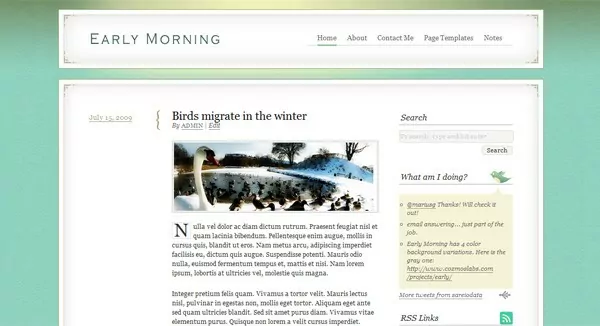
Early Morning – A refreshing child theme for Thematic
You also have some nifty options:
- You can upload your own logo
- It comes with it’s own custom designed Twitter widget, so your visitors can see what you’re doing from your blog
- If green isn’t your style, it comes with 5 background options that you can select from the Early Morning Theme Options (Green, Turquoise, Brick Red, Gray and Black)
- Has a one column page template and archive template
- It’s been tested and works on Firefox 3.5, Safari 4, Opera 9, Chrome, IE7, IE8
In order to install it you have to download the Thematic Theme (from which this child theme inherits all of the functionality), upload both themes (Early Morning and Thematic) to your server in the themes folder AND THEN ACTIVATE the Early Morning Theme.
Related Articles

15+ Best WordPress Membership Themes in 2026
Looking for the best WordPress membership theme? We collected 20+ free and premium options, all of which make a great option for membership websites.
Continue ReadingGreen anyone? Try Commune – Thematic Child Theme!
Update 11.17.2010 The category image was removed and all thumbnails are now created using the Featured Image default functionality. If no Featured Image is added a default image appears in place. Simply put I have been lazy lately. I know this isn't the best way to sell my self but a little bit of honesty […]
Continue Reading
I Searched for the Best WordPress LMS Themes So You Don’t Have To
Searching for the best WordPress LMS themes for your online course or eLearning website? There are a lot of options out there, but not all of them are great. To save you a bunch of time, I narrowed down the list to the eight best WordPress eLearning themes that work with popular LMS plugins such […]
Continue Reading
As usually, it looks amazing and well balanced. Congratz!
One thing though, sliding menu is positionned slightly too left (in Opera 10)
Thanks but Opera 10 is still in Beta. Will do a thorough test once it’s out.
[…] Early Morning Thematic WordPress Child Theme Cozmos Labs release a nice, clean and simple child theme of Thematic. It comes in different colors and looks perfect for any personal blog or content oriented blog. (tags: WordPress thematic theme) […]
Beautiful work guys! Thank you for making it available. I’m constantly amazed at the wordpress community and at sites like yours. Thanks again.
Beautiful WordPress theme! Similar to https://www.adrianpelletier.com/, which I’ve admired for a while…
Nice theme. Looks surprisingly familiar 🙂 http://www.adrianpelletier.com
Perhaps I did get to inspired. Your design is one of those you love immediately when one sees it. I hope I don’t get to your wall of shame… if you have one! 🙂
[…] This post was Twitted by adrianpelletier […]
This is gorgeous! It just may be the ticket for my art blog. (floral photographs with an antiqued photoshop / painter effect.)
If I use it, I’ll come back and post a link, etc.
I’m really glad you like it! If you use it please let me know. I would love to see it with real content!
OK, this is my first testing. As much as I love your backgrounds, I thought the gray was better for my subtle photographs. This blog is very much a beginning, including the logo, but thought I’d give you a peek. I feel so lucky to have found such a classic, slightly romantic, perfect background for my art. Now I have to figure out how to do all the sidebar stuff. Thanks!
http://www.leslienicole.com
[…] Early Morning is is an elegant Thematic child theme, designed by Cozmoslabs. […]
[…] un nuovo Child Theme per Thematic Framework per WordPress da Cozmoslabs: Early Morning. Early Morning Child Theme (clicca per […]
Dear Cristi,
This theme is quite exquisite and it’s going to be perfect for a niche I’m planning to do – once I sort out a few teething troubles! At the moment I’ve put it on a sub-domain (https://arthemiamirror.japanesemapleguide.com/) that I use as a test bed for layouts and new plugins for an existing site, so there are just random posts, etc, on there.
The main problem is the header logo – the site is on Hostgator and all folder permissions are 755. I’ve changed the permissions to 777 on the uploads folder and all folders below that, in this case 2009 and 08. The file I want to use uploads to the 09 folder ok using your form but nothing appears on the page. Am I missing something here? Do permissions for higher level folders have to be changed as well, do file names have to be all lower case or no gaps? While I can always put a logo image in the index top widget area, I’d rather use that for something else and do it properly.
The next problem is drop caps. I think they are extremely elegant when used correctly but unfortunately in the Early Morning Child Theme they are surrounded by a visible box that draws attention to the excessive gap between the drop cap and the rest of the word. Is it possible to make the box width variable depending on the letter and also to remove it?
My third problem is the drop down page menu – the box containing the sub heading is excessively wide and goes over the boundary; you can see it when you click on ‘contact’. Can these boxes be made smaller or at least give them a transparent background?
If you can help me in any way it would be much appreciated as this is probably the best free ‘premium’ theme I’ve ever come across!
Best regards,
John
cool..!
[…] 演示:DEMO 发布页:Theme Post […]
Still working on my own child-theme in Thematic in my spare time (nearly none) and determined to make a go of it. If I were to ever just grab a ready-made theme and be done with it, it would be “Early Morning”.
Oh wow.
This is gorgeous. Clean, content-centered, elegant, with tiny little details for a sophisticated flourish and that burst of colour that is the background.
I have to say, this is one of the best themes I’ve seen you do. & I like your use of text-shadow in the footer. It honestly makes me want to forget about doing my own theme and just snag this one. ^^
I’m not a Thematic user (yet) but this sure does look nice. Great job!
First off, this is a beautiful child theme, thanks! I would like for my posts page to have a wider content area, is there a way for me to not call the sidebar?
great theme! anyway to add mutliple twitter feeds using your designed rss?
Cristi:
I have been through testing dozens of themes. I will state without shame all free at this point as I would not invest in anything until I was totally comfortable (and a little more ‘flush. I am amazed at the creativity of yourself – and a few of your peers – and the outstanding themes they release for free.
This is, without a doubt, one of the most simple, yet elegant designs I have found – and the simplicity of changing the backgrounds is unique I believe. Many strive for this, you have nailed it! (IMHO).
Thank You! (But what is there to buy now)?!
Al
any idea’s why my title is wrapping? I’d like it to be on one line.
thanks!
Your title is a bit to long. However you can modify the css so it accommodates a longer one.
Open the file style.css inside Early child theme and search for the declaration #blog-title . Inside it change the width: 335px to 400px and also the declaration #access, change the width from 500px to 400px… See if that helps and let me know!
Hi, I love the theme, I just have a quick question. How would I add a subheader with a short description of my blog? I was using K2 lite before and really appreciate that option.
Hi. To show the description open the file functions.php and change the line remove_action(‘thematic_header’,’thematic_blogdescription’,5);
with
//remove_action(‘thematic_header’,’thematic_blogdescription’,5);
However after that you’ll have to style it using css so it looks nice! (you can do that in the style.css file).
[…] Cristi Antohe has—yet again—released a beautiful and incredibly usable Thematic Child Theme, Early Morning. […]
Nice theme! We’re using it for our family blog. Noticing an issue, though. The built-in WordPress 2.8.4 Gallery formats odd. We select “5” and we get 3 on one row, two on the next. Select “2” and we get a single column…etc. No changes have yet been made to the theme and the same thing occurs when all plug-ins are disabled (just Auto Thickbox and Lifestream so far.)
See it here: https://douthit.org/2009/09/at-the-fair/
Ryan, try to use the One column page template to add the gallery and see if that works( however this is for pages only ). I’ll try to test it with a gallery my self and see how that goes.
Nope, that doesn’t render any differently. I’ve now noticed that the same problem exists with Hybrid-based themes. Though, Kubrick and Thesis work just fine (as do others).
I reported the same issue to Hybrid maker, Justin Tadlock, and he said the problem is from invalid XML in the Gallery module. Justin suggested I load the plugin he wrote, “Cleaner Gallery” and that worked.
Cool! Didn’t know that. Thanks for sharing! Justin is just great, I don’t think there’s anything he doesn’t know about WordPress 🙂
Great child theme. I am using it on a personal project for my Mom, and the theme looks great:
https://recipe-drawer.com
Thanks again.
i love this theme and am hoping to use it for my new blog but am having troubles with the banner image. i’ve uploaded it but it isn’t all centered, it’s all wonky. you can see it here:
https://lulumarais.com
any ideas on how to fix it?
thanks!
The upload is for your logo. If you want to change the banner just replace the image: ‘earlymorning/images/branding_bg.png’ and make sure it’s exactly Width: 940px Height: 115px. After that upload an 1px by 1px transparent gif file in the back end. That should do the trick!
thanks for the fast reply Cristi! i’ll try that now. out of curiosity, what is the transparent gif file for?
Cristi — I realize this is most likely a total newbie question but where do I replace my banner for the logo? Not sure which part of the editor to do so in. My other blog uses the ProPhoto blog themes and apparently is much easier to fiddle around with (at least for me!).
Thanks!
I doubt you can do that from the theme editor. The best way to do it would be using FTP, connecting to your hosting server and then replace the branding_bg.png file inside wp-content/themes/earlymorning/images.
Now that I think about it you could upload your header (make sure it’s exactly Width: 940px Height: 115px. ) in the Media Library. Copy the url to that image and then open the theme editor -> style.css and search for #branding. After you find it replace
background: url(images/branding_bg.png) top left no-repeat;
with
background: url(https://www.yourblog.com/wp-content/uploads/my-header-image.jpg) top left no-repeat;
I know this is rather technical but I hope this helps you! 🙂
hi cristi, lovely theme thank you.
how can i increase the width of the reading area a bit? and decrease the right sidebar width?
thanks
annad
@Anand Philip Unfortunately there isn’t a easy way to doing that. There’s a lot of css to modify in order to change the width of the content consistently and make it look good also.
I’m afraid you’ll have to dig into my css and make those changes.
Got it! Thanks for braking it down for me!!!
thanks cristi
messing around with the css is not worth it, but i would like to at least increase the font size and increasing it to 14 px in the style.css doesnt seem to make a difference is there something else i should do?
In the style.css of the earlymorning theme go to line 411 (or search for body, input, textarea and go to the second declaration ).
Probably it didn’t change for because it’s declared in 2 places 🙂 My bad! Will note it down and update the css accordingly so you’ll be able to change the font size in just one place.
thanks, done!! the site i have linked to in the name is running morning light.
[…] 演示:DEMO 发布页:Theme Post […]
[…] header nav bar treatment was inspired by the Early Morning theme, which evidently was inspired by a previous edition of Adrian Pelletier’s site. After […]
A good design, very affordable and simple code topic. It is for pure blogging in the classical sense. Posted on its website information with reference to your resource.
[…] Early Morning […]
Hi,
Great theme! Just one comment, make sure you add the ‘alt’ attribute to the main banner image tag, this will render it XHTML valid via W3C validator. 🙂
Line 67
…-content/uploads/2009/07/logo.gif" alt="" /></a>
<!--  #branding …
Cheers,
Tracy
Above someone posted this question…”how can i increase the width of the reading area a bit? and decrease the right sidebar width?”… you answered that you have to go though the ccs and modify it. I would like to do this…so what exactly do I have to change?
In the style.css search for:
#container, #content, .main-aside, .page-title (it has a 50px margin left), .hentry, .entry-meta and .entry-date.
These are the elements that need to be changed so that you get another width for the content!
Let me know if that worked out ok for you!
It made it wider which is what I wanted…but it’s shifting left… here is the website to check out what I mean.
https://mercerbuckszta.com/?page_id=73
Sorry to be a pain but for some reason the Early Morning Theme Options button isn’t appearing anymore under the Appearance tab and it had yesterday when i installed it for the first time.
So it seems that if I change anything in the ccs the Early Morning Theme option button isn’t appearing anymore under the Appearance tab. Any suggestions?
That can’t be from changes in the css. Something else might be the reason for the button to disappear. Most likely changes to the functions.php file.
You could try to delete and reupload the theme. See if that changes anything. Also backup any changes you made to the style.css so you don’t lose them!
Hi Cristi,
Nice Theme, I have just uploaded it to my website.
Just wondering where to look and how to remove without breaking the code the text below the comment box:
You may use these HTML tags and attributes:
Hi! I love this theme and I am currently using it for the site I am building for a client. The problem is though that I can’t get the logo to show up at all. I’ve changed the write permissions for the uploads folder and all of the subfolders. But I am still getting a red x. How do I get the image to work?
I also love this theme. Is there any reason as to why adding a caption to an image within WordPress removes the grey outline borders from the images? Can I have a caption and the border? If so, how can I change this? Thx.
I guess I forgot to test it with a caption! Check back in a couple of days on this comments list and I’ll post an update! (You can use subscribe to comments so you’ll get email updates!)
Thanks Cristi. Any news with this? Sorry to be a pain. I was also wondering whether there is a way of indenting the ‘description’ text for the categories. It currently sits flush with the left border when a category is selected. Thanks for the great theme. It’s actually working really well for me.
[…] header nav bar treatment was inspired by the Early Morning theme, which evidently was inspired by a previous edition of Adrian Pelletier’s site. After […]
[…] is another child theme for Buddymatic. Early Morning is a Child Theme by Cristi Antohe. Early Morning needs some minor tweaks for […]
[…] Early Morning » […]
I’m helping a friend with their wordpress website; using this theme, I find that the caption is receiving the large capitol letter that should go at the beginning of the post (what is that called)
Some other people seem to have had similar problems; is there a work-around?
Thanks!
You might try to post this on the forums.
Right now the Drop Cap is applied to the first paragraph tag followed by a capital letter. So if you put the caption first then it will make it a capital letter.
[…] header nav bar treatment was inspired by the Early Morning theme, which evidently was inspired by a previous edition of Adrian Pelletier’s site. After […]
[…] Early Morning ( Превью | Скачать ) […]
Cristi –
I am using the Early Morning on one of my blogs and I have a slight issue. In the sidebar, everything seems to align nicely in the lists except for the blogroll widget. There is too much space between the links and it just looks funny. The other widgets for recent comments, archives and etc are fine – nicely spaced above and below each one. But again, the blogroll widget seems to have extra spacing. I can’t seem to find anything in the css that is out of place.
You can take a look at https://www.raynefire.com
Any thoughts?
Thanks!
Hi Rayne, can you please post this on the forums? This way more people will benefit from the resolve. https://www.cozmoslabs.com/forums/
I think it’s a css bug and I’ll definitely have a look!
Hi Rayne
I too encountered this issue and I got around it by downloading a new plugin called ‘better blogroll’ which seems to have solved the problem.
Sorry, I know I shouldn’t reply here but the question has not been posted in the new forum yet. Hope this helps.
Thanks, Cristi and Samantha!
I’ll post in the forum as well.
[…] EarlyMorning (only one version, it seems) […]
Hi, I am using the Early Morning Theme and it’s great. I was wondering how to limit posts to the excerpt when they appear on the home page. I entered an excerpt, but the home page always shows the full post.
I have Front Page Displays —> Your Latest Posts
and For Each Article In A Feed, Show —> Summary
Thanks,
Mike
Hello Michael,
Please post that question in the forums.
I’ll answer it there. This way more people will benefit from the answer!
Thank you.
[…] immer noch auf dem Thematic Theme Framework für von Ian Stewart. Das aktuelle child theme Early Morning ist von Cristian Antohe. Allerdings habe ich noch kräftig daran […]
Mixed case logo name problem
I uploaded a logo via the Early Morning theme option page.
Filename MyRedLogo.png
The logo did not display.
When I looked in the uploads directory, the file had been uploaded correctly.
However the page source code was looking for filename myredlogo.png.
This would have been OK on a case insensitive Windows server but fails on my unix host.
Is this a problem with the early Morning Theme or WordPress 2.9.2?
Thanks
Adrian
Not sure. I’ll need to check it out. In the meantime just upload lowercase logos 🙂
Hi, I really love your theme…But I am using Blogger platform…So, i managed to convert this theme to Blogger version and I successfully converted it. Yahooooo!!! I gave a credit/link at the footer and in the theme to you in that template. Pls have a look at this blogger version of your Wonderful theme….
Early Morning Blogger Version
That looks great! Thank you for letting me know about it. I hope blogger users will appreciate it!
Yes…for sure…It is a great theme…..
[…] Theme (Hat tip Diwaker). Using the template framework of Thematic and a modified frontend from EarlyMorning, I was able to generate the kind of look and feel I wanted. The best part is the decoupling of the […]
simply beautiful. – had to comment and let you know. thanks!
[…] Features | Demo | Download […]
[…] Features | Demo | Download […]
[…] Features | Demo | Download […]
[…] Features | Demo | Download […]
[…] Features | Demo | Download […]
[…] Features | Demo | Download […]
[…] Features | Demo | Download […]
[…] Features | Demo | Download […]
[…] Features | Demo | Download […]
[…] Features | Demo | Download […]
[…] Features | Demo | Download […]
[…] theme for ThematicEarly Morning – Child theme for ThematicBy Eugen on 28 April 2010Demo | Launch Page | DownloadArticole pe aceeasi tema:Fotofolio WordPress ThemeTopzglow the Sparkling WordPress […]
[…] Скачать — https://www.cozmoslabs.com/2009/07/20/early-morning-child-theme/ […]
[…] Features | Demo | Download […]
[…] Features | Demo | Download […]
[…] Features | Demo | Download […]
[…] Features | Demo | Download […]
[…] Themes I Personally Like: https://www.cozmoslabs.com/2009/07/20/early-morning-child-theme/ https://www.cozmoslabs.com/projects/commune/ https://www.bestwpthemes.com/#top10 […]
[…] Features | Demo | Download […]
[…] Features | Demo | Download […]
[…] Features | Demo | Download […]
My tweets aren’t showing up in the twitter widget.
Sometimes twitter takes to long to respond so it doesn’t load up the tweets. This happens with pretty much any twitter widget.
hi!
i saw somebody say this earlier, but i’m a total newb and i’m struggling to install the child theme. i have no problem uploading thematic, and when i activate it, it works just fine. i uploaded early morning and it uploaded great, but when i pressed activate, it says the theme is broken. i think you said there was an extra file somewhere? maybe? what should i do? i’ve been playing around with this for hours now! 🙁
thanks!!!!!!!!!!!
[…] Features | Demo | Download […]
[…] Features | Demo | Download […]
[…] To see in live preview and to get Early Morning Child Theme , go to CozmosLabs.com […]
[…] Features | Demo | Download […]
https://www.durhamdigs.ca
WordPress 3.0.1
buddymatic theme 1.2
early morning child theme 0.2
With the Early Morning Child theme on, the “Join Group” button only displays as a link (not a button) and it does nothing. If I click it, it disappears and does nothing. I can join groups with the default theme on though.
Could anyone give me a suggestion on what to do?
Hi Jim,
You should probably ask this question here: https://freebpthemes.com/themes/early-morning/ since you’re using BuddyPress.
Hi Cristian,
I did post a comment there but it’s “awaiting moderation”. It looks like an admin hasn’t replied since January so I don’t know what my chances of a response are.
Let’s continue this on the forums.
The theme is awesome. I did a lot of searching for a very simple two column, customizable theme that will provide an easy base for my website. The Early Morning theme is just the one I needed. Though I plan on editing the CSS later on, it works so well right out of the box.
Why the background not is in the teme? watch my blog please.
chrisdiaz.webuda.com
Can’t get the main menu (pages with drop down sub-pages) to show up in the header.
‘skip to content’ is showing up in that space. Could you help me please? Thanks – j
Hey all o/
I own a blog https://www.fofuritas.com.br
and im using early morning as theme.
I really dont know what happend but it’s not showing the pages at the top of the blog!
It was working fine when I installed it a few months ago.
I dont know when the problem startd ’cause i just realized it today.
same issue i’m having. Please let me know if you resolve it.
None of the childthemes have been updated to work with the latest Thematic version. I’ll do my best to have all of them updated by the end of next week.
How did you fix the top menu?
[…] header nav bar treatment was inspired by the Early Morning theme, which evidently was inspired by a previous edition of Adrian Pelletier’s site. After […]
WordPress 3.0.1
buddymatic theme 1.2
early morning child theme 0.2
When I downloaded your beautiful Early Morning Theme I got this message:
Warning: unlink(www.aroundtheworldinholidayhomes.com/wp-content/uploads/earlymorning.zip) [function.unlink]: No such file or directory in /wp-admin/includes/class-wp-upgrader.php on line 155
It then says installation has gone through succesfully, but I do not see any preview in the Dashboard and if I activate it, the page is all messed up. Does it mean the Theme is not supported on latest WP version or is there something else I should know to make it work properly?
Thank you so much for an answer 🙂 Ciao!
WordPress 3.0.1
Thematic theme 0.9.7.7
Early morning child theme 0.3
When I downloaded your beautiful Early Morning Theme I got this message:
Warning: unlink(www.aroundtheworldinholidayhomes.com/wp-content/uploads/earlymorning.zip) [function.unlink]: No such file or directory in /wp-admin/includes/class-wp-upgrader.php on line 155
It then says installation has gone through succesfully, but I do not see any preview in the Dashboard and if I activate it, the page is all messed up. Does it mean the Theme is not supported on latest WP version or is there something else I should know to make it work properly?
Thank you so much for an answer 🙂 Ciao!
I searching many wp theme for my blog but I find none great, butthis themplatic childthemes is great theme for me. Simple, elegant and Fast. thanks you for build this child theme and make it free 🙂
Hi Christi,
I love your beautiful theme and would like to use it as a framework for my latest project. Is there anyway that I can fix it to work with the latest version of thematic? I’m still a little new to WP customization. Thank you for your hard work on this! I know you are busy with the 80+ comments from us babies.
HI Jenn,
Actually we updated all the themes to work with the latest Thematic version, just didn’t got a chance to upload the zip files. I’ll do that today and write a post about it.
Hi.
I love this theme!
But i have one question about full width pages. How can i make Full Width page actually fullwidth from side to side, now i just have some space left on right side of the page (i took all the widget’s off and select Full Width in template option when creating pages)?
Sorry..my english is not perfect..
Hope to get the answer.
Actually that was a bug. It’s now fixed. You can re-download the theme and try again. The one column should now be full width.
Hei!
Thanks !!!!that really made my day easier 🙂
The answer to this is probably pretty obvious (especially as I’ve done it once before myself) it’s just not coming to me at the moment!
I am using Early Morning & previously I had replaced the blog title in the header with an image of my logo, but today after making a small change to the image I tried to upload the new image and cannot get it to work.
The logo is an Illustrator file that I save using ‘save for web & devices’ & I have tried saving the image as a .GIF .PNG and .JPG but nothing works.
I am uploading the image using the ‘Early Morning Theme Option’ contraol panel under Appearance.
Sorry for the simple question but I can’t for the life of me figure this out.
Thanks, Poosie.
All sorted I needed to save without capital letters eg websitelogo not WebsiteLogo!!!
[…] Features | Demo | Download […]
[…] Features | Demo | Download […]
i tried this theme, its really wonderful especially when you read in the morning, that freshness we can feel in your theme. But i would really appreciate your help, if you could help me to remove the tags from main page and each posts, it is really making the page dirty with lots of tags. Thank you for reading this 😉
That’s fairly simple. In the style.css at the very end add:
.tag-links, .meta-sep-tag-links{
display:none;
}
That will remove the tags.
wow, the way of coding is entirely different from a normal theme, may be that’s why I have always difficulty in working with Theme Frameworks. i tried, but no luck. It still shows all Tags after each post, on Main Page and Single Posts.
Can you send me a link?
Its shame to send link at this stage. As there is only 1 post, Hello World… 🙂
your code works.first time when I tried I was testing the result in Firefox. But in Chrome it works. Firefox need to clear all the cache to refresh with new code. Chrome in always instant. Anyway Thank you so much for your kind help.
Hello,
I’m trying to upload my own logo image, and when I click the ‘Here’ link, it takes me to a log-in page but my WordPress log-in details do not work! It’s says incorrect username. Any help is appreciated!
Thank you!
Hi Grace,
Thank you for your bug report. I’ve uploaded an updated version. You can re-download it. However, if you just go to Appearance -> Header that will get you where you need to be.
Thanks Cristian! I did attempt going through Appearance, but it didn’t seem to properly upload and change the default, not sure why.
All sorted, thanks for your help!
I have another question – I’m finding the date listing with the “{” symbol that pushes the text in the post area to be limiting. Can you point out the bit of coding with modifies that? I wasn’t sure if it was possible to condense it slightly to make better use of space.
Thanks!
Help! I installed this beautiful child theme but I don’t see the results as per the above, nor do I see any Early Morning Theme options.
Also, my photos are all ‘chopped’ up, can I increase the width for the content side so that I can showcase my photos?
Please advice.
Thanks,
Nat
Hi Nat,
I think you didn’t install the theme correctly. Basically you need to put both themes Thematic and EarlyMorning in the themes folder. I think you copied Early Morning over Thematic or something like that.
I am using the Early Morning child theme but the header of my website says “Early Morning”. I cannot figure out how to change it. I do not want to add a different image, I would just like to change the text to show the title of my website.
Any help appreciated as I really love the look of the theme and would hate to have to go looking for another that I like nearly as well.
By the way, I had to change the theme on this blog until I hear back from you about this. I also left a question in the forum but there has been no response for several days.
I REALLY want to use the Early Morning child theme.
This theme is amazing.
I’m using WordPress 3.1, Thematic 0.9.7.8 and EarlyMorning 0.3 but the theme doesn’t show correctly. Some bacground images (from the CSS stype) doesn’t show correctly. The webside for the tests is: https://taoterapias.es/blog/
To install the theme and Thematic I’ve downloaded both, then I’ve unzipped and copied them to wp-content/themes/
What’s wrong?
Hi Didac,
I think the theme didn’t get uploaded correctly via FTP. Please delete it and try again.
[…] is another child theme for Buddymatic. Early Morning is a Child Theme by Cristi Antohe. Early Morning needs some minor tweaks for […]
Hi Christian,
This is a nice looking theme which I am thinking of using for me new niche blog.
Is it compatible with the latest version of WordPress,
Many Thanks
Joel
It should work just fine.
I love the fresh clean look of this theme. I am going to install in on a site I am building for a client. It is perfect for their spring garden site.
Thanks!
Relaxing theme, look so calm and at peace.
Should apply that to my brother’s wedding site, for sure he will loved that too.
Thanks!
Ella Faith Harriz
Graphic Design Courses
Hi, I am loving your theme for my new travel blog, but I was wondering if your theme allows vertical and horizontal photos to be centered and in a decent sized around 550X600, you can see what I am trying to say at my first attempted at https://indochinamonamour.tumblr.com/
Thanks so much.
This is a BEAUTIFUL theme. I am helping a friend with a blog of hers and this theme would be perfect. 🙂
[…] Features | Demo | Download Early Morning […]
[…] Features | Demo | Download […]
[…] Contact Story Time Cuts Into Design Time » April 4, 2011Setting Up Home: My New Website By Jennifer K. Oliver var addthis_product = 'wpp-260'; var addthis_config = {"data_track_clickback":true};I finally decided to buy my writing domain, in case the name was snatched up by someone else. This will also give me the opportunity to create a layout, when I find the time between day jobs and offline life. This may take a while. In the meantime, I’m using a lovely layout by Cozmos Labs. […]
This is so lovely, I adore the colours and elegant feel. Thank you very much for sharing it!
Any idea when activating (yes Thematic is already installed) I get errors such as these?
Warning: Cannot modify header information – headers already sent by (output started at /home/content/96/8175296/html/wp-content/themes/earlymorning/functions.php:417) in /home/content/96/8175296/html/wp-includes/functions.php on line 861
I’m trying to figure this out for my wife. I’m having the same issue. We can’t even get to the admin page.
Apparently we’ve introduced that bug a month ago and didn’t properly test it. Please re-download the zip file and try again. It should work as expected now.
Sorry for the inconvenience.
I just now redownloaded the zip file. When i go to the wp admin page of my site this is what I get:
Warning: Cannot modify header information – headers already sent by (output started at /home/content/36/8319736/html/wp-content/themes/earlymorning/functions.php:417) in /home/content/36/8319736/html/wp-includes/pluggable.php on line 934
Can’t log into my blog- any help would be great. thanks.
Hello James,
I have tested it locally also, and it gives no warning. So please try downloading it again, maybe try clearing your cache.
Gabriel
It is really great design. I just downloaded this beautiful theme. But the Twitter widget is not working. It is crashing. Is it not compatible with the latest version of WordPress???
Different seo packages companies have got their own options. We at our link building package providing services, attempt to use only the best systems of search engine optimization. Hence, just because of it we are stated as most professional seo organization in the world!
I think that to get the mortgage loans from creditors you ought to have a firm reason. However, once I have got a term loan, just because I was willing to buy a bike.
I am able to study very hard, nevertheless, I cannot write academic papers. Therefore, I want to search for other pathways to solve my essays creating assignments. I opine I can order Reaction paper writing. It can surely help me.
What a great post and great idea, loved it – interesting stuff!
It got good posts as well. I will bookmark this site for future viewing. Thanks for sharing.
This theme is created some 3 years ago and still its one of my favorite themes, thanks for this awesome free thematic child theme.
I just downloaded this beautiful theme. It is really great design. Unfortunately the Twitter widget is not working. It is crashing. Is it not compatible with the latest version of WordPress?
Now I must learn and collect thematic child themes, this one is good start for me.
thanks Cristi
I love this theme, but I’m having some problems since upgrading thematic to the latest version. Apparently some css is messing with things. Look here: https://ccsvi-atlanta.com
The navigation menu is broken. It used to be horizantal but now displays vertically. Is there some css that I need to add to fix this?
Nevermind. I needed to float left a:link.
I’ve noticed that this theme doesn’t play nice with Jetpack Publicize. At first I thought it was a conflict with one of the plug-ins but I deactivated all of the plug-ins and it still had a conflict with Publicize not going through and connecting to the login pages for the social media (FB, LinkedIn, G+, Twitter, etc.), instead it shows a blank page. I contacted Jetpack’s developers and they were perplexed as to why it still continued to not work even with all the other plugins deactivated. I told them it must be a theme problem, but I wasn’t able to change the theme to test as it is a live site and it couldn’t be changed without disrupting the company. I am at a loss as well what could cause Jetpack Publicize to show just a blank browser page and hang up, not being able to connect to the social media sites to log in.