



Table of Contents
Although WordPress is the most popular content management system out there, it lacks some basic features – specifically, front-end user management. In other words, WordPress doesn’t let users view their profile information or customize their user profile page from the front-end.
While there are plenty of features for users in the WordPress back-end, extending the same to the front-end isn’t easy. For example, adding custom WordPress user profile fields to the front-end using a custom page template or through code isn’t exactly a cakewalk.
With this in mind, in this step-by-step tutorial, we’ll show you how to create your custom WordPress user profile page using the Profile Builder Pro WordPress plugin. This lets you give users a more flexible and intuitive way to view and modify their user profile information.
Creating Your Custom WordPress User Profile Page, Registration Page, and Login Page
Traditionally, you would need to create custom fields if you wanted to ask for more user profile information. The Profile Builder Pro plugin is a user profile plugin that comes with default fields as well as advanced custom fields. This lets you create a fully customizable profile page, registration page, and login page without having to mess around with custom fields in WordPress.
For this tutorial, you’ll need to have the Profile Builder Pro plugin installed and activated on your WordPress site. Once that’s done, all you have to do is create your 3 new pages:
- WordPress user profile page
- User registration page
- User login page
1. Creating a WordPress User Profile Page
The simplest way to create a custom WordPress user profile page is by using the Profile Builder Pro plugin. This way, you don’t have to use user_meta or profile_fields functions to retrieve user profile information.
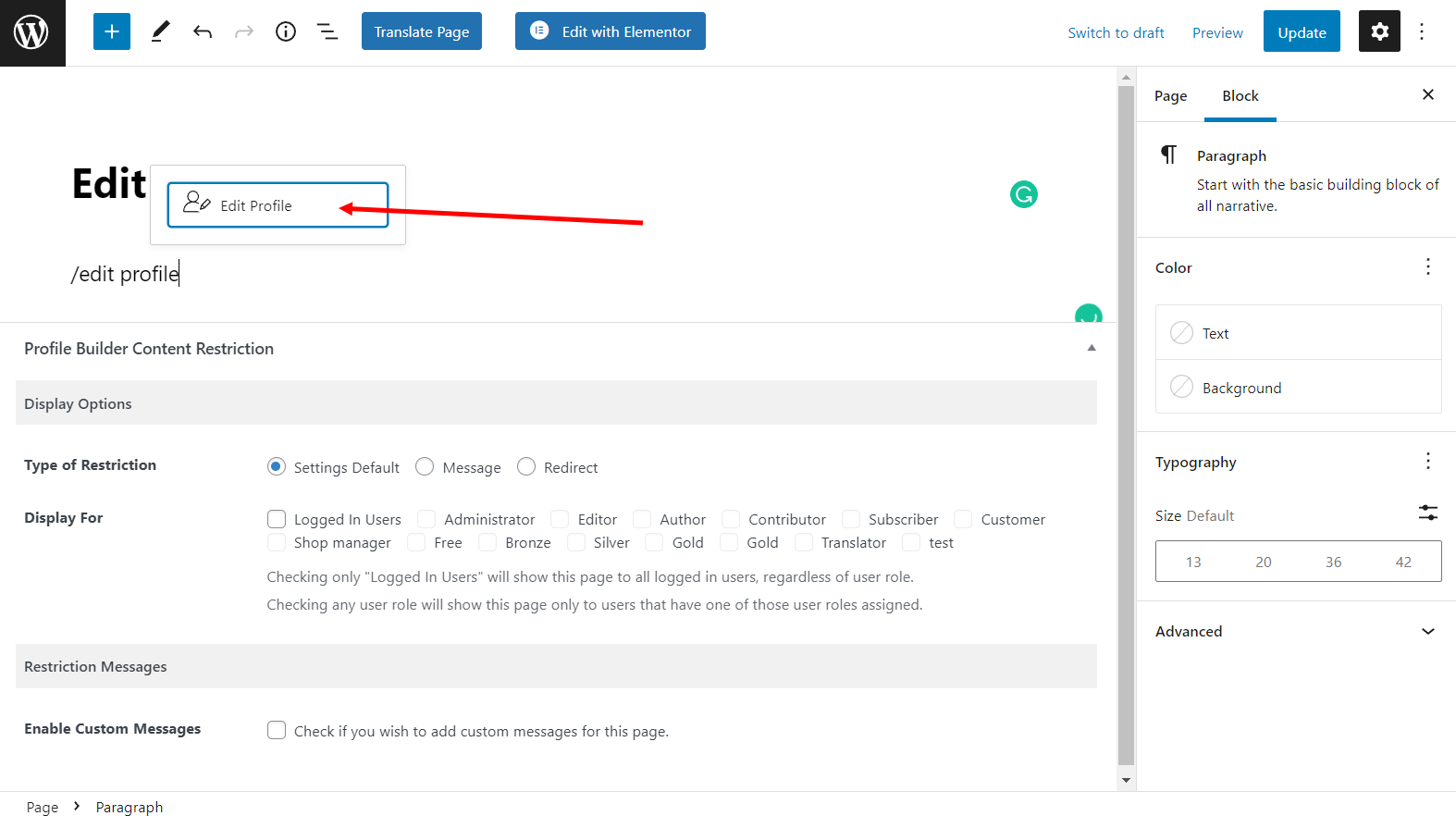
The first thing you need to do is create a new page (by going to Pages → Add New) that users will access to view and modify their profile information. For example, you might call it something like Edit User Profile or Edit Profile. Once that’s done, search for the Edit Profile block in the Gutenberg editor and add it to the page. Alternatively, you can also use the [wppb-edit-profile] shortcode to display the form.
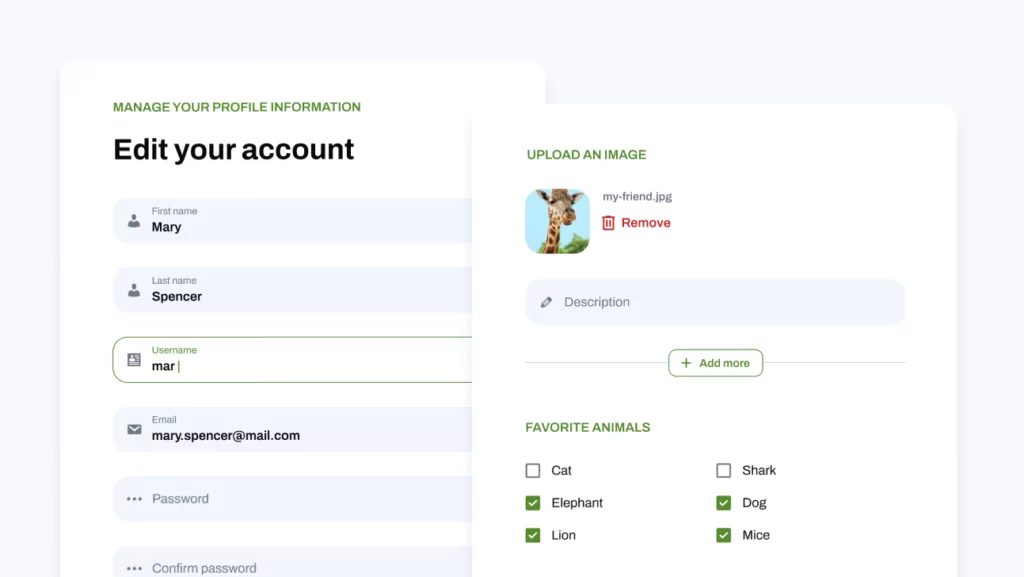
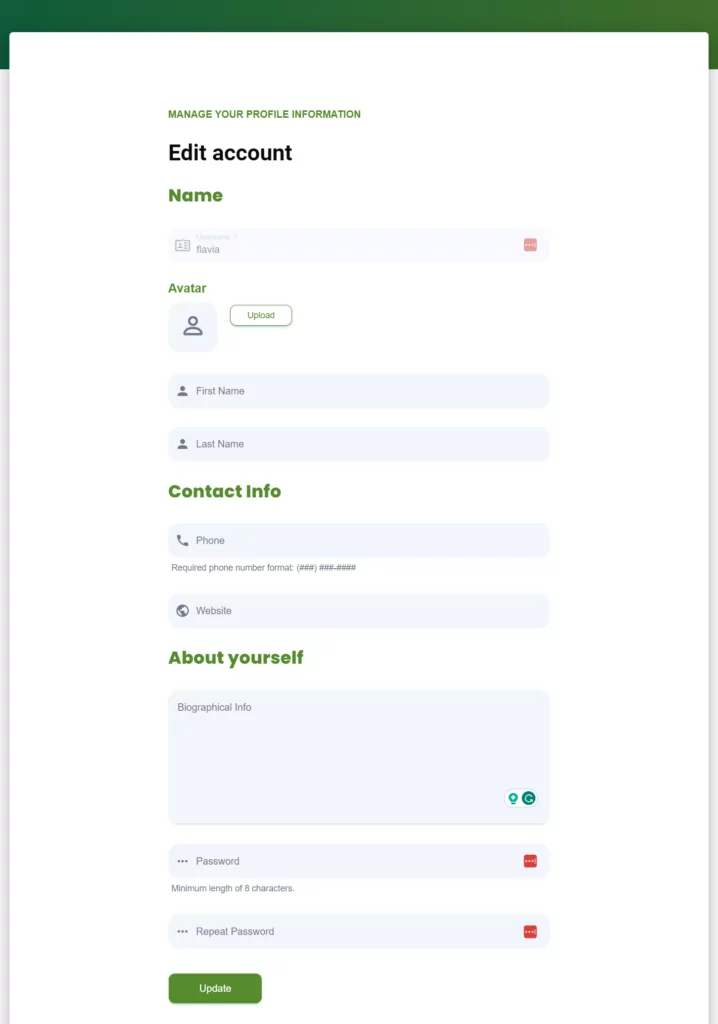
Your form would look something like this on the front-end:
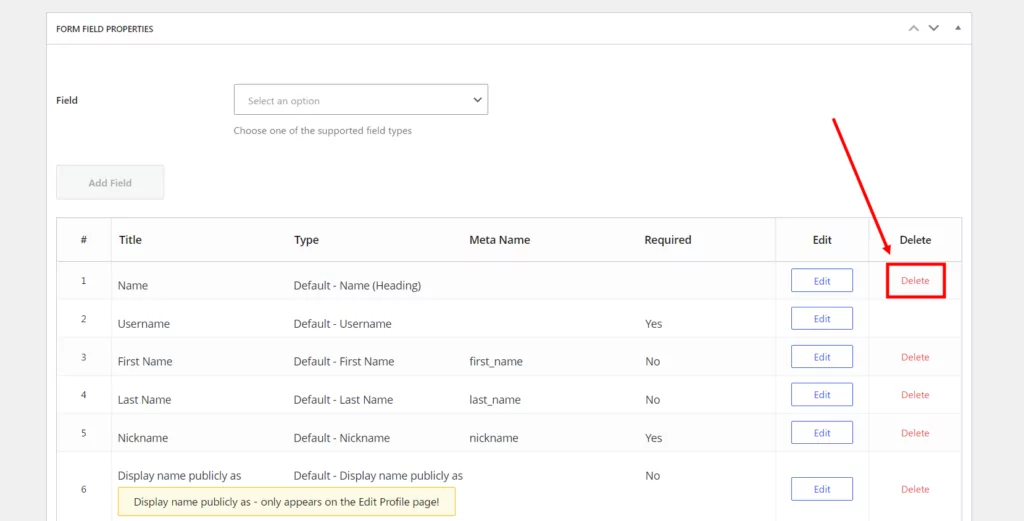
You can choose to add (or remove) any of the fields by heading over to Form Fields from the Profile Builder menu item in the WordPress admin panel. For example, you could remove the Nickname field from the front-end form:
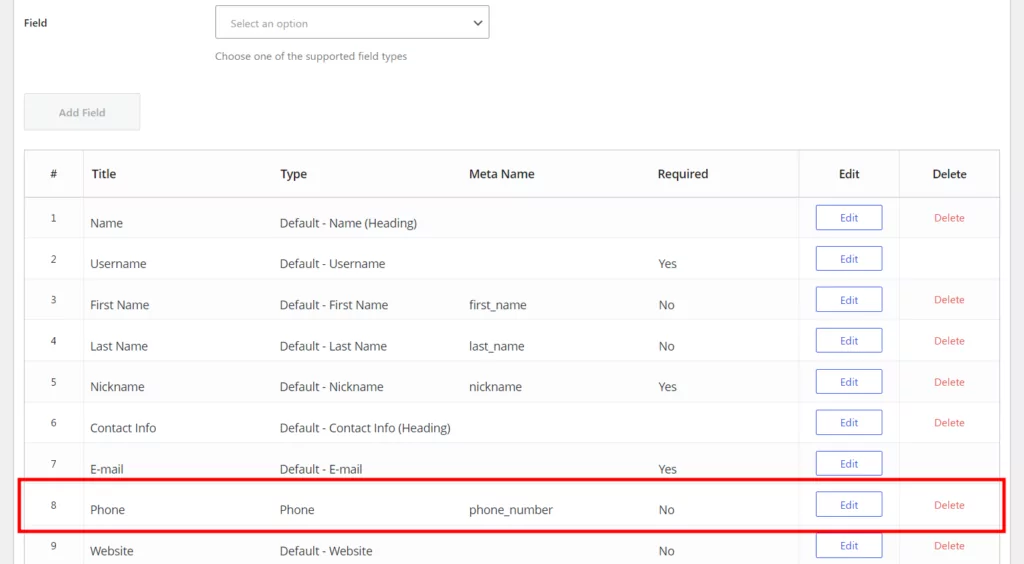
Or, you might want to add a Phone field under the Contact Info heading.
The modified front-end custom edit profile page will look something like this:
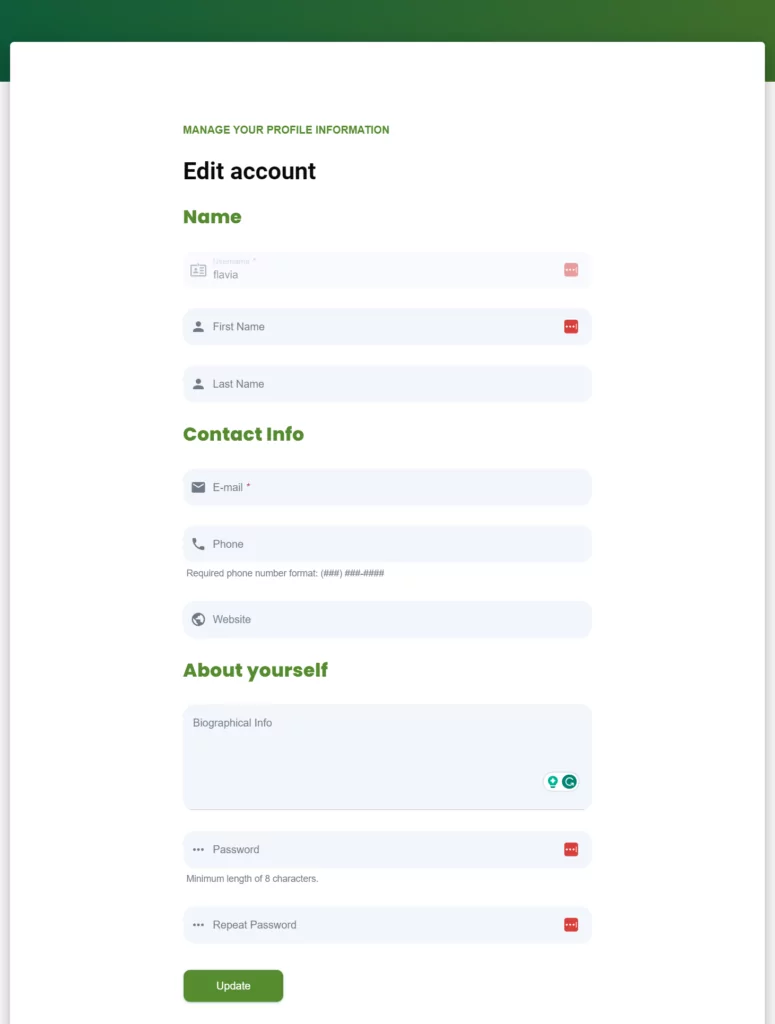
This allows you to create a front-end form that gives your site’s users an easy way to modify their user profiles. They can use this form to update their contact information, modify their user role, or change their password without accessing the WordPress back-end. Your WordPress site’s users can see their full profile page from the front-end.
Additionally, the WordPress website’s administrator can access (and edit) all user profiles from the same screen. The page will be populated by user data from your database. Admins can view user data, modify user roles, and much more. This is all possible with the easy-to-use Profile Builder Pro plugin.
2. Creating a User Registration Page
There are many scenarios where you might want to let users register directly from the front-end. For this, you’ll need to create a user registration page to display the registration form. The easiest way to do this is by using the Profile Builder Pro plugin. (Hint: you won’t have to create any custom fields!)
Start by creating a new page (Pages → Add New) in WordPress to accept online registrations. You might call it something like User Registration. Next, add the Register block in the Gutenberg editor (or, alternatively, the [wppb-register] shortcode). This shortcode will add the registration form to your page.
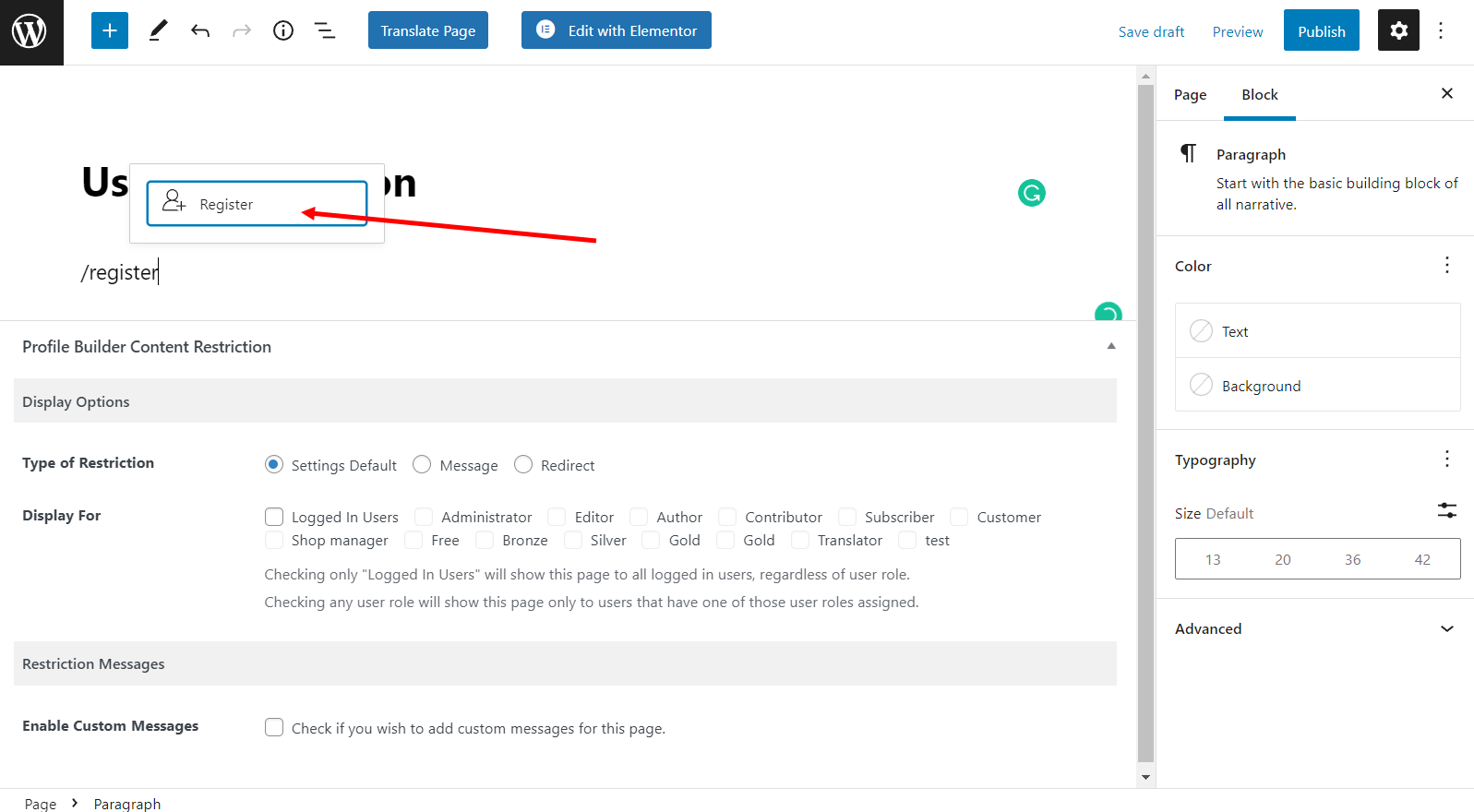
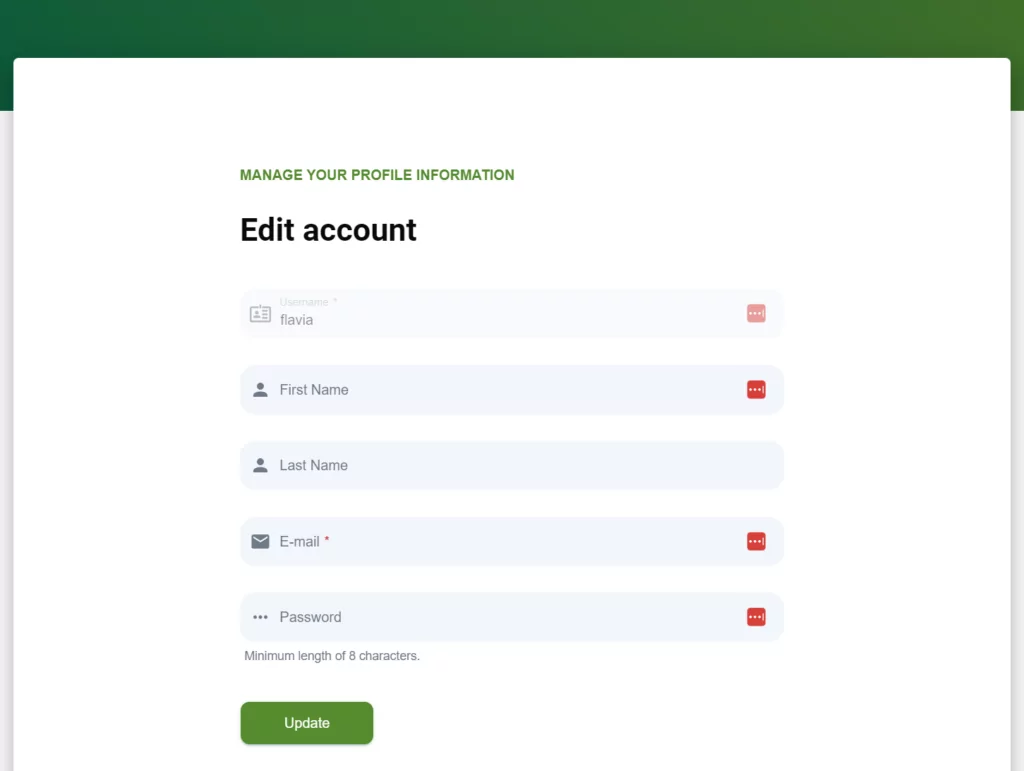
By default, your page should look something like this on the front-end:
With Profile Builder Pro, you can choose to add (or remove) any of the fields from the registration form by heading over to Form Fields from the Profile Builder menu item in the WordPress admin panel. For example, you might want to add an Avatar field to the front-end registration form.
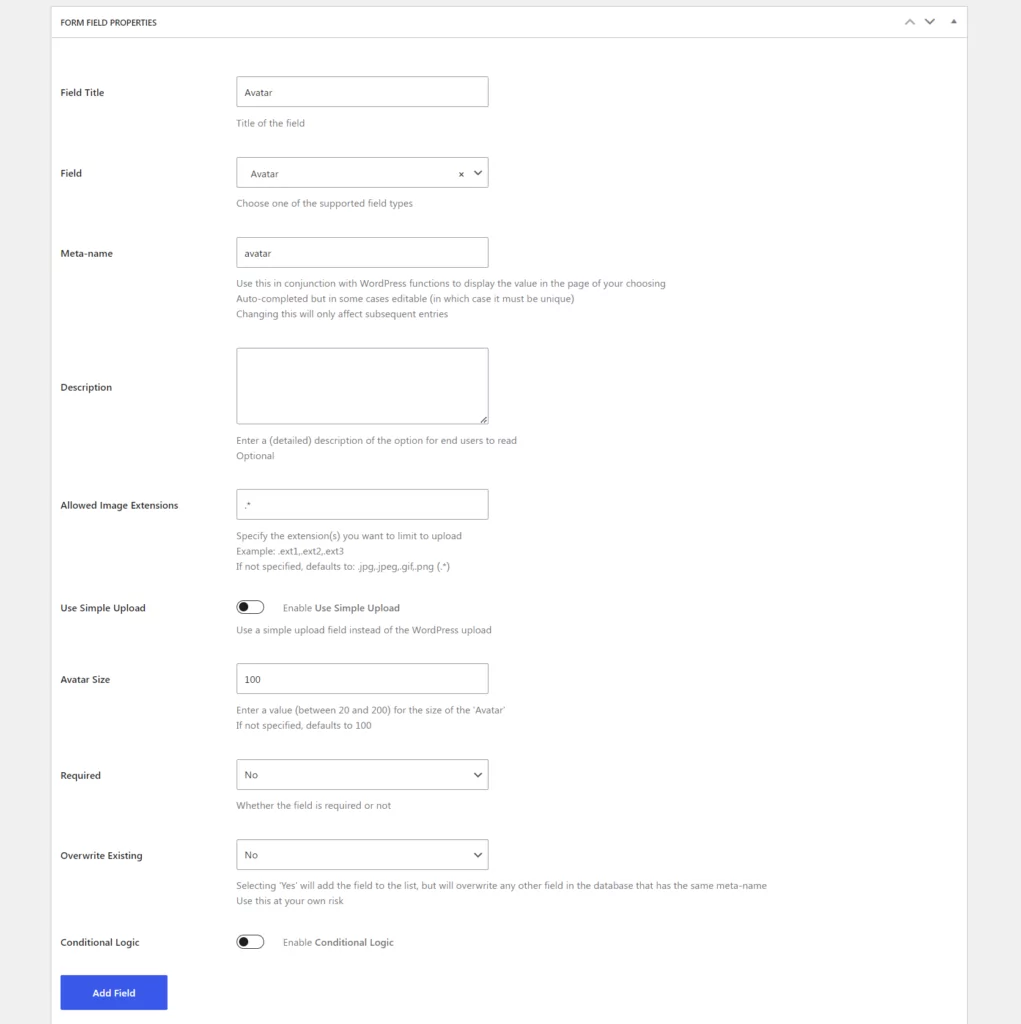
The modified front-end user registration form will look something like this with the avatar field:
This way, you can create a front-end registration form that makes it easy for your WordPress site’s users to register online. New users can also set their user roles. The best part is that you don’t have to worry about manually creating a new user every time a registration form is submitted or sending login credentials to new registrants (via MailChimp) – all of this happens automatically. Optionally, you can add the registration form to a widget.
The MailChimp for Profile Builder add-on lets you associate MailChimp list fields with Profile Builder Pro’s fields and configure advanced settings.
3. Creating a User Login Page
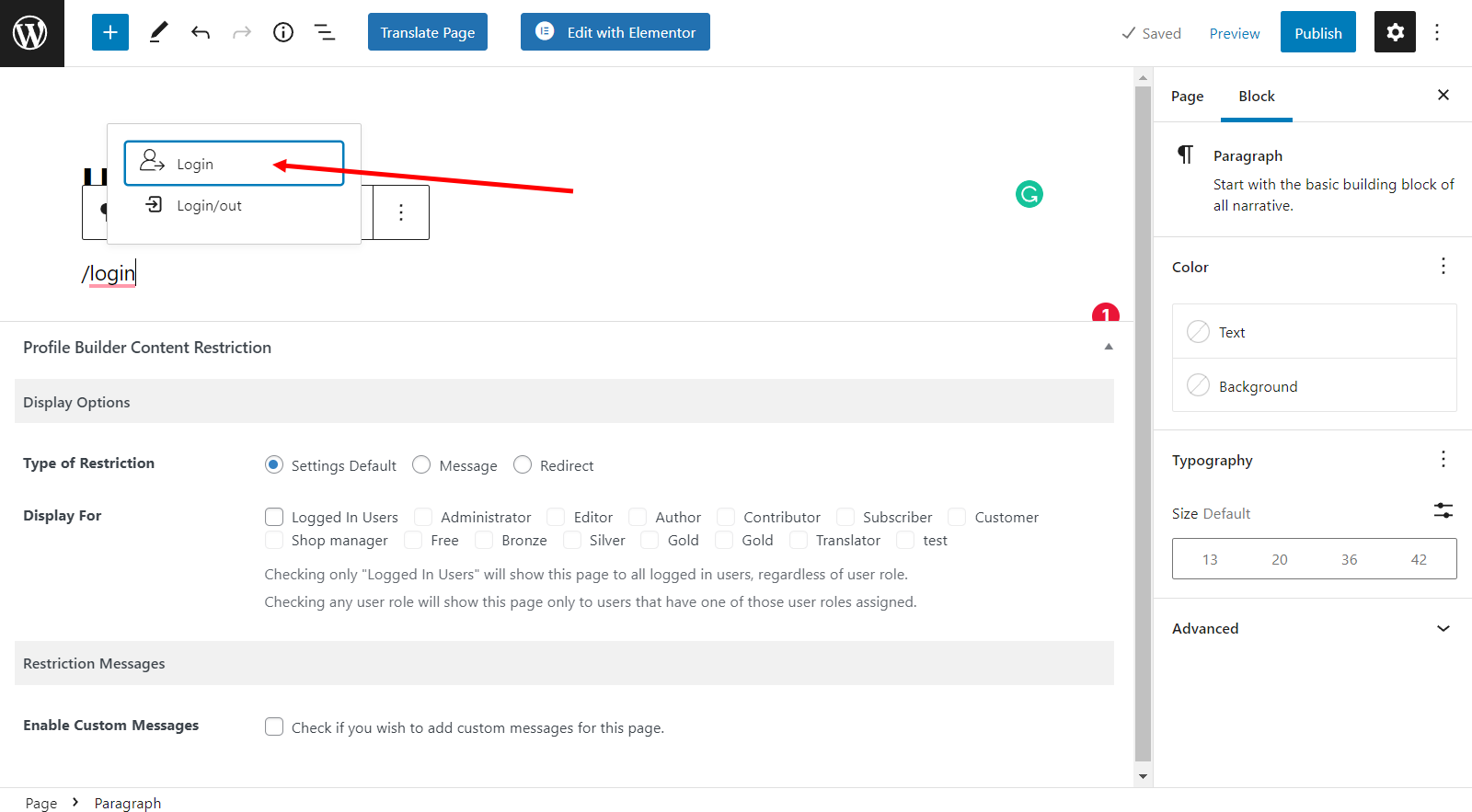
Creating a custom login page for users is incredibly easy with the Profile Builder Pro plugin. All you have to do is create a new page that will work as your front-end login page. You can do this by going to Add New from the Pages screen. Call it something intuitive like User Login. Next, add the Login Gutenberg block (or the [wppb-login] shortcode).
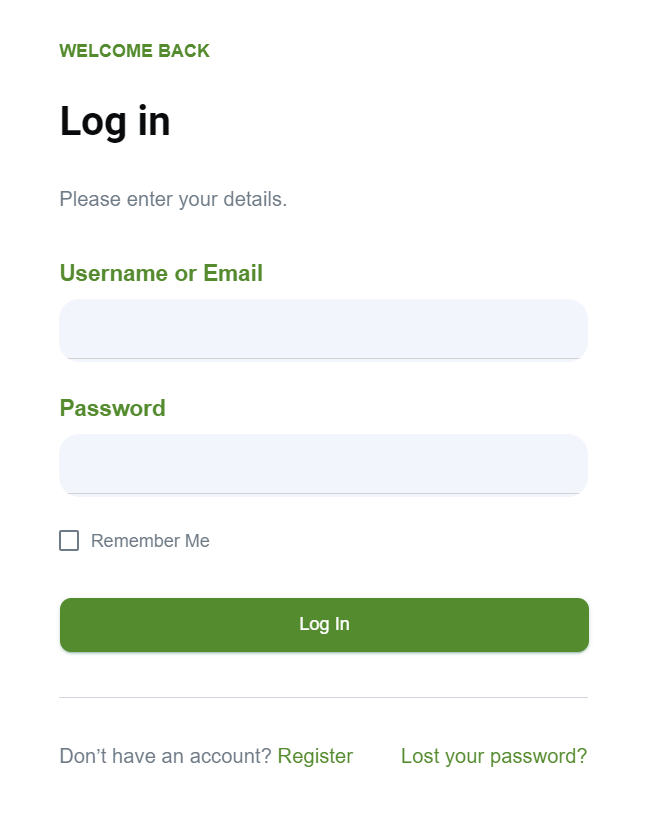
Your login page should look something like this:
To take it to the next level, you can use Custom Login Page Templates to give your login page a new look and feel.
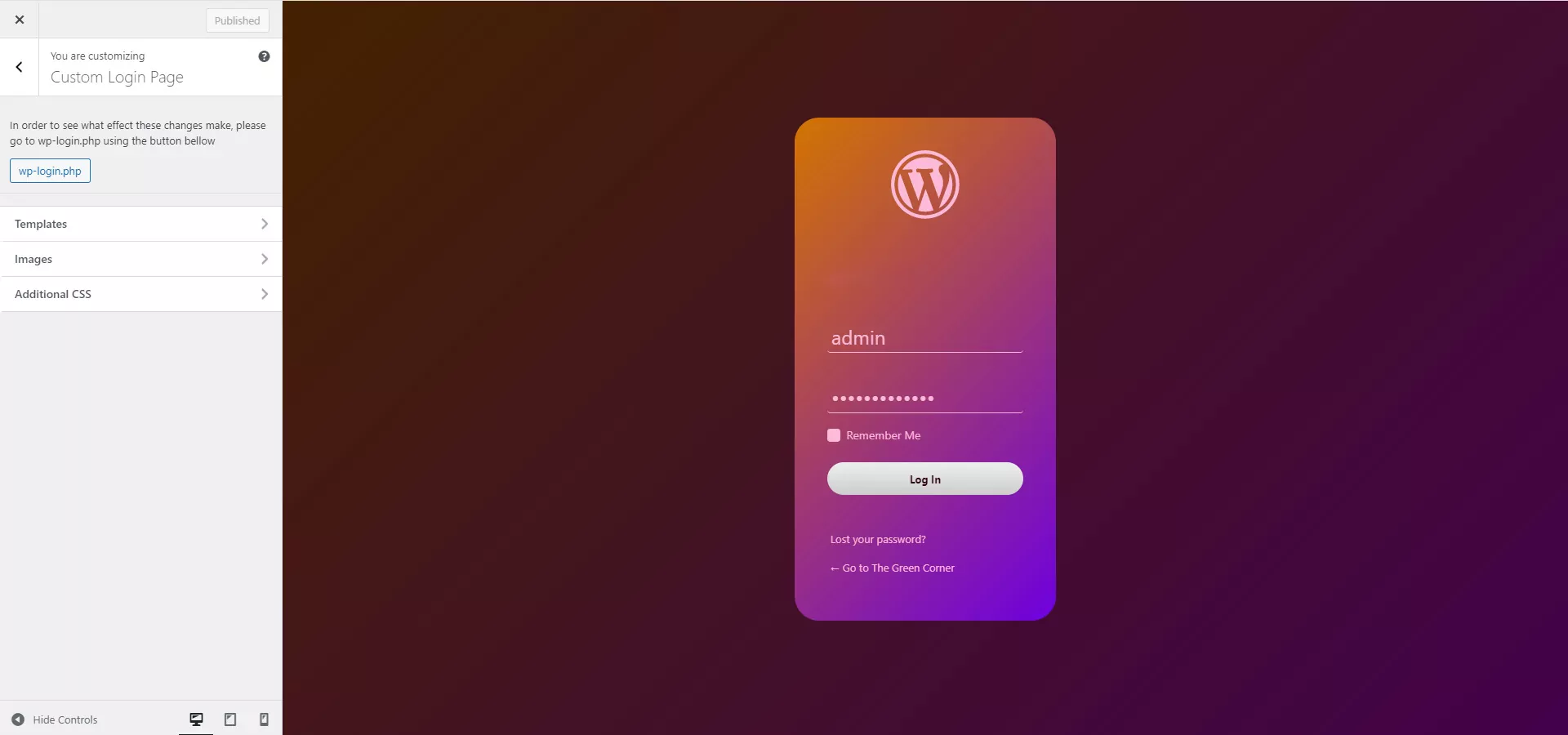
You can choose from one of the available templates and upload your branding elements to it. For example, you might consider adding a logo and background image. You can also choose to add the shortcode to a widget.
Be sure to check out our tutorial on How to Create a Custom WordPress Login Page for more ideas!
Create Your Custom User Profile Page Today!
The good news is that you can add just about any kind of custom field to your WordPress user profile page. Instead of messing around with custom code, user profile fields, and validations, we recommend using the intuitive user profile plugin.
Let’s quickly recap some of the different ways you can use the Profile Builder Pro plugin:
- Create a custom user profile page that’s accessible from the front-end;
- Let visitors register online directly from the front-end without creating custom fields manually;
- Allow users to log in to their accounts directly from the front-end using a shortcode.
Whether you’re a developer or trying to DIY a better user experience for your site’s visitors, having a WordPress plugin that lets you create custom front-end user profile pages is a must-have. We showed you how you can get started and, hopefully, you’re in a good position now to take the next steps.

Profile Builder Pro
The best plugin to create your custom user profile page without any code.
Get Profile BuilderDo you have any questions about how to create your custom WordPress user profile page without manually creating custom fields? Let us know in the comments section below.
Related Articles

WordPress Profile Builder: a Front-end User Registration, Login and Edit-Profile Plugin
Easily Login, Register and Edit your Profile Directly from the Front-end Profile Builder lets you add front-end forms that give your users a more flexible way to register, log in, and modify their profile information. If you allow public registration on your site, you don't want to force your users to use the backend WordPress […]
Continue Reading
8 Best WordPress User Registration Plugins
Not sure what WordPress user registration plugin to use for your project? Going through all the WordPress user registration plugins can be disorienting. You may have spent hours and hours searching for plugins and tutorials to help you with your project, and you’re still as confused as you were when you started. Imagine finding the […]
Continue Reading
WordPress Form Builder Plugin for User Registration (Step by Step Tutorial)
Having a WordPress form builder for user registration on your WordPress site saves you from having to create user accounts manually. In other words, you can give prospective students, members, or customers the option to create their own user account. This way, they don’t have to get in touch with you using a contact form […]
Continue Reading
Thanks for this Cristian! I was wondering if you knew a way to incorporate a file uploader to the front and backend of this as well?
I haven’t tried this yet, but incorporating a normal upload button would do the trick. Of course you’ll need proper server-side programing for this to work but it shouldn’t be an issue. After the file gets uploaded to the server just save in the database it’s url or server path (so you can delete it if needed on the edit page) like you would save the Twitter extra information field.
thanks for sharing this link
Hey question: How safe is this?
I’d say quite safe. I’ve used the same process and functions WordPress uses to register users, escaped everything that goes to the database.
I can’t guarantee it’s 100% safe but then again what is?
Can this work in any wordpress theme? I also noticed in the functions.php file, the php tag is left open, is there a reason for this?
This code can be adapted for any WordPress theme without a lot of work.
Also the php tag is left open so we don’t get the “Headers Already Sent” error when we have spaces after the last ending tag. You can add it if you like. 🙂
Hello Christian,
Thanks for this great article. I am not the best coder in this world, and i cant find out how to implement this to my own theme. Can you help me?
This article was a great help building a profile page. It took me a while to get it going on my end.
Is there any way to echo a message after someone updated their member profile? Additional it would be great to send an email to admin and the user to inform them of the changed profile.
Thomas
Sure. It should be a piece of cake.
Just look for the line that says
if(!$error){Then remove the following two lines, and instead of them add your
wp_mail()function and perhaps set a variable that you will later echo someplace in your template.This is excellent, just what I was looking for! I would love WordPress to have these templates available by default but C’est la vie.
This is fully compatible with WordPress 3.0, correct?
Yes, I’ve tested on 3.0.1 and is working beautifully.
Cya,
Yes, but update_usermeta is deprecated, and should be replaced by update_user_meta.
this works for 3.4.2. with the update_user_meta. I just added it to my custom_theme/functions.php
adds custom field to default registration page.
add_action(‘register_form’,’show_extra_reg_fields’);
function show_extra_reg_fields(){
?>
Location
<input id="user_email" class="input" type="text" tabindex="20" size="25" value="” name=”location”/>
<?php
}
function register_extra_fields($user_id, $password="", $meta=array()) {
this gets the post data and saves it to an array
$usermeta = array();
$usermeta['location'] = $_POST['location'];
this adds the custom field to the db
update_user_meta($user_id, 'reason',$usermeta['reason']);
}
This adds your custom fields to the default user profile page.
function my_user_contactmethods($user_contactmethods) {
$user_contactmethods['comment'] = __('User Comment');
// etc for each field you want to appear
return $user_contactmethods;
}
add_filter( 'user_contactmethods', 'my_user_contactmethods');
hello, how do I include this feature in my blog? I have another issue, would have to use shortcode pages? these codes would go where? please help me!
I don’t think he offers support like that, you’ll have to search for your own implementation.
I am tinkering with the code myself now to get a front-end registration and user profile management system up and running on my site.
that’s a fine work!
it really opened my eyes about what wordpress can do in the area of community content sites. it is not trivial.
but i have a bug, though.
it’s in your preview also.
I’ve tried to give flash details to check the stability of the over-all-registration function.
when i used Hebrew letters in the user-name field (an issue that could accrue again on my website cause it’s in Hebrew 🙂 ) i got:
Catchable fatal error: Object of class WP_Error could not be converted to string in /home/cozmosla/public_html/project/wp-includes/formatting.php on line 2772do you have a clue how to work around it?
if i can help, tell me how…
Cheers, Asaf.
This could be an issue with WordPress it self. Have you tried to put Hebrew letters in the backend in the user name?
yes.
then i got a message that tells me that my username is not valid, instead of the php “fatal error” that i’ve got on the stand-alone registration form in the preview.
asaf.
so, what do you say?
what is the right way to the solution? can you make an educated guess about it? i’ll try to look for it, and if i’ll find a solution, it will be posted here, of course…
I think you need to open up profile.php file inside wp-admin and see where it verifies the username and use that function in the front end template.
At this point I don’t have the time to look into it. If I’ll find out something I’ll post an update on the post.
I appreciate your contributions, but as a complete programing noob I had no idea how to follow your methods – some of your notes do not even mention what file you are modifying. For instance the first step, “First of all, we want some extra profile fields in the back-end.” What file is this?
I am desperately trying to learn. I used WP-Member plugin for a while but now I have someone asking for custom fields, alas I stumbled on your Web site. Help!
If you had bothered to read the actual post, it says
Hi,
Thanks for the tutorial. I have added my own custom fields using this and have everything setup pretty much the way I wanted but is there a way to make the other fields required besides just user name and password?
Of course, but you have to validate them your self. In the registration area where you setup the $error variable that’s where you can validate your fields so they aren’t empty. If they are echo out to your user that they should complete them.
Thank you, thank you, thank you. I’ve had the most difficult time trying to find an article that explains so well how to customize user profile fields and options. This is precisely what I’ve been looking for!
Thanks for taking the time to write this out and share this information.
Can somebody help me with a country select?
I’m stuck here:
'Please select a country', ....,'ZW' => 'Zimbabwe' ); foreach($countries as $code => $name) { $selected = ($country == $code) ? 'selected="selected"' : ''; echo '' . $name . ''; }?>Sorry, this should be fine
select
‘Please select a country’,
‘–‘ => ‘None’,
….,’ZW’ => ‘Zimbabwe’ );
foreach($countries as $code => $name) {
$selected = ($country == $code) ? ‘selected=”selected”‘ : ”;
echo ” . $name . ”;
}?>
select
The country select should be similar to the year select that’s already implemented. You can duplicate that functionality and instead of years have countries.
Hi, Thanks for posting this, it has been really helpful. My only problem is that text fields entered by the user are not saved when I click “Update Profile”. Radio boxes and drop downs are fine. Any idea why they wouldn’t be stored?
Thanks.
Did you use the Childtheme download of the just copy pasted from the tutorial. I’m asking because you could have forgotten to add some code. The demo is working fine and the code there is in the download.
I am using an original theme, so I downloaded the zip file and copied it into the folder of the theme I am using. It seems to be functional except for the one issue. I am not using the code as a child theme but implementing it in the Tradoc manner. I had the same problem with his method.
Thank you very much for this plugin, it’s very helpful! – I have noticed something (I’ve copy-pasted your code for edit-user) when I click on ‘Update’ this reload the page but doesn’t show anything (a page without forms…) can you review your code… maybe it’s something related with the update action but I’m not sure…
Actually I have fixed this, I just removed the ‘!’ from the conditional if ( !$error ) and now it reads if ( $error ), this is after the text that reads /* Redirect so the page will show updated info. */, also, I don’t know if the wp_redirect() function is returning any problem… but it works now! Thanks!!
If i activate the theme is still gives the default forms, how can i fix that?
THNX !
We’re not changing the default registration fields, instead we’re creating our on on the front page. Just set up your register, edit profile and login pages with the corresponding page templates.
oh oke 🙂
and how do you do that, i’m new to wordpress
just add a new page with that code in it?
thnx !
Please read about Page Templates here: https://codex.wordpress.org/Pages#Page_Templates and then come back and read the tutorial. 🙂
thnx cristian !!
How can one port this to work in a different theme other than Thematic theme?
I’m getting a reference call error to the thematic function.
Great job Cristian!
I have just a little security issue i want you to note.
In the “User Registration Page Template”, to the line:
else{
		$new_user = wp_insert_user( $userdata );
		wp_new_user_notification($new_user, $user_pass);
i would make this change:
elseif($_SERVER['HTTP_REFERER'] == the_permalink()){
		$new_user = wp_insert_user( $userdata );
		wp_new_user_notification($new_user, $user_pass);
or someone could create thousands of users in your db with automatics external post requests…i dont know if “$_SERVER[‘HTTP_REFERER’] == the_permalink()” is the right control (i had this idea very quickly…), but of course a controlo here is necessary.
Anyway thanks, you are a master!
Thank you for the contribution. I’ll try and find some free time and update this tutorial.
To Web Fusion,
The wp_nonce_field() in form is suppose to deal with that, but cristian code of it in form is incomplete.
Hello, is there a way to add the password fields in the Registration page? To permit users create their own password.
Thanks a lot!
The way it’s functioning right now is auto-generating a password. After the signin the user can edit that one from the edit template.
To loop back to the first comment.. has anyone figured out a solution to add an upload field to this? Ideally I could get this working with something like the user-photo plugin which I threw on Pastie if anyone has any ideas…
https://pastie.org/1159894
It can’t be that hard to do… just that I don’t have the time to do it… will try and update this sometime in the future with upload fields.
After a bit more searching around I found the solution here
and here
and adding the CIMY plugin
This is the code that worked for me and a ‘my account’ page
https://pastie.org/1160039
Hello,
This is some nice code, however i am trying to include the login form on the sidebar and keep getting this error:
Warning: Cannot modify header information – headers already sent by (output started at /Users/johnhodgson/Sites/virofinal/wp-content/themes/viroshop/single.php:3) in /Users/johnhodgson/Sites/virofinal/wp-includes/pluggable.php on line 690
This is the warning.
Hi Matt. Make sure the first part between the php tags is at the very top of your page header.. and make sure you are not calling the header twice.
Hey, thanks for the response 🙂
I have tried your solution but still get the same error 🙁 what happens is when i login it redirects me to a post with the errors on that page.
I believe it has something to do with this part of the code that redirects me:
<form action="” method=”post” class=”sign-in”>
The code works smoothly with its own page template. I’m trying to include the script on all pages within the sidebar.php.
Any ideas?
Cheers
Are thought you were talking about the profile page.. your action should be directed to your wp-login.php. If you cant get it to work you could do what I ended up doing.. put it in a modal window and have the pages called through AJAX. If you need it displayed in the sidebar at least a temporary solution would be to iframe it as a work around.
Yer, i did think about the iframe method but something i’d rather stay away from.
I found an a plugin called sidebar-login, i managed to use a piece of code from there and everything is all good.
Thanks for your help though 🙂
Hi,
Enjoying your post, but where can i find the frontendprofile.po file to translate ??
regards
hmm,
i think i found a simple solution to translate i have put the files in a sub theme folder and with poedit i can now translate. Only need to find a way get the templates to work in a subfolder
regards
Great post, thank you, it was very helpful for current theme creation task. One issue that I found is that wp_signon returns an error object but this is empty no matter what. I even went step-by-step according to the codex:
$creds = array();
$creds[‘user_login’] = $_POST[‘user-name’];
$creds[‘user_password’] = $_POST[‘password’];
$creds[‘remember’] = $_POST[‘remember-me’];
$login = wp_signon($creds, false);
if(is_wp_error($login)) {
print_r($login);
}
Given wrong credentials it returns empty:
WP_Error Object ( [errors] => Array ( ) [error_data] => Array ( ) )
Anybody else with that problem?
Thanks! I have just recently been messing with my templates php coding. This helps!
That code is great…
i’ve tryed your demo at
but any kind of username i try to use it still say me “This username is invalid because it uses illegal characters. Please enter a valid username. ”
I tryed to use “danielelikesthatcode” also… but it wan’t works…
Where i wrong? tnx
This is so valuable. Using this code in conjunction with Justin’s member shortcode function here has allowed me to create an effective and simple user registration/registration-protected content solution.
Thanks 🙂
Hi, i get this error :
Fatal error: Call to undefined function thematic_abovecontainer() in /home/*****/public_html/wp-content/themes/thematic-frontend-profile/tpl_register.php on line 59
please help me, thx
Do you have Thematic installed. If yes, try and reupload it.
I’ve tried registereing with several usernames, but keep getting this error:
“This username is invalid because it uses illegal characters. Please enter a valid username.”
Me too same error. Is there a fix for it?
Awesome post – can’t thank you enough. I’m developing a plugin that needs to store extra user information and this post gives me exactly the information I need. My plan is to use custom shortcodes instead of templates to display the edit profile, user registration and login information on the front end. I’ll have to let you know how it goes!
PS – I was hoping to use the Register Plus plugin to do this but it needs an overhaul and doesn’t address the front end display. Hmmmm – maybe there is a need for a new plugin?
If you figure it out or can update the original plugin, let me know, I’ve been looking for a clean and easily updateable solution with no luck, I’m surprise one hasn’t been made yet, a front-end membership solution I mean.
i’m getting this error when i’m logging:
Warning: Cannot modify header information – headers already sent by (output started at /home/oystertr/public_html/site/wp-content/themes/ne/header.php:2) in /home/oystertr/public_html/site/wp-includes/pluggable.php on line 690
Warning: Cannot modify header information – headers already sent by (output started at /home/oystertr/public_html/site/wp-content/themes/ne/header.php:2) in /home/oystertr/public_html/site/wp-includes/pluggable.php on line 691
Warning: Cannot modify header information – headers already sent by (output started at /home/oystertr/public_html/site/wp-content/themes/ne/header.php:2) in /home/oystertr/public_html/site/wp-includes/pluggable.php on line 692
You have successfully logged in as admin.
My header.php looks like:
<html xmlns="https://www.w3.org/1999/xhtml" >
<meta http-equiv="Content-Type" content="; charset=” />
…
You know why?
Thanks
I am getting the same error now. It seems to be a conflict with one of my plugins (Photosmash). I will let you know if I figure anything out..
thanks a lot Cristian,
this is the most needed functionality in a multi user site/blog but also missing from wordpress core,
thank you very much for this, i think the only thing is missing is a profile image upload,
i have try to include User Photo and Cimy User Extra Fields plugins, but with no luck,
does anyone have found a working solution?
thanks a lot!
I have been trying to get profile images on the front forever! If anyone finds a solution please post the code here.
oh man.. i need to sleep more or something. i forgot i already found a way to make this work, i posted a comment a couple of months ago on this thread 😛 here is the pastie https://pastie.org/1160039
thanks for your reply Zac,
i checking your code at pastie but i think is based on an another tutorial that doesn’t use the show_user_profile and edit_user_profile to store/edit the user data.
i try to add cimy-fields plugin (image upload form) but i can’t make it upload and save the image.
anyone can help with this?
thanks a lot,
Philip
Hello,
I have this almost working, but it isn’t fitting into my template. I have the 2010-weaver template, and I am copying the code that you supplied and pasting into the page through the admin area of wordpress. I have it so that I can edit it, but the content is being pushed down below the sidebar. If I edit the css, it will change the layout of my entire site.
Do you know how to set this up for 2010-weaver
Thanks,
Aaron
Cristian i just seen that in the login template you make use of the “wp_login” that have been deprecated and now is “wp_signon”, but if you replace it you get errors
any plans to release an update?
thanks a lot,
Philip
Hi Philip,
I don’t have plans to update this tutorial, however I do have plans for a User Profile Plugin that can do everything in this tutorial from a GUI. I don’t have a timeframe for it but I’ve already started work on it. 🙂
thanks for this information Cristian,
one simple question that no one have ask or talk about,
how you get the “Hobbies” and the “Agree” selections in an Author template?
for the “Birth” i use echo $curauth->birth; and it returns the year selected,
for the Agree i try:
$eg = $curauth->agree;
if ($eg==”Yes”)
echo ‘Yes WordPress is the best’;
for the Hobbies i have no idea…
what i have to do to get this info? can you help a bit, or someone here knows how to do this?
thanks a lot for sharing this tutorial!
Joanna
Hi All,
I downloaded theme from link below:
Put in themes folder, and activated theme, but i don’t see what i see in the demo. What am i doing wrong? I have never used templatic themes before. Help is much appreciated.
Cristain,
In general, why are you using error checks in your input value attrributes? I noticed the log on templare does have error checks.
David Shoe
Russia
It’s a pitty the “forgot pasword” link still points to the back-end login page of wordpress
How can I also make this work trough the front-end
many thanks!
Rinni
I think the best way to do this is to style the WordPress “forgot password ” so it’s integrated with your logo and design.
also i have a intent to change the forgot password template … but seem to be nothing in my head
jusst say thanks you ! but i have to have a small change to your code to suite my theme …
This is great, but how easy is it to implement into a WP site that isn’t using a Thematic Child Theme?
This was done using Thematic out of convenience. You should be able to modify it to work with your own theme if needed… just make sure to test everything. There are a lot of variables and it’s easy to miss something.
Hello @Cristian hi i have one question about how to display selected hobbies of individual authors on author.php because when i try this code
  ID );
		?>
it show the text Array. I want to display selected hobbies by author. Please help me out from here. Thanks in advanceI´m I tried to register myself using flaviowd as an username, but an error appears, informing that “flaviowd” is using a invalid characters. What is wrong?
There is a problem with that particular demo. Unfortunately I don’t have time to test it properly.
Also I’ve started work on a plugin that will allow you to add front-end profiles a lot easier and without writing any code. The initial version will be out in a week or so and will allow you to make use of the existing WP fields to create your front end registration and user profiles. You can subscribe to this blog to know when it’s released.
Hi there,
Great article, many thanks! Would you know how it would be possible to incorporate a CAPTCHA or human test question to weed out spam bots filling out bogus information? Thanks.
Jon
I don’t see any problem with doing that. However you’ll have to code that your self.
Im looking for some developer who can optimize this template. Is a good basement, but it has some issues to enhance. Find me in google.
This tutorial has been transformed into a plugin. Check it out: https://www.cozmoslabs.com/2011/04/12/wordpress-profile-builder-a-front-end-user-registration-login-and-edit-profile-plugin/
Brilliant article / tutorial. Just implemented, adjusted for my own custom profile fields, and viola, works. Little bit of DOM / CSS adjustment and it’ll look great.
I believe I’m on WP 3.0.4, running multisite. Did a lot of looking at plugins and other tutorials that tried to use add_action(‘register_form’ … ) and they all failed for multisite. Sweet thing about your approach is the content admins can edit the content that appears above the form right in WP-Admin Page edit, and not bork the form in the process. Nice.
Thanks for your contribution, Cristian.
[…] To Web Fusion, The wp_nonce_field() in form is supposeIan Gordon iangordon.us. Posted July 24, 2010 at 12:59 am | Permalink ….. Robert. Posted October 23, 2010 at 10:03 am | Permalink … […]
Hi there,
Great article, many thanks! Would you know how it would be possible to incorporate a CAPTCHA or human test question to weed out spam bots filling out bogus information? Thanks.
I’ve yet to try this, but I’m curious what you think would happen if WP core implemented the same functionality?
That would be a really good thing honestly. However until that happens you can try out the plugin: https://www.cozmoslabs.com/profile-builder-beta/
Hi Cristian,
great tutorial. I would not use the plugin, how do I add a message “Update Post” .can you help?
Any help is appreciated, thanks!
sorry “Update Success”
[…] https://www.cozmoslabs.com/1012-wordpress-user-registration-template-and-custom-user-profile-fields […]
what is the hook to add custom fields while creating new user from admin panel. I can see only:
add_action( ‘show_user_profile’, ‘my_show_extra_profile_fields’ );
add_action( ‘edit_user_profile’, ‘my_show_extra_profile_fields’ );
but what for add_action(‘??’,’my_show_extra_profile_fields’) for https://**/wp-admin/user-new.php ??
Is there any hook for that? Am I clear to my requirement?
Thanks
Hello Robin,
not sure what you want to achieve exactly, but this may be what you were looking for:
register_form
Runs just before the end of the new user registration form.
https://codex.wordpress.org/Plugin_API/Action_Reference/register_form
OR this (depending on the timeline when you want your function to trigger):
register_post
Runs before a new user registration request is processed.
https://codex.wordpress.org/Plugin_API/Action_Reference/register_post
That for register form. But I want to add custom fields from admin panel while creating new user. “register_form” hook can be used for use registration for non-admin people.
I hope you understand.
Thanks
This tutorial is just a start-off for what you want. So basically the premium version of Profile Builder does all what you need, but from the front-end: add custom fields during registration.
Gabriel
Hey guys
I was wondering if anyone can please help me with something really small on my website that i cant seem to figure out.
I want to add in an extra “Custom Field” in my models profiles to say “Location” but i cant seem to get it into the frontend of wordpress to show up on the website?
Any ideas?
Thanks so much
Hi there,
I have a WordPress site & need to offer users a simple login/registration option so they can post topics on a bbpress forum (Im using the bbpress plugin).
Your plugin looks great & wonder if it would suit my basic needs?
thanks.
That should work just fine, however you should know there’s a page template in bbPress 2.0 that has login/registration/edit-profile. Maybe you should look into that before you install a plugin when the functionality already exists.
Cheers
Thanks Cristian,
Much appreciated. I’ll have a look!
[…] Referência: Cozmos Labs. […]
Howdy!
I created custom profile field, called “agenttitle” and it displays without a problem on a page showing single user info:
However I am not able to make it happen on the page that lists all users. That page is calling one function which works fine for displaying the picture and the name of user, but no way in hell can I add the custom field.
It’s something like (bottom part of it):
$agent = .$displayname.;
     echo $agent;
And above part works fine. How do I add the custom field?
Thanks!
Hello Ba1drick,
your info is really ambiguous. Please either send me either ftp credentials (if it is online) or the file itself (if it is on your localhost) with some more details to gabriel@cozmoslabs.com and I will debug it.
Gabriel
Hi all,
I have a profile page and I need to make a comment system on it. The comments system should work exactly the same way as standard WordPress comment system, but instead of posts it should work with users. For better understanding, I have 1 page which acts as a profile for every user (user_login is in the URL) and at the bottom of that page users can leave comments about ‘profile’ user. and
Any ideas how to achieve this? What should be changed? Is there any wordpress plugin for this of can you send me any PHP function for this.
waiting….
Thanks
Hello mylife,
you can add a textarea and a submit button with the class/id the wp uses for that same styling. Then you can just save the submitted data in the user_meta table.
I am not aware of (personally) of any plugin that would do this.
Gabriel
Hi,
I am looking if this functionality will work on my project and am new to wordpress. I did notice that registration.php is required in the tpl_register.php template ->require_once( ABSPATH . WPINC . ‘/registration.php’ );)
The problem is that the registration.php file is deprecated in wordpress version 3.2.1!
Also, will this work with Multisite?
Thanks for a great tutorial. I know it takes time to do and it is much appreciated by this community.
Regards,
Raynbow
Hello raynbow,
regarding the inclusion of the registration.php file: it’s only a warning that wp emits when including this file, so you should be fine. Also, seems the new versions of WP already include the basic functions this file contains, so including it shouldn’t be necessary.
Regarding the multisite: it should work, but it hasn’t been tested yet.
Gabriel
Hi Gabriel,
Thanks for your reply. I will try it this week and let you know how it turns out.
Regards,
Raynbow
[…] https://www.cozmoslabs.com/1012-wordpress-user-registration-template-and-custom-user-profile-fields […]
[…] dont like to use a plugin so i made use of user registration custom signup page and its not sending any emails:( at first everything is working then i added […]
Jus started now. Nice article Cristian. ‘ll be back with feed back in two days. 🙂
[…] dont like to use a plugin so i made use of user registration custom signup page and its not sending any emails:( at first everything is working then i added […]
I have a custom PHP based user system with database, users are managing their stuff in it. I simply want that all system should remain as it. Only want to integrate WP Users system with my system. Basically I want to run my current system with wp users/profiles.
Is that possible?
If yes can you recommend me any person who can do it perfectly. And how much cost I should pay for it.
Please reply as I really want like that.
Hello,
our plugin only works with WordPress sites…so no plugin designed for it will work as it is with a php site. We can however redo your site on the WP framework, should you decide for such a project.
Gabriel
Some time ago, I needed to buy a good house for my business but I did not have enough cash and could not buy anything. Thank heaven my brother proposed to try to take the business loans from trustworthy bank. So, I did so and was happy with my short term loan.
Hello you are genius!! Thanx you save a lots of my time..
again thanks… 🙂
Thanks a lot,
I was stock in a hell of the problem, just need to user profile extra fields to be repeated multiple times.
Your tutorial help me a lot.
Very Interesting. Thanks!
thanx for ur effort. but it would be much appreciable if you would add some screenshots. as a newbie i am in a fix. please add some photos if possible.
Thanks, definitely will be using this.
Hi, i’m in serious problems…can anyone help me please??
I’m doing a very important website, i’m using that plugin but i don’t know where to put it..
Can anyone help me? Pleaseeeeeeeee!
Thanks very much! This will be my starting point on customizing wordpress login and registration. Hope I can finish it through this tutorial.
In this tutorial you are using wp_specialchars, which is deprecated as of WordPress 2.8.0.
There is also a discussion on wp_specialchars vs esc_html and the XSS exploit here: https://groups.google.com/forum/?fromgroups=#!topic/wp-hackers/jxRm_rsWiTU
Any takes on this?
Thank you for this. I updated the tutorial to use esc_html instead.
That being said, this is a really old tutorial. Please use it as a starting point, not as an end product.
ok
Great, this works really well. One small issue in the registration template
In this bit of code $_POST[‘user-name’] should be $_POST[‘user_name’]
<?php
if ( current_user_can( 'create_users' ) )
printf( __('A user account for %1$s has been created.', 'frontendprofile'), $_POST['user-name'] );
else
printf( __('Thank you for registering, %1$s.', 'frontendprofile'), $_POST['user-name'] );
printf( __('Please check your email address. That\’s where you\’ll recieve your login password. (It might go into your spam folder)’, ‘frontendprofile’) );
?>
Hey! Do you use Twitter? I’d like to follow you if that would be ok. I’m definitely enjoying your
blog and look forward to new posts.
Amazing! Its genuinely amazing piece of writing, I have got
much clear idea regarding from this paragraph.
so if i want to use this all i have to do is
instal the theme & the child theme activated then ? what i have to do
? to display links like the demo
Register
Log In
Edit Profile
About
thanks for help
sorry a stupid question !! custom template page
Error ?
Warning: Missing argument 1 for thematic_post_class(), called in F:\wamp\www\42\wp-content\themes\thematic\thematicsamplechildtheme\tpl_register.php on line 75 and defined in F:\wamp\www\42\wp-content\themes\thematic\library\extensions\dynamic-classes.php on line 426 Call Stack #TimeMemoryFunctionLocation 10.0008367048{main}( )..\index.php:0 20.0017370720require( ‘F:\wamp\www\42\wp-blog-header.php’ )..\index.php:17 30.861925785256require_once( ‘F:\wamp\www\42\wp-includes\template-loader.php’ )..\wp-blog-header.php:16 40.867725901944include( ‘F:\wamp\www\42\wp-content\themes\thematic\thematicsamplechildtheme\tpl_register.php’ )..\template-loader.php:43 50.925125949320thematic_post_class( )..\tpl_register.php:75 “>
Christian, thanks so much for taking the time to put up these tutorials!
So, since you are an expert, let me ask a question that no one else in the WP developer community can answer!
All Commercial Frameworks are using basically the same method to allow Registered Users to Submit their own Posts. Frameworks are wrapping their own styling and js around Forms to hide the Ugly WordPress UI.
But, there are Plugins written, such as for individualized calendars that enable booking and rental availability calendars modifiable by Users.
These plugins when installed by the site admin give a special options view and links to settings for Registered members who have Author roles.
In other words, in the default WP install a logged in User will find their own posts views and screens in the Wp UI, and if a plugin has been installed for a booking calendar that is intended for each Member to modify for their own needs then the Plugin name and menu links show up in a view similar to the Admin logged in view.
However, because all Frameworks simply give a Form to these logged in Users then the existence of activated, installed Plugins for a logged in Post Author to use will never show up.
Is there a way to write a Custom Form or Template inside a Framework that will ALSO detect and pass along the same menu links and options settings into a Custom Add or Modify Post form?
Instead of, for instance, the Plugin Menu link that will show up in the lefthand navigation column in the default logged-in Author Admin view, this could be extended into a Custom Framework template?
The Framework “stripped down” Form inputs method never pulls in the same Plugin and its options.
Further, some of these plugins create extra selectors in the toolbar above the text content editor in the default WP Admin view. If a user creates and saves a Calendar with a range of dates then the name of that Calendar will be in the Content toolbar selector. Choosing that Calendar then creates shortcode into the Content area. On the End User side the Calendar appears with the text content.
But, Frameworks also do not pass along these options in the Submit Post Forms.
Is there a way to have a custom user registration template inside a custom framework that opens up these functionalities to logged in Members just as they would see and have available in the default WP UI?
Thank you for your reply!
Very nice an lot helpful! Unfortunately I worked a lot on these templates until i discovered these errors! This because the registration form will not shows and says that I’m logged in even though I’m logged out.
Please please help, anyhow to fix them? many thanks
Notice: registration.php is deprecated from version 3.1
Notice: Undefined variable: new_user in /Applications/MAMP/htdocs/mytheme/wp-content/themes/mytheme/template-registration-form.php on line 87
Hey I know this is off topic but I was wondering if you knew of any widgets I
could add to my blog that automatically tweet my newest twitter updates.
I’ve been looking for a plug-in like this for quite some time and was hoping maybe you
would have some experience with something like this.
Please let me know if you run into anything. I truly enjoy reading your blog and I look forward to your new updates.
Removing the code wasn’t ideal.
It turned a good tutorial into something that makes it hard to reference.
Might be an idea to replace it.
Does the plugin map onto buddypress x-profile?
Hello
I want a code that allows members to know statistics Google Analytics for their subjects