


This theme is no longer available for download.
Street is something that was created from a spark of inspiration, something that I felt should look like this. This wasn’t thought out nor planed.
It uses the beautiful Vegur Free Font for the headings and main menu, implemented by Cufon (text replacement technique). I’ve spent a great deal of time searching for the perfect free font for this theme, but I think I found the right combination.
While this child theme is just a skin for Thematic, because this exact reason is also functional. You have access to all 13 Widget Areas Thematic uses, the semantically correct HTML that is great for SEO, can use a page template that spans the entire width of the page without the sidebars and even you can upload your own logo or header image from the “Street Theme Options”.
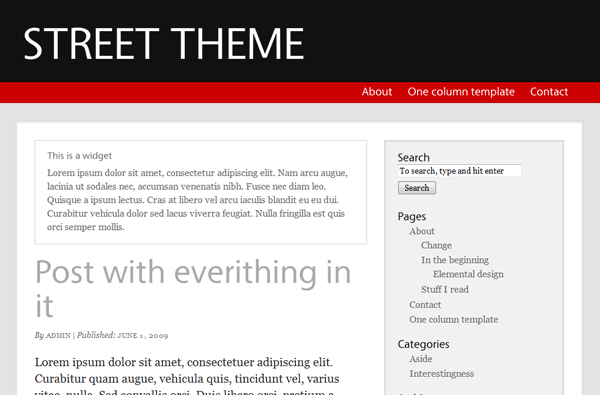
An elegant Child Theme for Thematic
I hope you’ll enjoy using this theme as much I enjoyed creating it!
In order to install it you have to download the Thematic Theme (from which this child theme inherits all of the functionality), upload both themes (Street and Thematic) to your server in the themes folder AND THEN ACTIVATE the Street theme.
Related Articles

15+ Best WordPress Membership Themes in 2026
Looking for the best WordPress membership theme? We collected 20+ free and premium options, all of which make a great option for membership websites.
Continue ReadingGreen anyone? Try Commune – Thematic Child Theme!
Update 11.17.2010 The category image was removed and all thumbnails are now created using the Featured Image default functionality. If no Featured Image is added a default image appears in place. Simply put I have been lazy lately. I know this isn't the best way to sell my self but a little bit of honesty […]
Continue Reading
I Searched for the Best WordPress LMS Themes So You Don’t Have To
Searching for the best WordPress LMS themes for your online course or eLearning website? There are a lot of options out there, but not all of them are great. To save you a bunch of time, I narrowed down the list to the eight best WordPress eLearning themes that work with popular LMS plugins such […]
Continue Reading
[…] the feedback as it really helped me iron out some things! You can see the finished product here: https://www.cozmoslabs.com/2009/06/02…rdpress-theme/ Cristi from […]
[…] ha presentato oggi un nuovo child theme per Thematic Framework per WordPress: Street. Street Child Theme (clicca per […]
Hey,
I like your themes, especially the Street Theme, it looks like you made it for my needs 😉
Or, let me say nearly all my needs, then I’m writing in German an Street, other than the commune theme (which I also tried, but it’s to green, I like it dark), does not work with the german letters äöü, they are not displayed. Is there a way to fix this (or a chance that you fix this)?
Have you installed the German localization for WordPress? https://codex.wordpress.org/WordPress_in_Your_Language .
If you did installed it and still doesn’t work, send me a link and I’ll look over it!
Thank you, yes, I’m using the German version of WordPress. However, I’ve decided to use commune, but with it, I have the same issue as simon (I commented on the commune-site)
Wow quite nice and very simple!I like your theme!
Hello Cristi! It’s being a while since I visited your site, wonderful theme design!
You’re bringing the power of sence and simplicity, great job!
I really like it! I’ve been using your commune theme in many different color variations on my sites and so definitely love seeing you come out with new stuff too! I am totally hooked on thematic now thanks to you. Keep up all the great work!
Thanks every one for the positive feedback. Your comments definitely makes me build future themes!
Would have been great if colours were also customizable.
Nice work! One question though. I’ve notice “Asides” category is being used in this child theme. Is it possible to get something like “Recommended reading” section here?
Once again, appreciate your work very much!
Cheers!
This theme considers the asides category just as any other category out there.
Are you talking about “This is a widget Area” ? If so you can add in the Index Top widget the recommended reading posts inside a Text Widget or use a Category or Tag based widget that lists posts from certain category or tag!
Heh, slight miscommunication here. 🙂 I’m talking about “recommended reading” on your blog, not on the demo site. As far as I can see, you’re using asides plugin here, on cosmozlabs. My question was, would it be possible to use asides on “street theme” with consistent match of colours and styling? Do I need to add additional css tweaks to street theme’s css?
I’m not using the “asides plugin”. It’s just a custom built widget that isn’t quite ready to release to the public. But I guess you can use the asides plugin just as well. With a bit of css I bet you can make it look like it’s a part of the theme.
Try it out, send me a link and if it doesn’t look good I might give you some pointers!
Hi, First Thanks for the awesome theme, I am using street for my website and have changed it around a little.
I am trying to change the width to make it wider, but am having trouble figuring out which pixel widths to change to get it to work in the stylesheet.
Any help is much appreciated, THANKS!
Dave
The theme uses the standard 960px, two columns right layout that comes with Thematic.
My suggestion would be to copy the css that you have inside ‘/thematic/library/layouts/2c-r-fixed.css’ at the end of the style.css in the Street Theme and make the modifications there.
[…] Street is an elegant Thematic child theme, designed by Cozmoslabs. […]
[…] […]
How do I convert Street to use three columns?
Hi,
You will have to modify the css inside style.css. Have a look at this css and try to make it work for you: https://reflectionmedia.ro/projects/spain/wp-content/themes/street/style.css
hi Cristi,
i’m a new at using WordPress, Thematic and Street.
it sure looks pretty sleek, so bravo and thanks for that!
two questions:
– how can i customize the colours used in the theme?
– how can i add the tagline back in below the blog title?
Hi. You can customize the colors using css. Just open style.css from the Street Theme and modify the colors there.
As for the tag line, again open style.css, search for
#blog-description{
display:none;
}
and delete it!
Hi,
This is a really cool theme.
May I know how to change the font size of the post? How to change the red color bar to another color? I guess I should change it at style.css. However, I am not sure which code to change and which code represent which color. Please guide me on these issues.
Thanks.
Hi there! this is a really cool theme! I really want to use it for a new blog project but unfortunately the German umlauts like äöü are not shown in h1 or links in the navbar.
My guess is, that this is because the java script files can’t handle umlauts. Is there any chance I can get this to work? I tried workarounds like ü but no chararcter is displayed.
Any help is very appreciated! Thank you for the great theme!!!!
Yup… the cufon font is the reason it doesn’t displays the German umlauts. To disable it open functions.php inside the Street theme and replace line:
add_action(‘wp_head’, ‘add_cufon’);
with
//add_action(‘wp_head’, ‘add_cufon’);
Also replace line:
add_action(‘wp_footer’, ‘add_cufon_iefix’);
with
//add_action(‘wp_footer’, ‘add_cufon_iefix’);
That should disable the cufon font.
How would one go about changing the navigation bar to be left justified. Thank you for your efforts.
This is beautiful. I love Thematic and like to keep design as simple and functional as possible. This theme *feels* inspired. Congratulations. I’m definitely going to try it out.
When I install this theme on my site and it renders in a browser, the fonts look really bad for about 2 seconds, like they’re not styled; then all they pop into place. It does it on every page load. I’ve never seen this happen before, and it doesn’t happen when I preview it on your site. Thoughts?
Not sure why that’s happening. If you have a lot of plugins that insert javascript that could also be a problem as it takes longer to execute the javascript that changes the font. Could you post a link to a test server?
I removed a few Javascripts and the theme works perfectly now. Thanks for the pointer and for the beautiful theme. You rock!
Hi! Love the theme, but apostrophes do not show up in the post titles. Is there any way to fix this? I love how it looks, but this would make it unusable for me. Thanks so much for a beautiful design!
I’d like to use a different Cufon font. I generated a new font .js and placed it in the \street2\.js directory. In \street2\functions.php I have replaced:
<script src="/js/Vegur_400.font.js" type="text/javascript">with
<script src="/js/MyFont_400.font.js" type="text/javascript">The text doesn’t show up at all with this new font implemented. Is there another setting I’m missing?
Thanks
Yup. That should be it. Not sure why it doesn’t work for you. Perhaps you should try recreating the Cufon font!
Se the CMD….
I’d like to add a drop down arrow next to menu items that have sub-pages. Anyone know how?
Hey,
Is this compatible with WP 2.8+? I upload the theme but in the themes menu it gives me an error next to the street theme that the template is missing.
In order to install it you have to download the Thematic Theme (from which this child theme inherits all of the functionality), upload both themes (Street and Thematic) to your server in the themes folder AND THEN ACTIVATE the Street theme.
Thanks for the quick response. I should have mentioned it in the first comment but I do have Thematic 0.9.5.1 installed. That shows up fine in my themes menu.
Try to activate the default theme, then reactivate Street. I think there was some sort of bug like that in WordPress. If this doesn’t help I’m not sure exactly what’s the problem. Also try uploading again the two themes, Street and Thematic. Something might have gone wrong in the transfer.
Thanks, it was a subdirectory problem.
It looks great now.
Really like the look of this theme.
I have three questions:
1) How do you change the color of the red title line under the header?
2) How can you change to the one-column template?
3) Can you have one page be a one-column template and other pages be a two-column OR does the whole blog have to use the same?
Thanks very much for making this theme available for free.
Neal
Hi Neal,
Let’s try and do then one at a time:
1. You can do that by changing the css inside the style.css file. Just search for the #access declaration.
2. Have a look here: https://codex.wordpress.org/Pages#Page_Templates
3. Your pages will have either one of the page templates. Please note that the posts don’t have this functionality, only the pages.
I appreciate all your help. My site is looking much better now. I still may take you up on the offer we discussed. http://www.examinethyself.com
I got the header looking good (at least I think so). It is a fatter than the default one but I can live with that.
Do you know of any reason why my font size would be different on the Privacy page when they’re all the same in the editor?
Thanks,
Neal
Hi Neal,
The website is looking great!
As for the Privacy page: you’ve used:
<span style="font-size: medium;"><span style="font-family: georgia,palatino;">
Probably you copy pasted from Microsoft Office. Have a look in the post edit part of wordpress and click on the HTML view. Once you clean that everything will be just fine!
[…] Street […]
great themes brother, i like it.
Hi Cristi,
I love this theme and want to use it. I would like to increase the width of the sidebar, but can’t find how to do this. I’ve looked in the styles css, but don’t know where else I should be looking.
Thanks for any help you can give me.
Hi,
just thank you for this theme. I had to modify some behaviours for french characters (éèï…) in nav and title but that’s totally what I needed 🙂
Hi, how would I make the […] after the excerpt on the category archive page a link?
By default you can’t do that. Here’s an article that shows you how that’s done.
https://lynnepope.net/the-excerpt-revisited
The street theme is just what I was looking for for my recently started
accessible web design blog. I was going to change the colour scheme to match my logo, but I decided that I liked the red/black/white combination so much that I would keep it and change my logo instead.
I have tweaked the theme to make it more accessible by:
1) Improving the colour contrast between text and background in some cases
2) Using relative font-sizes to allow text resizing without page zoom
3) Adding in link underlines
4) Adding in a thick red border when links receive focus
I will no doubt be making other changes too, but I just wanted to take the opportunity to thank you so much for this brilliant theme.
I love your theme! How would I activate the “one column” template for my main blog page? Thanks for the work on your themes and thanks in advance for helping.
Hi David,
Please post this question in the forums under the Street Topic. This way it’s going to be easier for people find the answer and maybe reuse it!
Hey, great theme.
Curious though, is it possible to add a ‘Home’ option to the navigation bar? Not to display a static home page, but to return to the front posts page of the blog?
I am trying to upload my own header image, I have installed thematic and street. When I upload my image nothing happens – my header is nowhere to be found. Any suggestions?
Could you please post this on the cozmoslabs forums here: forums
This way more people could benefit from the resolve.
When I have a post title with a hyphen in it, your font script replaces it with a space. How do I go around this to keep the hyphen, without removing the entire script?
Lovely theme you got here. I’m trying out on a new site for a client. I’m not sure it’s quite right for him yet but if not, I’m sure I’ll find a use for it somewhere 🙂 Thank you for taking the time to make it and putting out there for free 😉
hi Crist, nice theme! May you explain me step by step display home as a page? muchas gracias
[…] | Download Street (0) | Download Thematic (3) | Theme Homepage Tell your friend: Rate this theme: 3.00 out of 5 No comments yet Click here to […]
Looks pretty good. I enjoyed your coding while i designing some cool themes for by blogs. Thanks for your great effort.
Broken Theme…
The following themes are installed but incomplete. Themes must have a stylesheet and a template.
This is what im getting. Really liked the theme though but can’t use it at this time.
You need to have Thematic as well. Download it and put it in the theme folder and then activate the Street Child Theme.
I am a bit puzzled about some settings for my customization. I want to change the padding and would like the Access above the Branding, eg the menu on top. I seem lost in where to find this.
The access and the branding are inside Thematic. I wouldn’t recommend making the change inside Thematic, instead either do it with CSS or with hooks and filters.
Is there any way to pud Adsense code to the sidebar of this theme?
Just use the Primary Aside Widget and add a Text Widget there. After that put your Adsense code there.
Will this theme be updated to support the WordPress 3.0 menus?
This theme uses the default Thematic menu functionality. So if you’ll update Thematic you’ll have access to the 3.0 menus.
I did update thematic but their forums say that the child theme has to update function.php. They also provide the code but it didn’t work on my install of the Street Theme. I will keep trying to figure it out. If anyone does get the new menus work with Street, please post it here.
Thanks again for the great theme.
Update.
The current development build Thematic 0.9.7.2, does support 1 WordPress 3.0 when using Street. The only problem is the child links (dropdowns) don’t work.
Is that a problem with Thematic or the theme?
That’s a problem with the child theme.
Basically the menus work, but the css and javascript do not. You’ll need to update the css to target the new classes as well as the javascript.
To be honest I haven’t looked at the latest dev build of Thematic. Will try and have a look today and see what’s what. It shouldn’t brake like that.
I appreciate your response. Is street still being developed? Will you be fixing this issue? I may try to update my theme, but if you plan to update it, I’ll let the expert do it. Thanks again. I love the theme and your efforts to help people.
We do plan to update the themes, but only when the new Thematic version is uploaded to wordpress extend.
You can download the new WordPress 3.0 compatible version of thematic on their website. I guess they are waiting on approval from WordPress.
Thanks again for the help, and I look forward to your updates.
Wow, amazing theme. I found your site as I was looking for alternative to Thesis Themes. I would love to try these on my blogs.
[…] To see in live preview and to get the Street Child theme, go to Cozmoslabs.com […]
How do I change the behavior of the navigation bar? I’d like it not to auto-update with page titles, but instead only incorporate those titles/links that I manually provide. This would allow me to link to a page with a huge title withouit making the bar enormous, for example. I’ve looked everywhere I know to look, and the place I need to go to change this has eluded me.
Thanks for a great theme — I really love Street, its aesthetics, and its functionality!
You’ll need to modify Street to work with WordPress 3.0 menus:
https://themeshaper.com/forums/topic/using-30-menu-navigation-with-thematic
Thanks! I’ll give that a shot. 🙂
thanks for the theme! it’sperfect for my needs and aesthetic taste! I intended to return to the default theme of wordpress, then this childtheme saved my blog! 🙂 would be good, however, directions in a readme.txt explaining how to change the font of the titles for one that accepts accent symbols. anyway, I found the solution here in the forum. thanks a lot.
Hi,
Thank you for the “street” theme. I am trying to add author bio to my posts. Looking through the code it seems that it should display after filling in a bio, but it doesn’t… What am I doing wrong?
Thank you,
Thanks Cristian for your themes, i like it.
But i have question about wp themes, how to the wp themes is running fastest? i once find site using wp themes load fast.
thanks
thank you for this great read!! I definitely enjoyed every little bit of it and I have you bookmarked to check out new stuff you post.
Hi Christian, I have a question regarding avatars.
I have opted out of displaying avatars, but when people comment, there is still a blank, white space where the avatar normally sits. Do you know of any way to remove this blank space?
If I understand correctly, this should work:
replace in style.css on line 279 this
#comments-list .comment-author {
font-weight: bold;
padding: 9px 0 0 46px;
}
with this:
#comments-list .comment-author {
font-weight: bold;
padding: 9px 0 0;
}
and also on line 283 replace this
#comments-list .comment-meta {
color: #666666;
font-size: 11px;
padding: 0 0 9px 46px;
}
with this
#comments-list .comment-meta {
color: #666666;
font-size: 11px;
padding: 0 0 9px;
}
Hope it helps!
Thanks! Worked perfectly!
How can I align header and main to the center, i can’t get it to work.
Here is some of my css.
#header{
background:url(images/header_bg.jpg) top center no-repeat;
#container {
width:580px;
float:left;
}
#content {
margin:0 0 0 30px;
width:555px;
overflow:hidden;
}
#main{
padding:25px 0 25px 0;
background:#fff;
margin-top:20px;
margin-left:auto;
}
Also my footer was visible earlier and now it has disappeared.
#footer{
margin-top:0px;
border:none;
background:url(images/footer.jpg) bottom center no-repeat;}
Hello,
Great theme!!
Is there an compability problem with internet explorer 9, on safari the theme looks good but on ies 9 i can’t see the menu items and the paqe title. Only when i hover i see a black color in the menu bar. When i tun on the compablity button near the adres bar the menu items and the page title tuns up.
greats,
Arno Schouten